

Golf GPS units help you make faster, calmer decisions from the tee box to the approach shot. That matters on a busy course, during a quick nine after work, or on trips where you want reliable yardages without fuss.
Some picks favor simple clip-on use, others add voice prompts, touchscreen control, slope-adjusted distances, or cart mounting. You get a clearer route to the right fit by matching the device style to how you actually play.
Quick Look At Our Shortlist
Garmin Approach G12 Clip-on Golf GPS Rangefinder

Voice Caddie VC300SE Golf GPS Rangefinder

Bushnell Golf Phantom 3 Slope GPS, Red/Blue

Bushnell Golf Phantom 3 Slope GPS, Green
Bushnell Golf Phantom 3 Slope GPS, Black

Swami KISS 2.0 Handheld Golf GPS Ragnefinder Blue

Swami KISS 2.0 Handheld Golf GPS Ragnefinder Grey
MiLESEEY GeneSonic Pro Golf GPS Speaker
More Details On Our Top Picks
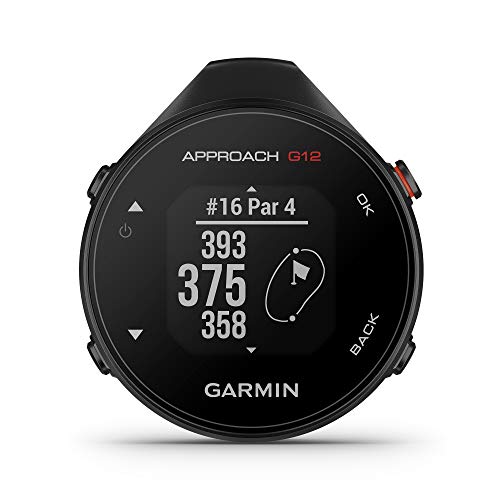
Garmin keeps this one simple, and that suits a golfer who wants yardage at a glance rather than a crowded screen. The clip-on format makes sense on a push cart or in a pocket, while the preloaded course library covers a huge range of rounds without much setup.
The trade-off is obvious: you are getting a smaller, more focused device instead of a full touchscreen experience. For commuters who head straight from work to the course, that lighter footprint can feel easier to live with than a bulkier unit.
Strong Points
- Clip-on format keeps it easy to carry.
- Preloaded course support reduces setup time.
- Small size suits pocket carry between shots.
- Well suited to golfers who want fast yardage reads.
Things To Consider
- The compact layout gives up screen room.
- Clip-mounted devices can feel less immersive than larger handhelds.
Feature Snapshot
Who It Suits Best
You are a good fit here if you want a straightforward golf GPS for casual rounds, quick sessions, or cart use.
Where A Sibling Pick Shines
MiLESEEY GeneSonic Pro Golf GPS Speaker suits you better if you want more display-forward controls and a more feature-packed setup.
Voice output changes the rhythm of play, especially for golfers who want yardage without looking down at a screen on every shot. The VC300SE also covers front, middle, and back green distances, which gives you a cleaner read on approach shots than a bare-bones yardage-only unit.
Compared with the Garmin Approach G12, this model leans harder into audio guidance and course awareness. The honest read is that voice output helps most on crowded tee sheets or windy days, while a few golfers will still prefer a visual display for quick confirmation.
Upsides
- Voice distance readouts support hands-free checking.
- Front, middle, and back green data helps approach planning.
- Course coverage spans more than 40,000 layouts.
- Audio prompts fit golfers who keep moving between shots.
Worth Noting
- Voice guidance is not for everyone, especially quiet rounds.
- Golfers who want a larger display may prefer a touchscreen model.
Technical Sheet
Best Suited To
You fit this pick well if you want audio yardages and play often enough to appreciate hands-free checks.
Another Choice May Suit
Bushnell Golf Phantom 3 Slope GPS, Black suits you better if a touchscreen and cart-mounted convenience matter more than voice prompts.
Touchscreen control and slope-adjusted distances give this Phantom 3 a more advanced feel than the Garmin and Voice Caddie picks above. Slope means the unit adjusts yardage based on uphill or downhill angles, which can help with club choice on hilly courses, though many rounds don’t need that extra layer every shot.
The magnetic cart mount matters in real use, because it keeps the device reachable without digging through a pocket. For golfers who spend most of a round on a cart, that convenience adds up fast, though the more feature-led layout may be more than you need for a plain nine-hole walk.
Highlights
- Touchscreen control feels direct on the course.
- Slope-adjusted yardage adds context on hilly holes.
- Magnetic cart mounting supports easy access.
- Large course library gives it broad travel appeal.
Areas To Watch
- Slope data is useful, but not every golfer wants it active all the time.
- Touchscreens can be less handy in heavy glove use.
Core Details
Right Fit For
You are the best match here if you ride carts often and want a GPS with a more polished control scheme.
Skip It When
Voice Caddie VC300SE suits you better if you want audio yardages and a simpler, less visual routine.
This version keeps the Phantom 3 formula intact, but the green finish gives it a more distinctive look than the red/blue model. The underlying setup stays the same, so you still get touchscreen control, slope-adjusted distances, and magnetic cart mounting in a package that suits golfers who like a little visual character.
Compared with the black Phantom 3, this one is less about blending in and more about owning a finish that stands out on the cart. For a golfer who wants the same feature load without a dark housing, that simple color shift can make the choice easier.
Best Bits
- Green finish gives the unit a distinct look.
- Touchscreen and slope support remain intact.
- Magnetic mounting keeps it handy on a cart.
- Same course scale as the other Phantom 3 options.
Small Caveats
- The color choice is the main difference, so feature-seekers may compare the other Phantom 3 versions first.
- Dark or bright housings come down to personal taste more than function.
Details At A Glance
Whose Shelf It Belongs On
You fit this pick well if you want Phantom 3 features and prefer a brighter finish on your cart setup.
Look Elsewhere When
Bushnell Golf Phantom 3 Slope GPS, Black is the cleaner match for golfers who want the same feature set in a more subdued color.
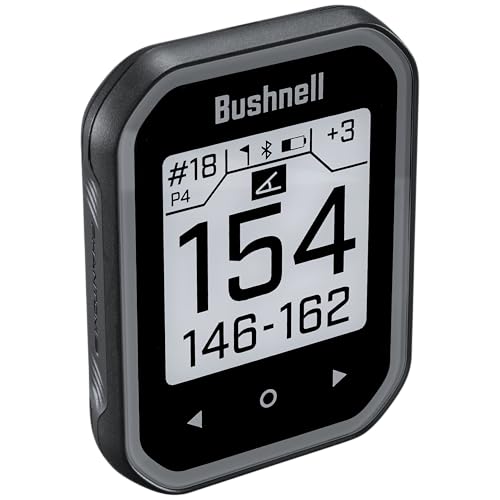
The black Phantom 3 is the quietest-looking version in the group, and that makes sense for golfers who want the same core hardware without a bright finish. It still brings the touchscreen, slope-adjusted yardage, and magnetic cart mount, so the real difference is mostly presentation.
That restraint is useful in a lot of bag setups, especially when you want the GPS to disappear into the gear instead of becoming the focus. Compared with the green model, this one feels easier to pair with any cart or accessory layout.
What We Like
- Subtle black finish suits most setups.
- Touchscreen control keeps navigation straightforward.
- Slope and magnet support add real playing convenience.
- Course coverage stays broad for travel and home play.
Room For Improvement
- The appeal leans heavily on color preference.
- Golfers wanting a smaller body may prefer the Garmin Approach G12.
Feature Rundown
Made For
You are the right fit here if you want a dark, understated golf GPS with cart-friendly hardware.
A Better Fit Elsewhere
Garmin Approach G12 suits you more if you want a lighter clip-on unit instead of a touchscreen handheld.
Swami leans into convenience with integrated magnets, which helps the device stick neatly to cart metal instead of living loose in a pocket. Two display modes give you a little flexibility in how you check yardage, and that can feel useful during fast rounds where you want a quick glance.
Compared with the Bushnell Phantom 3 units, this one looks less polished but can feel more straightforward in day-to-day handling. For golfers who value a simple handheld with magnet convenience over touchscreen polish, the trade-off is easy to understand.
Positives
- Integrated magnets support easy cart mounting.
- Two display modes add a bit of flexibility.
- Preloaded course data reduces setup friction.
- Blue finish gives it a clear visual identity.
Minor Gripes
- The misspelling in the product name is a listing quirk, not a feature issue.
- Handheld GPS units still need a place in your bag or cart between shots.
Key Specs
Who Should Grab It
You fit this pick well if you want a magnet-ready handheld GPS that stays simple on the course.
Where Another Pick Fits Better
Bushnell Golf Phantom 3 Slope GPS, Red/Blue suits you more if you want a touchscreen and slope-adjusted yardage.
The grey Swami KISS 2.0 keeps the same core formula as the blue unit, but the finish is more subdued. That matters more than it sounds, because some golfers want their gear to blend into the bag rather than stand out on the cart.
Same magnets, same dual display approach, same preloaded course data, different look. The honest read is that this version makes sense only when grey suits your setup better than blue, which is enough for plenty of golfers.
Bright Spots
- Integrated magnets keep cart mounting simple.
- Two display modes give you some presentation choice.
- Preloaded data helps speed up the first tee routine.
- Grey finish blends into a neutral bag setup.
Softer Spots
- The core features mirror the blue version closely.
- Style differences matter more than hardware differences here.
At A Glance
The Right Fit
You are the right fit here if you want the Swami KISS 2.0 formula in a neutral finish.
Swap It Out When
MiLESEEY GeneSonic Pro Golf GPS Speaker suits you better if you want a more advanced display and a wider feature set.
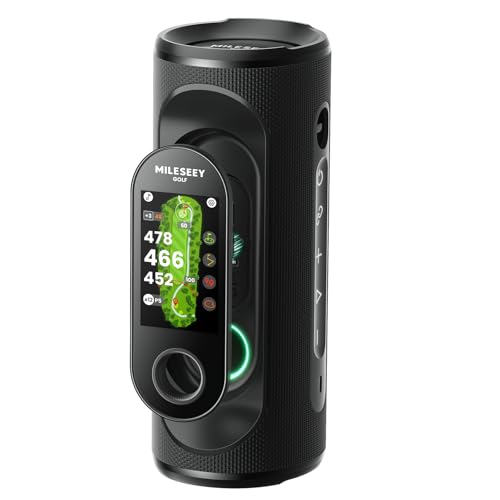
MiLESEEY goes further than the simpler handhelds in this roundup, starting with a detachable design, MagLock attachment, and a color touchscreen. Visual and audible yardage, layup, fairway-center, and hazard information make it feel aimed at golfers who want more context on every shot.
The 15-hour battery claim and IP67 rating give it a more rugged profile than the voice-first and clip-on options above. IP67 means it is sealed against dust and can handle short-term water immersion under the stated rating, though that still doesn’t turn it into a careless-use device.
Reasons To Buy
- Color touchscreen gives the unit a more advanced feel.
- Visual and audible yardage support quick decisions.
- MagLock attachment helps with cart-side convenience.
- 15-hour battery life suits longer days on the course.
- IP67 rating adds a tougher everyday profile.
Areas To Watch
- More features usually mean more to learn on day one.
- The detachable format may be more than a casual golfer wants.
Spec Overview
Built With In Mind
You suit this pick best if you want a feature-heavy golf GPS and like more information at a glance.
Reach For A Different Pick When
Garmin Approach G12 is the cleaner choice for golfers who want a smaller clip-on unit with less to manage.
How To Choose The Right Gps For Golfers
Match The Device To Your Round Style
Walkers often do better with a clip-on or pocket-sized unit, because it stays light and close at hand. Cart riders usually get more value from touchscreen models with magnetic mounting, since the device can stay visible throughout the round.
Voice output helps golfers who like to keep eyes on the fairway instead of on a screen. That style suits quick play, crowded groups, and rounds where you want less handling between shots.
Pay Attention To Course Coverage And Yardage Details
Course coverage matters more than it first sounds, especially for travel or weekend golf away from home. A larger preloaded library reduces the odds of setup friction and keeps the device useful across more clubs.
Front, middle, and back green numbers give you more context than a single distance read. Slope-adjusted yardage adds another layer on hilly layouts, though plain distance readouts still suit plenty of golfers who prefer simpler information.
Think About Battery, Mounting, And Handling
Battery life becomes important on long practice days or when a round stretches into extra holes. A 15-hour claim, like the MiLESEEY unit, gives you a better picture of how far the device can go before needing a recharge.
Mounting style shapes daily convenience too. Integrated magnets or magnetic carts keep the GPS easy to reach, while clip-on units feel better for golfers who want fewer pieces hanging on the bag.
Choose The Feature Level You’ll Actually Use
Basic handhelds cover the essentials without clutter, and that simplicity is often enough for new golfers. Feature-heavy models make sense for regular players who value touchscreen navigation, audible prompts, and extra shot context.
The right spend is the one that matches your habits, not the longest feature list. A golf GPS should speed up your round, not turn it into a setup project.
What To Weigh Before You Click
Hidden Buying Traps
Shoppers often focus on course count alone and forget about mounting style, display clarity, or how the device feels in a pocket. That creates regret later, especially on cart-heavy courses or in bright sun.
Another common miss is assuming every handheld works the same way. Voice prompts, slope adjustment, and magnetic attachment all change the daily experience in different ways.
The Upgrade Payoff
Higher-tier models usually charge more because they add easier navigation, richer course data, stronger mounting systems, or more information at a glance. A touchscreen and a larger feature set can be worth it for golfers who play often and want fewer small hassles.
Staying with the simpler end of the range makes sense for casual rounds and straightforward yardage needs. The extra spend pays off most when the device becomes part of your regular bag setup, not an occasional accessory.
Frequently Asked Questions
What does a golf GPS do on the course?
It gives you distance information to help with club choice and shot planning. Some models also show front, middle, and back green readings or slope-adjusted numbers.
Is voice output useful in a golf GPS?
Voice output helps when you want hands-free yardage checks. It works especially well for golfers who dislike looking at a screen before every shot.
What is slope-adjusted distance?
Slope-adjusted distance changes the yardage based on elevation changes between you and the target. It gives more context on uphill or downhill holes than a flat number alone.
Why do some models use magnets?
Magnets let the unit attach to a cart or metal surface instead of sitting loose in a pocket. That makes the device easier to reach during a round.
How much course coverage matters?
Broader course coverage helps the GPS stay useful when you travel or play unfamiliar layouts. A large preloaded library also cuts down on setup time before teeing off.
Closing Thoughts
Your best golf GPS comes down to how you play, not how long the feature list looks on the page. Clip-on simplicity suits fast-moving rounds, voice prompts help hands-free golfers, and touchscreen cart units bring more convenience to regular play. Spend where it improves your routine, and skip what you will barely touch. That is the cleanest path to a device that feels useful from the first round onward.


