Golf sim spaces live or die on throw distance, brightness, and how cleanly the image lands on the screen. You need a projector that fits a garage bay, a spare room, or a dedicated bay without forcing awkward ceiling placement or washed-out impact graphics.
This roundup focuses on short throw models and the enclosure package that often goes with them. The mix leans from casual home setups to more serious practice rooms, so you can match the gear to your space instead of making the room work around the gear.
The Shortlist At A Glance

BenQ TH671ST 3000 Lumens 1080p Short Throw Home Entertainment Projector

Complete Golf Simulator Enclosure Package 4K-Ready Impact Screen

ViewSonic PS502W 4000 Lumens WXGA Short Throw Projector

ViewSonic PS502X 4000 Lumens XGA Short Throw Projector

BenQ TK710STi 3200 Lumens 4K HDR Short Throw Home Entertainment Projector
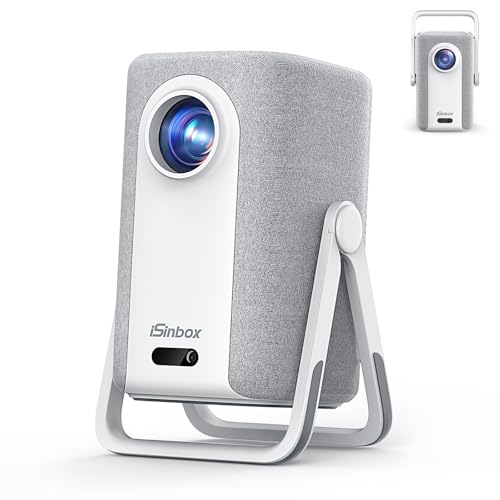
Short Throw Projector 4K, Now with Netflix, Auto Focus

Optoma GT2100HDR Compact Short Throw Laser Home Theater and Gaming Projector
More Details On Our Top Picks
BenQ’s TH671ST fits the kind of sim bay where you still want room to swing a driver without moving the projector out of the way. The 1080p image keeps the interface and ball flight readable, and the short throw design helps in tighter rooms where ceiling distance is limited.
Low input lag matters most in golf simulator use that doubles as console gaming, because the response feels less sluggish on screen. The trade-off is that this sits at the Full HD end of the range, so you’re choosing practical clarity over 4K texture.
Strong Points
- 1080p resolution gives a clean, easy-to-read image for score panels and course graphics.
- Short throw placement works well in garages and spare rooms with shallow mounting depth.
- Low input lag is a strong fit for gaming-heavy setups and fast menu navigation.
- Auto vertical keystone helps square the image when the projector can’t sit perfectly aligned.
- Dual HDMI keeps a simulator PC and another source connected without constant swapping.
Small Caveats
- 1080p is sensible, though the picture will not match 4K models for fine texture.
- Built-in sound is handy for casual use, but most dedicated sim rooms will still prefer separate audio.
- The setup leans home-entertainment friendly rather than fully premium in feel.
Feature Rundown
Who It Suits Best
Golf simulator users who also game and want a straightforward 1080p projector will get the most from it.
Where A Sibling Pick Shines
BenQ TK710STi suits you better when you want 4K HDR detail and a more premium room that pulls double duty for films and play.
This is the room-builder’s option, not the projector itself, and that matters because a good enclosure shapes the whole sim experience. The 8’4 x 8’4 x 5 footprint gives you a defined practice bay, while the blackout cage and side nets help contain the visual and physical mess of an active hitting area.
For a garage setup or a dedicated basement corner, the all-in-one layout saves you from piecing together frame, screen, and netting from separate listings. The honest trade-off is space, because a package this complete asks for a real footprint and more planning than a bare screen.
What We Like
- Complete bundle reduces the guesswork of matching frame parts and screen pieces.
- Impact screen and blackout cage create a more enclosed practice lane.
- Side shank nets add useful containment in tight indoor spaces.
- Projector mount support helps keep the layout organized overhead.
- The size works well for a serious home bay that stays set up.
Worth Noting
- The footprint is substantial, so measuring ceiling height and floor clearance comes first.
- Setup takes more effort than a simple projector swap.
- The package fits committed practice spaces better than temporary rooms.
Details At A Glance
Who Should Grab It
Dedicated sim builders who want a defined enclosure rather than a loose screen setup will get the most from this package.
Swap It Out When
BenQ TH671ST is the smarter route for a smaller room where you only need the projector and want lower overhead on setup.
ViewSonic’s PS502W leans into brightness, which helps when your practice space has windows, overhead lights, or both. WXGA, a widescreen resolution class, gives you a broader image shape than older square-format machines, so simulator menus and range data sit more comfortably on screen.
That makes it a sensible middle ground for a shared room where golf is only one job. Compared with the BenQ TH671ST, this model pushes brightness harder and feels more presentation-friendly, though it still stops short of the 4K detail of BenQ’s TK710STi.
Highlights
- 4000 lumens gives you more headroom in brighter rooms.
- WXGA suits widescreen simulator layouts and split-screen use.
- Dual HDMI simplifies connection to a computer and another source.
- USB-A input adds a handy path for compatible media playback.
- Short throw design helps keep the projector out of swing space.
Points To Note
- WXGA is practical, but it is less detailed than 1080p or 4K choices.
- The design is functional first, so it makes the most sense in utility-focused rooms.
- Shared spaces may still need careful mounting to keep the image square.
Core Details
Made For
You get the most from this projector in a shared practice room that needs brightness before premium resolution.
Look Elsewhere When
BenQ TK710STi makes more sense for a higher-end sim room where 4K HDR detail and faster gaming support matter more.
The PS502X follows the same bright, short throw playbook as the PS502W, but it is aimed more squarely at simple rooms and everyday viewing. XGA resolution is lower than WXGA, so the image feels more basic, yet the 4000-lumen output still gives you useful visibility in a living room or small meeting area.
For golf simulation, that trade-off works best when your priority is dependable brightness and a straightforward setup rather than the sharpest menu text. You may find it especially sensible for a second room or a starter bay, while the image-snob path points more clearly to the BenQ TK710STi.
Best Bits
- 4000 lumens gives solid output for bright multipurpose rooms.
- Short throw placement reduces the chance of casting shadows near the screen.
- Dual HDMI keeps source switching simple.
- USB-A input adds flexibility for basic device connections.
Areas To Watch
- XGA is the least detailed resolution in this group.
- The picture suits utility use better than a polished theater feel.
- Owners who want dense simulator graphics may prefer a sharper model.
At A Glance
The Right Fit
Home users who want a straightforward short throw projector for a living room or basic simulator corner will be comfortable here.
A Better Fit Elsewhere
ViewSonic PS502W suits you better when you want the same brightness with a wider WXGA canvas for simulator graphics and split-screen use.
TK710STi is the premium-feeling choice here because it pairs 4K HDR support with a laser light source, and that combination suits a room that does golf duty by day and movie duty later. Laser means the light engine uses a solid-state source rather than a lamp, which usually appeals to shoppers who want steadier upkeep expectations and less frequent lamp-style attention.
The 4ms input lag and 240Hz gaming support push it beyond simple simulator duty, especially for fast-paced play on a console or PC. The trade-off is brightness relative to the 4000-lumen models, so rooms with stubborn daylight still need better light control than the Optoma GT2100HDR.
Upsides
- 4K HDR support gives cleaner course detail and sharper on-screen text.
- Laser light source suits owners who prefer a more modern maintenance profile.
- 4ms input lag fits responsive gaming and simulator interaction.
- 240Hz support adds headroom for smooth motion in compatible setups.
- Android TV, Netflix, and AirPlay widen its home-entertainment reach.
Room For Improvement
- Brightness is lower than the 4000-lumen ViewSonic models.
- The feature set is broad, so first-time setup may take more patience.
- It makes the most sense in a room where you care about detail as much as brightness.
Feature Snapshot
Who Will Love This
You’ll appreciate it most in a polished home theater or simulator room where sharp detail matters as much as play response.
Reach For A Different Pick When
Optoma GT2100HDR is the stronger fit for brighter daytime rooms that need a more aggressive 4,200-lumen output.
This iSinbox option is built around flexibility, not just image output, and the dual-mode stand is the clue. In a bedroom, apartment, or travel-friendly media space, that kind of stand matters because you can re-aim the projector without building a permanent mount plan around it.
Auto focus and 40W Dolby audio make it easier to live with than a bare-bones portable unit, while Netflix and AirPlay extend its value beyond golf. The trade-off is the 1500ANSI brightness class, which is a lighter fit for dark rooms than for a sunlit garage.
Bright Spots
- Auto focus reduces manual fiddling during setup shifts.
- Dual-mode stand adds placement flexibility in compact rooms.
- 40W Dolby audio gives it stronger built-in sound than many basic projectors.
- Netflix and AirPlay support make it easy to use beyond simulator sessions.
- Portable layout suits rooms that change purpose during the week.
Trade Offs
- 1500ANSI brightness is better suited to darker environments.
- Portable styling is handy, though permanent sim builds may want a more fixed unit.
- The feature-rich interface may feel busy to someone who only wants a basic projector.
Key Specs
Built With In Mind
You’ll like this most in a flexible room where portability, streaming, and casual golf all share the same space.
Consider Something Else When
BenQ TH671ST is the safer route for a fixed simulator setup that puts low input lag and simple mounting ahead of portability.
Optoma’s GT2100HDR is the brightness-first choice in this group, and the 4,200-lumen rating makes sense for daytime practice spaces that never stay fully dark. The compact laser design also suits a room where you want a shorter mounting footprint without giving up punchy output.
Its 1080p base resolution with 4K HDR input means it can accept higher-resolution sources while staying practical for simulator work. Compared with the BenQ TH671ST, it brings far more brightness to the table, though the TK710STi still offers the more premium 4K-HDR-and-smart-platform package.
Reasons To Buy
- 4,200 lumens gives you strong visibility in brighter conditions.
- Laser light source fits owners who want a modern projection platform.
- Compact size helps in tighter simulator rooms.
- 1080p with 4K HDR input gives you a capable signal path.
- It works well for mixed golf and home theater use.
Honest Caveats
- 1080p is still the native resolution, so it won’t match a true 4K panel.
- The bright output is useful, but room light management still matters for the cleanest image.
- Dedicated cinema users may prefer the fuller feature set of the BenQ TK710STi.
Technical Sheet
Whose Shelf It Belongs On
This belongs with you if your simulator room has daylight, mixed use, and a need for strong brightness first.
Another Choice May Suit
BenQ TK710STi is the better fit for you when premium 4K HDR detail and streaming features matter more than raw brightness.
How To Choose The Right Golf Simulator Short Throw Projectors
Match Throw Distance To Your Bay
Short throw projectors earn their place in golf simulation because they can fill a large image from a much closer mounting position than standard home theater units. That matters in garages, basement bays, and spare rooms where the impact screen sits close to the wall or cage.
Measure the planned distance from lens to screen before you compare brightness or resolution. A great image on paper means little if the projector cannot sit far enough back to clear your swing path.
Choose Brightness For Your Light Control
Lumens describe projected light output, and that number becomes more useful once you think about the room itself. A darker basement can live comfortably with less brightness than a room with windows, overhead fixtures, or reflected light from pale walls.
Higher brightness helps the simulator image stay readable, especially on impact screens with some ambient spill. The trade-off is usually cost and, sometimes, a less cinema-like picture balance in fully dark rooms.
Pick Resolution For How You Use The Screen
1080p works well for many simulator setups because it keeps course graphics, ball data, and menus clear without pushing the budget too hard. WXGA and XGA move down in detail, so they suit utility-first spaces more than polished entertainment rooms.
4K-capable models make more sense when the room doubles as a movie space or you care about fine text and sharper turf detail. For golf-only use, the jump matters, but it is not always the first dollar you should spend.
Do Not Ignore Input Lag And Connectivity
Input lag is the delay between a signal and the image reacting on screen, and golfers who also game will feel that difference fast. Lower lag helps the experience feel more direct, especially when the setup doubles as a console or PC display.
HDMI count, USB-A, streaming support, and audio options also shape ownership. A clean connection path saves time every week, which is a small comfort that becomes a real one in a busy practice room.
A Quick Reality Check Before You Decide
Common Shopping Slip Ups
Shoppers often chase resolution first and forget the room. In a bright garage, a crisp image still looks flat if the projector cannot put out enough light.
Another common miss is mounting space. Short throw helps, but the lens still needs the right distance and angle, or you end up fighting keystone adjustments and screen alignment.
What The Higher Tier Buys
More expensive models usually give you a better light engine, smarter streaming support, faster response, or higher image detail. That extra spend starts to make sense once the projector is doing duty as both simulator display and main entertainment screen.
You also tend to get a more refined ownership feel, with features like laser light sources, broader input support, and better handling of mixed-use rooms. For a dedicated sim bay, that can be worth it, especially when the room is built to stay in place for years.
Frequently Asked Questions
What brightness level works well for a golf simulator room?
For dark rooms, moderate brightness can work, but brighter spaces usually benefit from a stronger lumen rating. The more ambient light you have, the more that number starts to matter.
Do you need 4K for golf simulation?
No, 1080p can be perfectly workable for many bays, especially for score data and general play. 4K becomes more compelling when the room also serves movies or you want finer image detail.
Why do short throw models fit golf bays so well?
They place the projector closer to the screen, which helps in rooms with limited depth. That also reduces the chance of shadows crossing the image during a swing.
Is laser worth paying more for?
Laser models usually make sense when you want a more modern light source and a room that sees frequent use. The value rises again when the projector also serves as a daily entertainment screen.
What matters more, brightness or resolution?
For many golf simulator rooms, brightness comes first because the image has to stay visible in real living conditions. Resolution matters next, especially once the room is dark enough to show the extra detail.
Closing Thoughts
The right golf simulator short throw projector depends on the room in front of you, not the spec sheet in isolation. Bright rooms favor the ViewSonic and Optoma models, while tighter home theaters often make better use of BenQ’s sharper, more feature-rich units. If you want a complete bay rather than just the projector, the enclosure package changes the whole setup conversation. Match the pick to your space, your light control, and how often you’ll use it for more than golf, and the choice gets much easier.