

Golf at home works best when the setup matches your space, your swing speed, and your patience for setup time. These eight picks cover the range from compact launch monitors to enclosed simulator studios, so your garage, basement, or spare room can do real practice work instead of serving as dead space.
You’ll also see the trade-offs clearly, because a launch monitor, a hitting net, and a full enclosure solve different problems. The right choice depends on whether you want shot data, simple ball containment, or a room that feels built for repeat sessions.
Quick Look At The Shortlist

Voice Caddie Portable Golf Launch Monitor and Swing Analyzer

Golf Net 10x7FT with Golf Practice Mat

Rapsodo MLM2PRO Mobile Launch Monitor Golf Simulator

The Net Return Home/Pro Series Golf Net
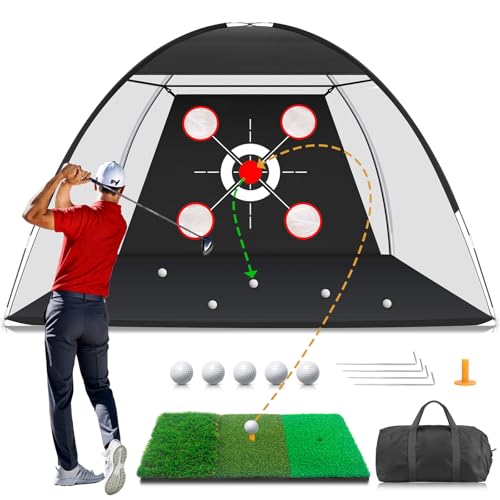
Golf Net with Practice Mat 10x7FT

GoSports Range Cage 10 ft x 8 ft Golf Net Cage

SLX MicroSim Indoor Mobile Golf Simulator

GoSports Fully Enclosed Inflatable Golf Simulator Studio
More Details On Our Top Picks
Voice Caddie keeps the footprint small, which matters in a spare room or garage bay where a full cage would feel intrusive. Its swing-speed mode also makes sense for tempo work, because you can rehearse a motion without a ball and still keep the session focused.
The battery life claim, up to 20 hours, points to long practice blocks without living next to a charger. The trade-off is obvious, though, because a portable launch monitor gives you feedback, not a full visual simulator environment.
Strong Points
- Portable form factor suits tight practice areas.
- Swing-speed mode supports tempo drills without a ball.
- Shot tracking helps you connect feel with numbers.
- Long battery life supports longer sessions away from outlets.
Things To Consider
- It gives data, not a screen-based course experience.
- Standalone monitors can feel less immersive than net-and-projector setups.
- You’ll still need enough room to swing safely.
Feature Snapshot
Who It Suits Best
Golfers who want compact shot feedback for garage or indoor use will get the most from it.
Where A Sibling Pick Shines
Rapsodo MLM2PRO Mobile Launch Monitor Golf Simulator suits golfers who want more data depth and a more simulator-like setup.
This one is about simple repetition in a backyard, basement, or living room corner. The net and mat combination gives you a defined hitting area, so you’re not assembling separate parts just to start chip and drive work.
Its easy setup and takedown are the real practical draw, especially for shared spaces where gear can’t live out all week. The honest read is that a net setup suits basic ball-striking practice better than deep simulator work.
Upsides
- Net and mat arrive as a practical practice pair.
- Targets help you work on face control and aim.
- Setup suits quick sessions in multiple spaces.
- Good fit for driving, chipping, and swing repetition.
- Compact enough to store after practice.
Room For Improvement
- It’s a training station, not a simulator system.
- Frequent setup and takedown can wear on patience over time.
- Backyard use still depends on enough clear space behind the net.
Core Details
Made For
Home golfers who want a straightforward net-and-mat routine in limited space will get along with it well.
Another Choice May Suit
The Net Return Home/Pro Series Golf Net suits golfers who want a more substantial practice frame and quicker reset between swings.
Rapsodo sits closer to the serious end of the home-simulator scale than Voice Caddie, largely because it brings dual-camera capture and 15 metrics into the picture. For golfers chasing more than basic shot feedback, that extra layer can make practice feel less like guesswork.
The included three Pro V1 balls also signal a more complete package, and that matters when you want to start a session without shopping for extras. The trade-off is cost and setup complexity, which usually fit committed home users better than casual tinkerers.
Highlights
- Dual-camera design adds more swing and shot context.
- 15 metrics support more detailed practice sessions.
- Indoor and outdoor use broadens placement options.
- Included balls make the bundle feel more complete.
- Better suited to golfers who track improvement closely.
Small Caveats
- More features usually mean more setup attention.
- Data-rich gear asks for a little more study.
- Best fit lands with golfers who want detailed feedback.
Details At A Glance
Built With In Mind
Golfers who want a deeper data-focused simulator setup for home practice will appreciate it most.
Swap It Out When
Voice Caddie Portable Golf Launch Monitor and Swing Analyzer fits better for simpler, more compact practice routines.
This net leans toward repeatable practice, not novelty. The auto ball return helps keep sessions moving, which is useful in a garage or indoor bay where bending over after every strike gets old fast.
The frame size, listed at 7×7 ft to 8×7.5 ft depending on configuration, gives it a more substantial feel than a basic portable net. That said, the ceiling and depth requirements still matter, so taller golfers should measure before they assume it will slide in neatly.
Best Bits
- Auto ball return keeps practice moving.
- Tool-free assembly reduces setup friction.
- Handles indoor and outdoor use.
- Frame size suits serious swing repetition.
- Modular design supports longer ownership.
Areas To Watch
- Assembly still needs enough room to unfold cleanly.
- The setup asks for ceiling and depth checks.
- More structure means less casual portability than a basic net.
Technical Sheet
The Right Fit
Home golfers who practice often and want a sturdier return system will get the most from it.
Where A Sibling Pick Shines
GoSports Range Cage 10 ft x 8 ft Golf Net Cage suits golfers who want more enclosed containment for indoor simulator spaces.
This MFNMFN set gives you the same practical appeal as the Zensouds kit, but the feel is slightly more backyard-first in its presentation. The 10×7 ft net and matching mat create a single practice zone for drives, chips, and regular swing work.
That all-in-one layout suits golfers who don’t want to piece together a setup from separate accessories. The catch is that any net-based station still works best as a strike-and-repeat aid rather than a full simulator environment.
What We Like
- Net and mat work together as one station.
- Supports driving, chipping, and swing repetition.
- Backyard orientation makes it easy to picture in use.
- Useful for golfers who like a defined practice zone.
Softer Spots
- It still centers on basic impact practice.
- Storage space matters once the net is folded away.
- More repeat use means more care with wear on the mat.
Quick Facts
Best Suited To
Backyard golfers who want a simple, self-contained practice corner will get the most from it.
Consider Something Else When
The Net Return Home/Pro Series Golf Net fits better for golfers who care more about fast resets and a heavier-duty frame.
The cage format gives this GoSports setup a more enclosed feel than open-frame nets, which matters when you want a safer boundary around full swings. It also makes more sense for home simulator layouts where the hitting zone and ball containment need to stay orderly.
At 10 ft by 8 ft, it gives you a larger practice zone than some compact nets, so it suits golfers with a little more room to spare. The trade-off is obvious enough, since a cage asks for more floor space and more attention to setup than a slim portable net.
Bright Spots
- Enclosed layout helps with ball containment.
- Large practice area suits fuller swings.
- Works for indoor and outdoor use.
- Fits naturally into home simulator plans.
Minor Gripes
- Cage-style gear needs more space than basic nets.
- Setup is less grab-and-go than a smaller practice aid.
- It’s still a frame-based training tool, not a launch monitor.
At A Glance
Whose Shelf It Belongs On
Golfers building a dedicated indoor practice bay will appreciate the larger enclosure most.
Look Elsewhere When
GoSports Fully Enclosed Inflatable Golf Simulator Studio fits better for anyone who wants a fuller room-style simulator setup.
SLX MicroSim leans toward the gamified side of home golf, with a motion sensor and swing stick feeding compatible software on Android, iOS, or PC. That makes it a different kind of home setup from the net-and-monitor products above, because the emphasis shifts toward interactive play.
The wheelchair-friendly and seated-use note broadens the use case in a meaningful way, especially for households where standing sessions aren’t the only option. The honest trade-off is that software compatibility and app setup matter more here than they do with a simple net.
Positives
- Motion sensor adds interactive tracking.
- Works with Android, iOS, and PC.
- Software support expands the practice experience.
- Seated use adds flexibility for different spaces and needs.
- Fast response helps keep play feeling connected.
Worth Noting
- App and software setup takes more attention.
- Interactive gear can depend on device compatibility.
- It feels closer to a simulator accessory than a net replacement.
Feature Card
Who Should Grab It
Golfers who want a more playful, app-connected indoor setup will enjoy this one most.
Where Shoppers Go Wrong
GoSports Range Cage 10 ft x 8 ft Golf Net Cage suits golfers who want a more traditional ball-strike setup with a larger physical hitting area.
This GoSports studio is for the home golfer who wants the closest thing here to a dedicated room without permanent construction. The inflatable shell, blackout enclosure, and included impact screen make it feel far more like a proper simulator bay than a simple net.
It’s also the most space-hungry option in the list, with fully inflated dimensions that stretch well beyond the footprint of the cages and nets above. The upside is clear in a garage, event space, or showroom, but the honest trade-off is that you need room, power for the pump, and a setup plan that respects the size.
Reasons To Buy
- Fully enclosed studio shape supports a more immersive setup.
- Inflatable construction stores smaller than a fixed build.
- Included pump and case simplify transport and packing away.
- Blackout design improves projector visibility in the right room.
- Commercial-grade PVC tarpaulin points to sturdy construction.
Honest Caveats
- Large footprint demands serious floor space.
- Better suited to dedicated rooms than casual corners.
- Projector and launch monitor are separate purchases.
- Inflatable gear adds a little more moving-parts thinking than a rigid cage.
Core Details
Perfect Match For
Serious home golfers, instructors, and event setups will get the most from this studio-style build.
Reach For A Different Pick When
The Net Return Home/Pro Series Golf Net fits better for golfers who want a smaller, more traditional practice frame.
How To Choose The Right Golf Simulators For Home Use
Start With Space, Not Hype
Floor area decides the category before features do. A launch monitor like Voice Caddie works in tighter indoor zones, while a cage or enclosed studio needs a real footprint and enough ceiling height for a full follow-through.
That’s why garage users and basement golfers usually think in measurements first. A larger enclosure can feel ideal on paper, then turn awkward the moment it crowds a car, a water heater, or a low beam.
Match The Product To Your Practice Goal
Shot feedback, ball containment, and immersive visuals solve different problems. Rapsodo MLM2PRO leans toward data-rich practice, the net products focus on repeatable striking, and GoSports’ inflatable studio moves closest to a room-like simulator build.
You’ll get more value when the tool matches the way you practice. A golfer who wants tempo work and swing numbers doesn’t need a huge enclosure, while someone planning long indoor sessions may care more about screen space and reset speed.
Pay Attention To Setup And Storage
Assembly time matters more than most product pages admit. Tool-free frames and quick-push designs suit busy home schedules, while larger cages and studio shells reward a dedicated setup area where the gear can stay in place.
Storage matters too, especially in shared rooms. Portable monitors and foldable nets tuck away easily, but an inflatable studio or a large cage still asks for planning between practice sessions.
Think About How Often You’ll Use It
Frequent practice favors sturdier builds, faster ball return, and accessories that reduce friction. If your schedule includes short weekday sessions, the quickest-to-deploy option often ends up feeling more useful than the most elaborate one.
Weekend-only golfers can prioritize simplicity, while daily tinkerers usually want a setup that encourages repeated use without becoming a chore. That’s the real divider, more than marketing language or accessory lists.
Things Worth Knowing First
Mistakes Worth Dodging
One common misstep is buying a net when you actually wanted feedback, or buying a monitor when all you needed was a safe hitting zone. Those are different tools, and the wrong one can leave your practice feeling incomplete.
Another trap is underestimating room dimensions. A cage or simulator shell needs more breathing space than a product photo suggests, and a tight room can make even a good setup feel cramped.
Why Top Tier Costs More
Higher-tier models usually pay for larger structures, stronger materials, richer data capture, or more polished software support. In this list, that shows up in the Rapsodo dual-camera system and the GoSports studio’s enclosed build and impact screen.
The upgrade makes sense when you practice often and want the setup to feel closer to a dedicated golf space. For occasional swing work, that extra spend can be more structure than you need.
Frequently Asked Questions
Are golf simulators for home use the same as launch monitors?
Not exactly, because a launch monitor measures shots while a simulator setup usually adds visuals, enclosure, or software. Some products combine both roles, but many home setups use separate pieces.
Do you need a full room for home golf practice?
Not always, because compact monitors and nets work in smaller spaces. Larger cages and enclosed studios need a roomier layout and more ceiling clearance.
Which option suits a garage best?
A portable launch monitor or a frame-style net often fits a garage more cleanly. A full studio works only when the garage has enough depth and you want a permanent-feeling practice zone.
What matters more, data or physical containment?
That depends on your practice style, because some golfers care most about shot numbers while others just want a safe ball-stop area. The best match is the one that supports your actual routine.
Can these setups work indoors and outdoors?
Several of them can, but the footprint and surface underneath still matter. Outdoor use also asks for more attention to weather, anchoring, and storage between sessions.
Closing Thoughts
You do not need the biggest setup to practice well at home, you need the one that fits your room and your routine. Voice Caddie and Rapsodo serve golfers who want feedback, the net-and-mat options make sense for repeat swings, and the GoSports studio steps into dedicated-simulator territory. Start with space, then decide whether you want data, containment, or immersion. The right pick will feel like it belongs in the room instead of taking it over.
