

You need a setup that fits the room, throws a clean image, and doesn’t turn every practice session into a wrestling match with shadows or wall space. That’s the heart of this shortlist, with projectors and simulator enclosure gear suited to garages, spare rooms, basement bays, and mixed-use spaces. A few picks lean toward gaming and home theater, while others are built around the golf bay itself, so you can match the gear to the way you actually practice.
Quick Look At The Shortlist

BenQ TH671ST 3000 Lumens 1080p Short Throw Projector

WEMAX Nova Pro 4K Ultra Short Throw Projector

ANYTHING SPORTS Complete Golf Simulator Enclosure Package

ViewSonic PS502W 4000 Lumens WXGA Short Throw Projector

ViewSonic PS502X 4000 Lumens XGA Short Throw Projector

GoSports Golf Simulator Projector Cover with Turf
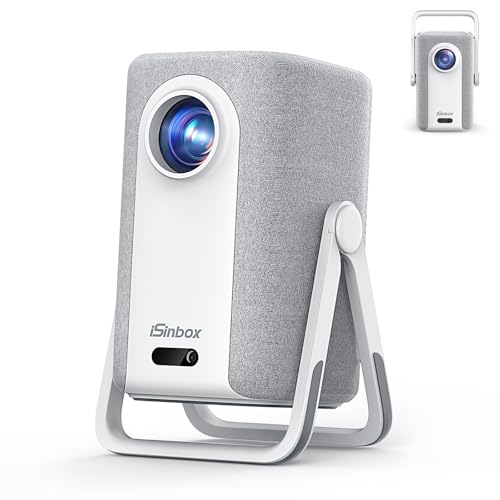
iSinbox Short Throw Projector 4K with Netflix

Optoma GT2000HDR Ultra-Compact Short Throw Full HD Home Laser Projector

Optoma GT2100HDR Compact Short Throw Laser Projector

Optoma ML1080UST 1080p Photon Go Ultra Short Throw Projector
More Details On Our Top Picks
Golf sim rooms that double as gaming spaces usually need speed first, and that’s where this BenQ makes sense. The 3000-lumen output gives you a healthier starting point for controlled indoor light, while low input lag matters more than flashy extras during a round. You also get auto vertical keystone, which helps square the image without much fuss.
Compared with the ViewSonic options later in the list, this one feels more tuned to casual home use than business presentation duty. The built-in speaker is handy for a simple setup, though most simulator rooms will still sound better with separate audio.
What We Like
- Low input lag suits golf sims and console play.
- 3000 lumens helps the image hold up in rooms with some light.
- Auto vertical keystone reduces the usual setup friction.
- Dual HDMI makes it easier to keep a simulator box and console connected.
- Built-in audio covers basic use without extra hardware.
Room For Improvement
- The built-in speaker is fine for convenience, not for richer room sound.
- Short throw placement still rewards careful screen and mount alignment.
- Home-entertainment tuning may matter less than raw brightness for some bays.
Core Details
Who It Suits Best
Golf sim owners who also game in the same room will get the most out of it, especially in compact setups with mixed lighting.
Where A Sibling Pick Shines
Optoma GT2100HDR suits you better when the room gets brighter and you want more headroom for daytime use.
This WEMAX model is built for a room where the screen wall matters as much as the projector itself. The ultra short throw design means it sits very close to the wall, and that can keep shadows down in a simulator bay that also serves as a lounge or media room. Google TV, WiFi, Bluetooth, and Google Assistant make it feel more like a modern living-room centerpiece than a bare-bones display box.
Compared with the BenQ TH671ST, this one leans harder into premium media use than quick gaming response. The honest read is that it suits a polished home theater space better than a bare garage, especially when you want a large picture and fewer visible cables.
Strong Points
- Ultra short throw placement keeps the unit tucked close to the wall.
- 4K-ready output supports a cleaner-looking large screen experience.
- Google TV gives you built-in app access without extra boxes.
- ALPD laser light source usually means a cleaner maintenance routine than lamp-based units.
- Dolby Audio, WiFi, Bluetooth, and Assistant support help in a living-room setup.
Softer Spots
- Ultra short throw setups need a very flat screen surface for the best result.
- 2100 ISO lumens may feel modest in a room with strong ambient light.
- Its feature set feels more cinema-focused than simulator-first.
Feature Rundown
Made For
You get the most value here in a dedicated media room where a close-to-wall image and smart streaming matter every day.
Consider Something Else When
BenQ TH671ST is the simpler fit for a simulator-first room where low-latency play matters more than smart TV polish.
Not every golf simulator problem starts with the projector, and this enclosure package is the proof. The 8’4 x 8’4 x 5 footprint gives you a defined practice bay, while the blackout cage, impact screen, frame poles, side shank nets, and projector mount build out a much more complete hitting area. That matters in garages and spare rooms where stray balls and messy cable runs can make a setup feel temporary.
Compared with the projector-only picks, this is the piece that turns a blank wall into a purpose-built bay. The trade-off is obvious: it asks for more floor space and more planning, so it suits committed home setups far better than a casual weekend nook.
Upsides
- Complete bundle cuts down on piecemeal shopping.
- Impact screen and blackout cage help the bay feel more contained.
- Side shank nets add a useful margin of protection around the hitting zone.
- Projector mount and frame poles make the layout easier to organize.
- The size suits a serious home practice station.
Points To Note
- The footprint needs real room, so tight basements may feel cramped.
- Assembly takes more patience than a single-piece accessory.
- It makes sense only for a setup you plan to keep in place.
Details At A Glance
Whose Shelf It Belongs On
You get the most from this package in a permanent or semi-permanent simulator room where you want the whole bay solved at once.
Swap It Out When
GoSports Golf Simulator Projector Cover with Turf is the simpler route for someone who already owns a projector and only needs floor-level protection.
Brightness is the main story here, and 4000 lumens gives this ViewSonic a strong case in mixed-light rooms. WXGA, which is a widescreen 1280 x 800 class resolution, is less about razor-sharp movie detail and more about straightforward display work, so it fits simulator dashboards, lesson software, and general practice use. Dual HDMI and USB-A keep the input side practical.
Compared with the BenQ TH671ST, this model feels more presentation-minded and less tuned to gaming response. The honest read is that it suits a bright practice room or shared home space better than a dark, dedicated theater.
Highlights
- 4000 lumens gives you strong visibility in brighter rooms.
- WXGA resolution keeps everyday simulator graphics readable.
- Dual HDMI simplifies switching between devices.
- USB-A adds a handy extra connection path.
- Short throw placement helps in rooms with limited depth.
Minor Gripes
- WXGA is less detailed than 1080p or 4K-oriented options.
- Its business-and-education slant feels a little plain for theater use.
- Short throw alignment still needs careful mounting and screen placement.
Technical Sheet
Built With In Mind
You get the best fit here in a bright multipurpose room where the projector may see practice software, lessons, and general entertainment.
Look Elsewhere When
Optoma GT2100HDR suits you better if you want similar brightness with a more entertainment-friendly image and laser-based styling.
This PS502X is the simpler sibling to the PS502W, and that difference matters. It still brings 4000 lumens, dual HDMI, and USB-A, but XGA resolution is more modest, so the picture is aimed at clear everyday use rather than finer detail. That can be enough in a garage practice setup where screen size and brightness matter more than cinematic sharpness.
Compared with the PS502W, this is the more stripped-back route for smaller rooms or utility spaces. The catch is that you give up some image detail, so it makes the most sense when you want a reliable, straightforward projector without chasing a more elaborate feature set.
Best Bits
- 4000 lumens helps in rooms that are not fully dark.
- XGA keeps the package focused on utility rather than extras.
- Dual HDMI supports a simple two-source setup.
- USB-A gives you another useful input path.
Things To Consider
- XGA looks less detailed than 1080p models.
- It makes more sense for practical use than media enthusiasts.
- Short throw placement still rewards a careful mount plan.
Feature Snapshot
Right Fit For
You’ll appreciate this most in small rooms, living rooms, or garage setups where you want brightness and simple operation over detail-rich visuals.
Another Choice May Suit
ViewSonic PS502W fits better for anyone who wants the same brightness with a cleaner widescreen spec for simulator software and mixed use.
Some simulator setups need less projector talk and more projector protection, and this GoSports cover answers that cleanly. It’s a floor-mounted enclosure for LED projectors, with turf on the outside so it blends more naturally into a golf bay than a bare plastic box would. For garages and indoor practice spaces, that can help the room feel finished instead of improvised.
Compared with the enclosure package earlier in the list, this is a much smaller commitment. The trade-off is clear: you’re buying protection and placement help, not a full hitting bay, so it suits owners who already have the rest of the room dialed in.
Positives
- Floor-mounted format keeps the projector low and out of the way.
- Turf exterior fits a golf simulator room better than a plain shell.
- Made for LED projectors, which narrows the fit in a useful way.
- Helps give the room a more finished look.
Worth Noting
- It only makes sense for LED projector setups.
- Floor placement means you still need to plan around foot traffic and cleaning.
- It solves protection and presentation, not the screen or impact area.
Core Details
The Right Fit
This suits you best when your projector already has a home and you want a neater, lower-profile way to shelter it in the simulator area.
Where Shoppers Go Wrong
ANYTHING SPORTS Complete Golf Simulator Enclosure Package is the stronger choice when you need the screen, frame, and netting solved in one go.
This iSinbox option reads like a compact home entertainment hub with projector basics still in place. Netflix, auto focus, HDR10+, AirPlay, Dolby sound, and a dual-mode stand give it a broad feature set, so it works well for a casual media room that also sees the occasional simulator session. The 1500 ANSI lumen figure places it in a more restrained brightness tier than the stronger room-light options above.
Compared with the BenQ TH671ST, it leans harder into smart features and portability than lag-sensitive play. You may find it more satisfying in a bedroom or camping setup than in a dedicated golf bay, unless the room lighting stays controlled.
Positives
- Netflix support reduces the need for an extra streaming box.
- Auto focus helps keep setup less fussy.
- HDR10+ and AirPlay broaden what you can send to the screen.
- 40W Dolby audio gives it a stronger built-in sound story than many compact units.
- Dual-mode stand adds flexibility for placement.
Areas To Watch
- 1500 ANSI lumens is less convincing in brighter rooms.
- Its strengths lean toward movies and streaming more than simulator speed.
- Portable gear often asks for a little more attention to cable management and storage.
Quick Facts
Best Suited To
This fits you best in a bedroom, den, or travel-friendly media space where smart features matter more than raw brightness.
Skip It When
Optoma GT2100HDR is the better route for brighter rooms that need more viewing headroom for golf and games.
Compact projector setups can be a blessing in a small simulator room, and this Optoma keeps the footprint disciplined. The laser light source is the important part here, because laser units usually fit better into a lower-maintenance routine than lamp-based projectors. Full HD also gives you a cleaner base for on-screen menus, shot data, and course views.
Compared with the ViewSonic PS502X, this one feels more purpose-built for home projection and less like a general presentation tool. The honest read is that it suits a tighter room where you want a tidy install and don’t want the projector itself to dominate the space.
Bright Spots
- Ultra-compact body helps in cramped rooms.
- Laser light source fits a lower-fuss maintenance routine.
- Full HD supports clearer simulator graphics than XGA class models.
- Short throw placement works well where depth is limited.
Areas To Watch
- Compact projectors can ask for very precise mounting.
- The smaller body may not suit people who want a more feature-heavy smart platform.
- Room brightness still matters, even with a laser source.
Feature Card
Who Should Grab It
You’ll like this most in a small simulator nook or apartment-friendly media room where a tiny projector footprint matters a lot.
Another Choice May Suit
Optoma GT2100HDR is the more flexible option for a brighter room that also needs better everyday entertainment reach.
Brightness is where this Optoma starts pulling ahead, and 4,200 lumens gives it a stronger claim in day and night viewing than the lighter-output picks. The 1080p panel with 4K HDR input support also makes it easier to feed modern content into a golf room that doubles as a movie or gaming space. The compact body keeps the setup manageable, even though the brighter output usually makes the whole unit feel a bit more serious.
Compared with the GT2000HDR, this one is the better match for rooms that get sunlight or simply refuse to stay dark. You may find it especially useful in mixed-use spaces where the projector has to handle simulator graphics, sports, and evening viewing without asking for a blackout routine.
Reasons To Buy
- 4,200 lumens gives you stronger visibility in bright and dim rooms.
- 1080p with 4K HDR input helps modern sources look more polished.
- Compact body keeps the projector easier to place.
- Laser design usually fits a cleaner long-term ownership pattern.
- Works well in rooms that serve more than one purpose.
Small Caveats
- Even strong brightness still benefits from a properly controlled screen wall.
- Compact laser units can reward careful placement and alignment.
- Its more versatile personality may cost you some pure cinema specialization.
Core Details
Who Will Love This
This suits you best in a bright multipurpose room where simulator use shares space with streaming, sports, or gaming.
Reach For A Different Pick When
BenQ TH671ST fits better for someone who puts low input lag ahead of sheer brightness and wants a more game-focused setup.
Ultra short throw design changes the room more than almost anything else here, because the projector can sit very close to the wall and keep the space open. Google TV makes it simpler to jump from simulator use to streaming, which helps in a family room or modern media setup. The mix of LED and triple-laser wording signals a more advanced light engine than the basic short-throw office models above.
Compared with the WEMAX Nova Pro, this Optoma feels more portable and less like a fixed home theater anchor. For most multi-use rooms, that balance is the point, though you still need a very smooth screen surface to get the cleanest result from an ultra short throw unit.
Best Bits
- Ultra short throw placement keeps the projector close to the wall.
- Google TV simplifies app access and day-to-day use.
- Full HD support works well for simulator visuals and streaming.
- Modern light-engine design suits a more polished setup.
- Fits rooms that need the projector to stay visually unobtrusive.
Trade Offs
- Ultra short throw setups depend heavily on screen flatness and alignment.
- The advanced feature set makes it better for polished rooms than rough utility spaces.
- It’s easier to appreciate here when the room has a well-planned front wall.
At A Glance
The Right Fit
You’ll get the most from this in a modern media room or polished simulator space where the projector needs to stay close to the wall.
Skip It When
ViewSonic PS502W is the simpler choice for a brighter, more utilitarian practice room that doesn’t need as much smart-platform polish.
How To Choose The Right Short Throw Projectors For Golf Simulator
Match Throw Distance To Your Room Depth
Short throw and ultra short throw are not the same thing, and that difference matters more than the brand name on the front. Short throw projectors sit farther back than ultra short throw models, so they need more room depth but often offer easier placement flexibility. In a garage bay, that can be the difference between a clean hitting lane and a setup that crowds your swing.
Ultra short throw models sit very close to the screen wall, which helps in tight media rooms and keeps shadows down. The catch is that they usually ask for a flatter screen and more careful alignment, so they reward a more permanent setup. That trade-off suits polished simulator rooms more than makeshift corners.
Give Brightness Real Weight
Lumen numbers matter because golf simulator rooms rarely stay perfectly dark. Higher brightness helps the image hold up against overhead lights, light-colored walls, and the stray bit of daylight that sneaks into a basement window. For mixed-use rooms, brightness can matter as much as resolution.
That said, brightness does not fix everything on its own. A dimmer projector can still work in a controlled room with a good screen and low ambient light, while a brighter model can feel wasted in a totally dark space. Your room, not the spec sheet alone, should drive the choice.
Look At Resolution And Input Speed Together
Resolution shapes how clean the picture looks, while input lag shapes how responsive the display feels. 1080p is usually the sweet spot for simulator graphics, menus, and casual entertainment, while WXGA and XGA are more utilitarian. The difference shows up most when you compare course detail, text sharpness, and on-screen overlays.
Low input lag matters more for golf simulation and gaming than many shoppers expect. A projector with a beautiful image but sluggish response can feel less connected during swing feedback or console play. The best fit balances sharpness with a snappy feel that matches your use case.
Plan For The Whole Bay, Not Just The Projector
A simulator room works better when the enclosure, mount, and screen support the projector instead of fighting it. A package like the ANYTHING SPORTS enclosure can solve structure and protection in one pass, while a cover like the GoSports unit protects an existing setup. That kind of planning saves you from awkward cable runs and last-minute furniture moves.
Think about maintenance too. Laser units and enclosed projector covers can reduce some upkeep, while open placements may need more dust management and more careful storage habits. The right choice feels like part of the room, not an extra object you keep working around.
Things Worth Knowing First
Common Shopping Slip Ups
Shoppers often match a projector to the room by resolution alone and forget about brightness. In a golf simulator space, that usually leads to a picture that looks fine on paper but fades under real lighting.
Another common miss is buying the wrong throw style for the wall distance. A short throw unit in a very shallow room, or an ultra short throw model on an uneven screen wall, can create more frustration than value.
Why Top Tier Costs More
Higher-tier models often spend more on light engines, smart platforms, and lens design. That’s why options like the WEMAX Nova Pro and Optoma ML1080UST feel more polished in a living room or dedicated media room.
You also pay for smoother day-to-day use, not just a longer feature list. Better placement flexibility, smarter streaming support, and cleaner image handling are the kinds of upgrades that matter once the room becomes a regular hangout.
Frequently Asked Questions
Do short throw projectors work well for golf simulator rooms?
Yes, they usually fit golf simulator spaces better than standard throw models because they need less distance to make a large image. They also help cut down on shadows near the hitting area.
Is 1080p enough for a simulator setup?
For many home simulator rooms, 1080p is enough for clean menus, course graphics, and casual viewing. You may want more resolution only when you also use the room for movies or large-screen media.
How bright should a projector be for a garage bay?
Brighter rooms usually benefit from a projector with higher lumen output. A darker, more controlled bay can make good use of a more modest brightness level.
Do ultra short throw models need special screens?
They work best with a very flat screen surface because the image lands close to the wall. A wavy or loosely mounted screen can make setup harder.
Should you choose a projector or an enclosure first?
Start with the room layout, because that tells you whether you need a projector, a full enclosure, or both. A complete bay package makes sense once the hitting area is staying in place long term.
Closing Thoughts
The right choice depends on how your room actually works on a normal day. A bright garage bay points you toward the Optoma GT2100HDR or the ViewSonic PS502W, while a quieter media room leans closer to the WEMAX Nova Pro or the Optoma ML1080UST. If you want the whole simulator area built out, the ANYTHING SPORTS enclosure package changes the room more than any projector alone. Match the gear to your space, and the rest gets easier.