


Golf club engraving is about control, not drama. You want a machine that fits your workspace, handles small surfaces cleanly, and gives you enough precision for club tags, personalization, or workshop labeling without turning setup into a weekend project.
The ten picks below cover portable handheld units, enclosed desktop models, and higher-output machines with tighter spot sizes or larger work areas. That mix matters because club work often happens on curved, coated, or awkwardly positioned surfaces, where the wrong form factor slows everything down.
Quick Look At The Shortlist

LaserPecker LP2 Laser Engraver with Roller
ACMER S1 Laser Engraver Machine 6000mW

Creality Falcon 10W Laser Engraver Machine
LONGER Laser Engraver Ray5 5W
Genmitsu Kiosk 10W 10000mW Laser Engraver

ACMER S1 Laser Engraver Machine 2500mW

AlgoLaser 10W Portable Laser Engraver Machine

LaserPecker LP2 Handheld Laser Engraver

xTool F2 5W IR 15W Diode Dual Laser Engraver
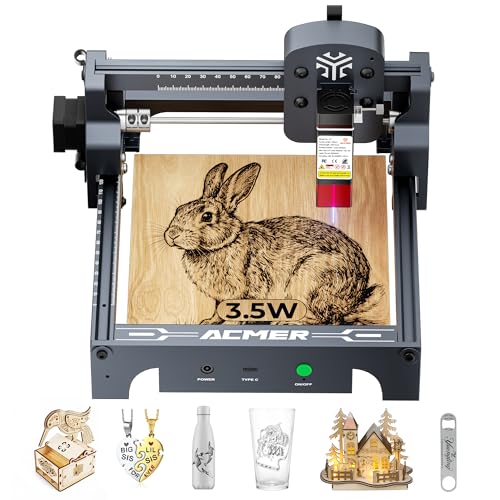
ACMER S1 Laser Engraver Machine 3500mW
More Details On Our Top Picks
The roller set makes this LP2 feel better matched to awkward shapes than a plain flatbed unit. For golf club work, that matters because curved grips, shafts, and small accessories need steadier positioning than a desk-only machine usually gives.
You also get a handheld form that travels more easily than the heavier desktop picks in this list. In a workshop that handles custom tagging or club-side personalization, that portability can save setup time, though the trade-off is a smaller, more manual workflow.
Strong Points
- Handheld format helps you reach pieces that do not sit flat.
- Roller support adds more control for rounded or cylindrical items.
- Fits wood, metal, leather, and acrylic use cases.
- Easy to move between a bench, storage, or a travel kit.
Things To Consider
- The smaller portable layout is less suited to bigger batch work.
- Hand positioning can take patience on narrow or glossy surfaces.
- Accessory setup adds a little more prep than a simple desktop unit.
Core Details
Who It Suits Best
You benefit most here if you want a portable setup for occasional club marking, travel jobs, or tight workspaces.
A Better Fit Elsewhere
Creality Falcon 10W Laser Engraver Machine suits you better if you want a larger desktop machine for steadier batch work.
This ACMER S1 leans into precision with a 0.04 mm laser spot, which is the tight beam footprint that helps fine details stay crisp. For golf club engraving, that kind of control is useful on small logos, initials, and other marks that need to stay legible on narrow hardware.
The 130 x 130 mm work area keeps the machine compact, so it suits a desk or small craft station more than a sprawling workshop. The software story is also friendly, since Acmerstudio is included and LightBurn or LaserGRBL support gives you room to grow beyond the starter workflow.
Highlights
- Very fine spot size supports more detailed lettering and artwork.
- Compact footprint suits a tidy hobby bench or spare table.
- Software flexibility helps you avoid being locked into one workflow.
- The 6000 mW output gives you a stronger middle-ground option.
Areas To Watch
- The smaller work area limits larger templates and wider accessories.
- Compact machines usually demand careful placement and alignment.
- Desktop cleanup still matters, especially with repeated small jobs.
Feature Snapshot
Who Will Love This
You suit this pick best if you want a compact desktop engraver for careful detail work and do not need a big bed.
Another Choice May Suit
Creality Falcon 10W Laser Engraver Machine fits better for you if you want a larger workspace and a stronger desktop setup.
The Falcon 10W gives you the broadest workshop feel so far, and that shows in its 15.7 by 16.3 inch workspace. For club-related jobs, the extra room is useful for jigs, fixtures, and repeat layouts that need a little breathing space.
Its 0.06 mm precision still stays in the fine-detail zone, while the 72W system points to a more capable class of machine overall. The honest read is that this is better for a dedicated setup than a casual shelf-and-put-away routine.
Upsides
- Larger workspace gives you more room for fixtures and templates.
- Fine 0.06 mm precision supports clean lettering and small marks.
- Higher-output design suits broader workshop use.
- Good match for users who want a more permanent station.
Points To Note
- The larger footprint asks for a more committed desk or bench.
- More capable machines usually mean more setup and storage planning.
- It feels less travel-friendly than the handheld LaserPecker picks.
Quick Facts
Built With In Mind
You fit this machine best if you want a larger bench setup for repeated engraving tasks and more flexible workholding.
Skip It When
ACMER S1 Laser Engraver Machine 6000mW is the better fit for a tighter desk and a simpler footprint.
The Ray5 stands out because the 3.5 inch touchscreen keeps setup from feeling buried in menus. For a busy garage or hobby desk, that kind of on-device control is useful when you want to move from design to engraving without bouncing back and forth to a computer.
Its 400 x 400 mm working area is generous for a desktop unit, so you get room for larger fixtures or multiple small pieces. Compared with the ACMER S1 picks, this one feels more like a practical daily station than a detail-first compact tool.
Bright Spots
- Touchscreen control makes everyday operation feel more direct.
- Offline use is handy in workshops with limited computer access.
- 400 x 400 mm area gives you extra layout room.
- The 0.08 mm spot stays fine enough for careful marking.
Small Caveats
- The 5W output sits below the stronger machines in this roundup.
- A bigger bed can tempt you into adding clutter around the setup.
- Touchscreen convenience still works best with a tidy workflow.
Details At A Glance
Whose Shelf It Belongs On
You suit this one best if you want a desktop engraver that feels easy to live with day after day.
Look Elsewhere When
xTool F2 5W IR & 15W Diode Dual Laser Engraver suits you better if you want more advanced marking capability and camera-assisted positioning.
The enclosure changes the feel of this Genmitsu right away, because it gives you a more contained tabletop setup. For club marking in a shared room, that can be a real comfort, especially when you want the machine to stay in one place instead of becoming part of every surface in the shop.
The 3.9 by 3.9 inch work area is small, yet the 10W output and 0.01 mm precision give it a more serious profile than the size suggests. Compared with the LONGER Ray5, you give up workspace, but you gain a more focused footprint and one-touch repeat engraving for repeated runs.
Reasons To Buy
- Enclosure keeps the setup feeling more contained on a desk.
- 0.01 mm precision supports very tight, repeatable detail.
- One-touch repeat engraving is useful for small batches.
- Compatible with LightBurn and LaserGRBL for flexible control.
Worth Noting
- The 3.9 by 3.9 inch area is compact, so larger layouts need planning.
- Enclosures take a bit more space than open-frame machines.
- Regular cleaning around the enclosed area still matters after repeated use.
Spec Overview
Best Suited To
You fit this model best if you want a contained desktop engraver for small, repeated club-related jobs.
Where A Sibling Pick Shines
Creality Falcon 10W Laser Engraver Machine is the better fit for you if you need a much larger workspace and a more open setup.
This lower-output ACMER S1 is the gentler entry point in the lineup, and that can suit a first desktop setup. For golf club labels, tags, and other lighter-duty work, the 130 x 130 mm area gives you enough room without asking you to manage a large machine.
It keeps the same compact design language as the stronger ACMER S1 model, but the 2500 mW output makes the use case more modest. That trade-off is fine for simple hobby jobs, though you may find it less appealing once your projects start asking for more speed or depth.
Positives
- Compact desktop layout suits small rooms and clutter-free benches.
- 130 x 130 mm area is enough for labels and modest layouts.
- Lower-output format can feel approachable for basic engraving tasks.
Trade Offs
- 2500 mW is the lightest output in this roundup.
- It is better for simple jobs than for demanding production routines.
- Like most small desktop units, alignment still rewards patience.
Feature Card
Right Fit For
You suit this pick best if you want a starter desktop engraver for light club-related personalization.
A Better Fit Elsewhere
ACMER S1 Laser Engraver Machine 6000mW fits better for you if you want more output and finer detail control.
The AlgoLaser puts smart control front and center, which can be a relief in a workshop that doesn’t need another laptop chained to the bench. Its 3.5 inch touchscreen and AlgoOS system make the machine feel more self-contained than the open-frame desktop picks around it.
Hand-drawn input, wireless transfer, and offline use give you several ways to move a design into the machine. For club personalization work, that flexibility helps when jobs arrive in different formats, though the broader feature set does ask for a little more learning than a plain starter unit.
Plus Points
- Touchscreen control keeps operation direct and easy to reach.
- Wireless transfer suits a modern desktop or shop workflow.
- Offline use is handy where computers are not always nearby.
- Good fit for people who like a guided, tech-forward setup.
Room For Improvement
- The smarter interface can feel busier than a simpler engraver.
- More features often mean more menus to learn.
- Portable form still benefits from a stable, flat work surface.
Core Details
Who Should Grab It
You suit this option best if you want a portable machine with a more modern, self-guided control style.
Reach For A Different Pick When
LaserPecker LP2 Laser Engraver with Roller is a better fit if you want the roller accessory for more awkward curved items.
This is the most travel-friendly shape in the group, with a 1 kg body that stays easy to move around a shop or carry to an outside job. For golf club work, that makes sense when the club or part cannot come to the machine, which happens more often than people expect.
The 36,000 mm/min speed and 0.05 mm precision create a fast, fine-detail mix that suits lettering and simple graphics. Compared with the LP2 roller bundle, you give up the accessory support, so the setup is leaner but less helpful on rounded pieces.
Best Bits
- Light 1 kg build is easy to move and store.
- High speed helps with quick personal marking jobs.
- Fine 0.05 mm precision suits neat lettering.
- Multi-angle engraving is useful for awkward placement.
Softer Spots
- The basic set is lean, so you may want more support accessories later.
- Handheld use takes more steady positioning than a fixed desktop frame.
- Portable gear usually needs a little extra care in storage.
Feature Rundown
Perfect Match For
You fit this unit best if you need a light, movable engraver for on-site or travel-friendly work.
Swap It Out When
Genmitsu Kiosk 10W 10000mW Laser Engraver suits you better if you want an enclosed desktop setup instead of a handheld tool.
The xTool F2 sits at the high-control end of this list, and the built-in 50 MP camera is a big part of that story. For golf club engraving or small-batch workshop labeling, camera-assisted placement helps you line up work more confidently, especially on small or irregular targets.
Dual laser support, 3D embossing, and color marking on metal make this machine unusually versatile for a portable desktop model. The trade-off is cost and complexity, so it feels most sensible for advanced hobbyists, small shops, or anyone who regularly handles mixed materials.
Positives
- 50 MP camera supports careful placement on small workpieces.
- Dual-laser setup expands the range of jobs you can handle.
- 3D embossing adds another layer of surface detail.
- Color marking on metal broadens the finishing options.
- Portable desktop shape still keeps it less bulky than a large fixed system.
Honest Caveats
- The feature set is advanced, so setup can feel less casual.
- Higher-tier hardware makes the machine easier to justify for frequent use.
- Mixed-material versatility may be more than a simple club-label setup needs.
Quick Facts
Who It Belongs On
You fit this machine best if you want premium controls and advanced marking options for frequent, varied projects.
Where Shoppers Go Wrong
LONGER Laser Engraver Ray5 5W makes more sense if you want a simpler desktop layout and do not need the dual-laser feature set.
This ACMER S1 lands between the starter 2500 mW unit and the stronger 6000 mW version, which makes it a sensible middle step. For golf club personalization, that middle ground can feel easier to justify than jumping straight to a more elaborate machine.
You still get the 0.04 mm fine spot and 130 x 130 mm working area, so the shape stays compact while the output steps up a bit. Compared with the lower-power ACMER S1, this one gives you a little more headroom without pushing into the higher-tier price and complexity zone.
Standout Traits
- Middle-power output balances capability with a compact desktop size.
- 0.04 mm spot supports crisp detail on small work.
- 130 x 130 mm area keeps setup manageable.
- Good step-up choice for hobbyists who want more than a starter unit.
Minor Gripes
- The work area remains compact, so larger layouts still need planning.
- It sits in a crowded middle where feature priorities matter a lot.
- Small desktop machines always ask for careful alignment and cleanup.
At A Glance
The Right Fit
You fit this pick best if you want a compact desktop machine with a little more output than an entry model.
Where Shoppers Hit A Wall
ACMER S1 Laser Engraver Machine 6000mW is the better match if you want the stronger version in the same family.
How To Choose The Right Laser Engravers For Golf Clubs
Workspace Shape Matters More Than Marketing
Golf club engraving rarely rewards a huge machine with no handling plan. A small, curved target surface asks for either a handheld body, a roller, or a desktop frame that gives you room for fixtures and careful placement.
That’s why the LP2 roller bundle, the handheld LP2, and the Genmitsu enclosure solve different problems. The first helps with rounded work, the second travels easily, and the third keeps a small station contained.
Precision Sounds Simple, But It Has Layers
Laser spot size tells you how tight the beam is, and that matters for small lettering or fine logos on club hardware. A 0.04 mm or 0.05 mm spot usually gives you more confidence on compact marks than a looser beam footprint.
Output matters too, but not in a vacuum. Higher power often helps with speed or material range, while lower power can still be fine for lighter personalization work where control matters more than raw force.
Software And Controls Change Daily Use
A touchscreen, offline mode, or wireless transfer can remove friction from a normal workshop routine. That matters most when you move from one-off club labels to repeated jobs, because fewer steps usually mean fewer setup mistakes.
ACMER’s software bundle, Longer’s touchscreen layout, and AlgoLaser’s AlgoOS each point to a different kind of workflow. Choose the one that matches how you already work, not the one with the longest feature list.
Pick The Form Factor Around Your Real Routine
A portable engraver makes more sense for club-side work, shared rooms, or occasional trips between locations. A desktop machine becomes the better call once you expect steadier volume, more repeat jobs, or a fixed bench.
The premium route, like the xTool F2, earns its keep with camera-assisted alignment and broader capability. For many hobby setups, though, a simpler machine with a clear control path is the calmer and more practical choice.
Things Worth Knowing First
Common Shopping Slip Ups
Many people focus on output and forget the physical setup. A strong unit still feels clumsy on a crowded bench, and a compact unit can disappoint when you want room for templates or accessories.
Another common miss is software fit. A machine that looks simple on paper can feel awkward on delivery day if the control path does not match how you work.
What The Higher Tier Buys
Higher-tier models often add camera guidance, dual-laser setups, stronger speed, or more specialized finish options. Those extras matter most when you engrave often, handle mixed materials, or need repeatable alignment for small parts.
That upgrade makes less sense for occasional labeling. In that case, you may get more value from a simpler machine with a cleaner setup and fewer moving parts.
Frequently Asked Questions
Can you engrave golf clubs with these machines?
These engravers can suit club-related personalization, labels, and small markings when the workpiece and setup are handled carefully. The better fit depends on whether you need portability, a roller, or a stable desktop frame.
What matters more, power or precision?
Precision usually matters more for small club marks, because a tight spot helps keep lettering and logos clear. Power still matters for speed and material range, so the best balance depends on your workflow.
Is a handheld engraver enough for club work?
A handheld machine can work well for on-site or awkward angles. A desktop model is easier for repeat jobs, while a roller helps when the surface is rounded.
Do you need software experience?
Not necessarily, because several of these picks include beginner-friendly software or touchscreen control. More advanced workflows still help once you start using templates, repeat jobs, or design files from other programs.
Which model makes sense for a small workshop?
LONGER Ray5, ACMER S1, and Genmitsu Kiosk each fit small workshop use in different ways. Your best match depends on whether you want open-frame workspace, compact precision, or an enclosed tabletop setup.
Closing Thoughts
The right laser engraver for golf clubs depends on how you work, not just how much output a spec sheet lists. If you want portability, the LaserPecker models make sense, while the ACMER and LONGER machines suit steadier desk use. For advanced alignment and richer marking options, the xTool F2 stands apart. For most shop setups, the calmest choice is the one that fits your space, your pace, and the kind of club work you actually do.

