


Home golf practice works best when the setup matches your space, not the other way around. Some folks need a launch monitor for swing data in a spare room, while others just want a net, mat, and enough room to keep the driver from feeling cramped. You’ll find both ends of that spectrum here, plus a few in-between picks that make sense for garages, basements, and backyards. The right choice turns random swings into a routine you can actually stick with.
Quick Look At The Shortlist

Voice Caddie Portable Golf Launch Monitor and Swing Analyzer

Golf Net 10x7FT with Golf Practice Mat

Rapsodo MLM2PRO Mobile Launch Monitor Golf Simulator
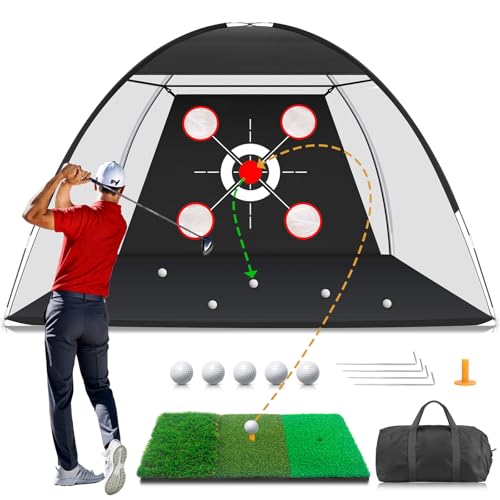
Golf Net with Practice Mat 10x7FT

GoSports Range Cage 10 ft x 8 ft Golf Net Cage

SLX MicroSim Indoor Mobile Golf Simulator

Rapsodo Mobile Launch Monitor Golf Simulator MLM

High-Precision Golf Hitting Mat

Complete Golf Simulator Enclosure Package
More Details On Our Top Picks
Voice Caddie keeps the setup lean, which helps in a garage bay or a den that doubles as practice space. The draw here is live shot data and a swing-speed mode that works even without a ball, so you can work on tempo without dragging out the whole range routine.
That kind of flexibility suits golfers who want feedback without building a full enclosure around the whole room. The trade-off is obvious, though, because this is an analyzer and trainer first, not a full-screen simulator with course graphics.
Strong Points
- Portable body makes it easier to move between indoor and outdoor practice spots.
- Real-time shot feedback helps you connect swing changes to ball flight faster.
- Swing-speed mode supports tempo work without needing a ball each session.
- Battery life up to 20 hours suits longer practice blocks and range visits.
Worth Noting
- You will still need space for safe full swings, especially with the driver.
- It does not replace a projector-based sim for course play and graphics.
Feature Snapshot
Who It Suits Best
Golfers who want portable swing feedback for indoor drills, backyard practice, and range work will get the most from it.
A Better Fit Elsewhere
The Rapsodo MLM2PRO Mobile Launch Monitor Golf Simulator suits you better when shot data depth matters more than simple portability.
This one is built for straightforward practice, not gadget-heavy sessions, and that keeps it approachable in a backyard or unfinished basement. The 10×7-foot net gives you enough strike zone for driver work, while the included mat adds a basic hitting surface so you’re not arranging separate gear pieces every time.
It makes sense for families and casual golfers who want a clear place to hit balls without turning the room into a project. The honest trade-off is that setup and takedown still take some space, even with a simplified pole structure.
Bright Spots
- Net and mat together reduce the need to source matching pieces.
- Works for driving, chipping, and swing repetition in one spot.
- Ground-spike anchoring helps keep the frame steadier outdoors.
- Fits common home practice zones like garages, living rooms, and yards.
Areas To Watch
- Assembly still takes a little floor space before each session.
- Mat wear will depend on how often you practice with the driver.
Core Details
Who Will Love This
Casual golfers and households setting up a simple home practice corner will appreciate the no-fuss layout.
Another Choice May Suit
GoSports Range Cage 10 ft x 8 ft Golf Net Cage is a better fit for golfers who want a more enclosed full-swing station.
Rapsodo MLM2PRO leans hard into shot data, and that makes it more appealing for golfers who care about numbers, not just ball flight. Dual cameras and 15 metrics point this pick toward a more serious practice routine, especially in a garage or dedicated simulator nook where you want to track changes over time.
Compared with Voice Caddie, this one is a deeper tool and a better match for golfers who like feedback density. It does ask more from your setup and attention, so the learning curve is a real part of ownership.
Upsides
- Dual-camera design supports more detailed swing and shot analysis.
- Fifteen metrics give you more ways to study progress.
- Works indoors and outdoors, so your routine can move with the weather.
- Included support coverage adds a practical layer of protection after the maker’s coverage period.
- Ball-speed, club-speed, and launch-angle focus fits serious range work.
Softer Spots
- More data also means more setup attention before each session.
- The feature set may feel dense for very casual practice.
- App and device pairing can matter more here than with simpler nets.
Details At A Glance
Built With In Mind
Data-focused golfers who want to study their swings in a home bay or at the range will get the strongest return from it.
Where A Sibling Pick Shines
Voice Caddie Portable Golf Launch Monitor and Swing Analyzer fits better for golfers who want a lighter, simpler training companion.
MFNMFN’s setup looks aimed at the golfer who wants one tidy practice zone for driver, chip shots, and swing reps. The 10×7-foot net is large enough to feel useful without swallowing the whole yard, and the included mat makes it easier to keep a training habit going after work.
It sits close to the Zensouds net in function, but this one leans a little more toward a ready-made backyard station. The practical catch is the same kind you see with most home nets, because storing and moving the frame takes some planning.
Positives
- Net plus mat give you a more complete practice setup in one purchase.
- Supports driving, chipping, and general swing repetition.
- Good fit for backyards where a permanent bay is not realistic.
- Helps you build consistency without leaving home for every session.
Small Caveats
- Frame setup takes room, so cramped patios may feel tight.
- Outdoor storage habits matter for long-term material care.
Quick Facts
Right Fit For
Golfers who want a simple backyard practice corner with a mat and net in the same package will feel right at home with it.
Look Elsewhere When
GoSports Range Cage 10 ft x 8 ft Golf Net Cage works better for golfers who want a sturdier, more enclosed swing zone.
The GoSports cage is the closest thing here to a real practice bay, which is why it stands apart from the open net picks above. A 10-by-8-foot footprint gives you room for fuller swings, and that extra enclosure helps in garages or basements where stray shots are a concern.
For golfers building a home simulator around a screen or simple impact target, this shape makes a lot of sense. The trade-off is footprint, because a cage like this asks for more square footage than the net-and-mat setups.
Reasons To Buy
- Enclosed cage style gives you a more protected practice area.
- Roomy 10 x 8 ft dimensions suit fuller swing work.
- Good match for garage and simulator-style home builds.
- Works indoors and outdoors, which helps in mixed-weather climates.
Points To Note
- You will want enough ceiling and floor space before setting it up.
- Assembly is more involved than a basic net frame.
At A Glance
Whose Shelf It Belongs On
Home golfers building a simulator bay or serious garage practice area will get the strongest fit from this cage.
Skip It When
Golf Net 10x7FT with Golf Practice Mat is the easier choice for a smaller backyard or a tighter room.
SLX MicroSim is the most software-driven pick in the group, and that changes the kind of home setup it wants. It uses a motion sensor plus a swing stick, then works with Android, iOS, and PC through E6 Connect, GSPro, and CreativeGolf, so the appeal is less about a net bay and more about interactive play in tighter quarters.
The enclosed setup isn’t the point here, which is why it differs so much from the GoSports cage. You may find it especially useful in cold weather or in a room where full ball striking is awkward, though the app side means your device setup matters more than with a simple mat.
Highlights
- Motion-sensor play creates a more game-like indoor experience.
- Works with Android, iOS, and PC for wider device flexibility.
- Included swing stick helps you practice without a full hitting bay.
- Compatible software options give you room to choose a simulator style.
- Suitable for seated use, which helps some home layouts a lot.
Room For Improvement
- Software and device pairing add setup steps.
- It feels less like a physical training net and more like an app system.
- Expanded content access adds another ongoing cost layer.
Technical Sheet
The Right Fit
Apartment dwellers, seated users, and golfers with very limited swing space will appreciate this more than a full cage.
Reach For A Different Pick When
High-Precision Golf Hitting Mat works better for golfers who want a simpler physical training surface with less app dependence.
This Rapsodo model is narrower in device support, but that focus also makes the proposition clearer. It works with iPhone and iPad, adds GPS satellite view, and reports ball speed, club speed, and launch angle, which is a strong mix for golfers who like tracking the shape of each shot in a familiar phone-based setup.
Compared with the MLM2PRO, it’s the lighter sibling in the lineup and a little easier to think about as a mobile lane rather than a full simulator ecosystem. The limitation is plain, though, because Android users are out, and that matters more than any one spec.
Best Bits
- GPS satellite view adds useful course context to shot sessions.
- Ball speed, club speed, and launch angle cover key swing basics.
- iPhone and iPad focus keeps the setup centered on Apple devices.
- Portable launch-monitor format suits the range and home practice alike.
Minor Gripes
- Device support is limited to iPhone and iPad.
- It’s not the right match for a mixed-platform household.
Feature Rundown
Made For
Apple-based golfers who want a portable launch monitor with clear shot metrics will get the best fit here.
Swap It Out When
Rapsodo MLM2PRO Mobile Launch Monitor Golf Simulator is the better choice for golfers who want broader data depth and dual cameras.
The mat is the quiet workhorse in this roundup, and that’s exactly why it belongs in a home simulator setup. Swing-path feedback and impact detection help you feel where the club is moving and where the face is meeting the turf, which is useful in a garage, basement, or spare room where a whole net rig would be overkill.
It pairs especially well with launch monitors from Voice Caddie or Rapsodo, since you can combine surface feedback with shot data. The trade-off is simple: a mat teaches contact, but it does not provide ball containment or course visuals on its own.
What We Like
- Swing-path feedback helps you work on direction and contact habits.
- Impact detection gives more immediate information on strike quality.
- Indoor and outdoor use makes it easy to move sessions around.
- Small footprint fits into tighter practice areas than a cage setup.
Trade Offs
- It does not stand alone as a full simulator bay.
- You may want a net or screen beside it for safer ball handling.
Core Details
Perfect Match For
Golfers who want technique feedback without building a full simulator room will appreciate this mat most.
Another Choice May Suit
GoSports Range Cage 10 ft x 8 ft Golf Net Cage is the better call for golfers who want a physical enclosure around their hitting area.
ANYTHING SPORTS sells the most complete home-build approach in this list, and the enclosure makes that clear right away. You get the frame poles, blackout cage, projector mount, side shank nets, and impact screen, so the result is a true simulator shell rather than a single training accessory.
That extra structure matters for garage builds and serious indoor spaces where you want a cleaner visual field and better shot containment. The catch is cost and footprint, because this level of setup asks for planning in a way that a mat or portable monitor does not.
Reasons To Buy
- Complete enclosure pieces reduce the need to source parts separately.
- Blackout cage and side nets help create a tidier hitting zone.
- Projector mount supports a more immersive simulator layout.
- 4K-ready impact screen suits a polished home bay build.
Honest Caveats
- The setup asks for more room than any portable training aid here.
- It suits committed simulator spaces more than casual weekend practice.
Feature Card
Who Should Grab It
Golfers building a dedicated home simulator room or garage bay will get the clearest value from this enclosure package.
Where Shoppers Go Wrong
Skip this tier when you only need a small practice corner, because a launch monitor or net will be easier to live with.
How To Choose The Right In Home Golf Simulators
Match The Gear To Your Space
Space is the first filter, not the last. A compact mat or portable launch monitor works in a spare room, while a cage or enclosure asks for more ceiling height, more depth, and a cleaner strike zone.
Garage golfers usually need room for full driver swings and safe ball flight, while apartment setups lean toward sensor-based systems or swing trainers that do not need a full net wall.
Decide How Much Feedback You Want
Some setups give you simple contact cues, and others break down ball speed, club speed, launch angle, and more. That difference matters because more data helps with swing work, but it also adds setup steps and a little more learning.
Golfers who just want a practice habit may be happiest with a net and mat. Golfers chasing swing changes often benefit more from a launch monitor with cameras or shot tracking.
Think About Ball Containment And Safety
A hitting mat alone only tells part of the story. Nets, cages, and enclosures protect walls, windows, and storage shelves, which matters a lot in basements and garages where one bad strike can cause a mess.
The bigger the swing, the more useful enclosure-style gear becomes. For shorter chips and half-swings, a simpler footprint often feels easier to maintain.
Plan For Setup And Storage
Some home golf systems stay ready in a corner, while others are closer to a weekend project. Foldable frames, lightweight monitors, and smaller mats suit people who want quick sessions, not a permanent build.
Permanent cages and full enclosures make sense for committed practice spaces, but they also ask for storage planning, cleaning, and a stable spot to live.
What To Weigh Before You Commit
Mistakes Worth Dodging
A common slip is matching a full simulator purchase to a tiny practice space. Another is buying data-heavy gear before you know whether you want shot numbers or just a reliable place to swing.
Storage gets overlooked too, especially with frames, side nets, and mats that need a dry home between sessions. A setup that fits your room and your routine usually lasts longer in daily use.
The Upgrade Payoff
Higher-tier systems cost more because they combine more parts, more structure, and more feedback. Dual cameras, impact screens, enclosures, and broader software support add convenience and make the practice bay feel more complete.
The upgrade makes the most sense for golfers who use the space often and want a stable simulator corner instead of a temporary training aid. For occasional practice, simpler gear can be the calmer choice.
Frequently Asked Questions
What matters most in a home golf setup?
Room size, swing type, and how much feedback you want matter most. A small space often favors a mat or portable monitor, while a dedicated room can support a cage or enclosure.
Do you need a full simulator to practice well at home?
No, you do not. A net, mat, or launch monitor can support steady practice without a full projector build.
Which gear works best for tight spaces?
Compact launch monitors and swing trainers are usually the easiest fit. A full cage or enclosure needs more room and more planning.
What should you look for in a practice mat?
Look for surface feedback, strike detection, and a size that fits your swing path. A mat that stays stable helps your contact feel more consistent.
Are app-based simulator systems worth it?
They can be, especially for golfers who like data and game-style practice. The trade-off is more setup and more dependence on compatible devices.
Closing Thoughts
The best home golf setup is the one you can use without rearranging half the room every time. For some golfers, that’s a launch monitor and mat, while others will want a full cage or enclosure that feels closer to a practice bay. The right choice depends on how much space you have, how much data you want, and how often you plan to swing. Pick the system that fits your real routine, and home practice starts feeling a lot more natural.

