

Bringing golf practice inside solves a very real problem, you keep your swing moving without chasing daylight, weather, or a crowded range bay. The right setup also depends on your space, because a basement corner, garage bay, or living room net all ask for different gear. Some of these picks are simple net-and-mat tools, while others build toward a full screen-and-projector room that feels more like a studio than a spare room.
Quick Look At The Shortlist

Golf Net 10x7FT with Practice Mat

Rapsodo MLM2PRO Mobile Launch Monitor Golf Simulator
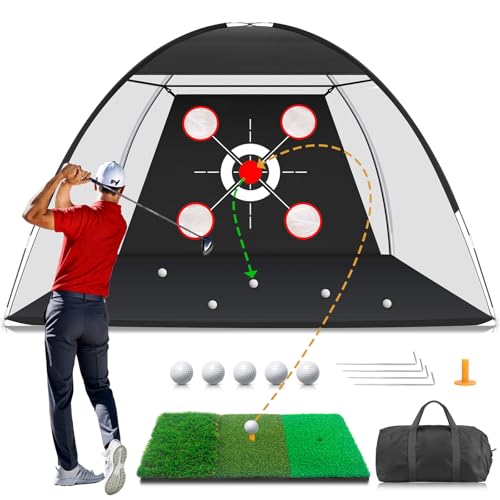
Golf Net with Practice Mat 10x7FT

SLX MicroSim Indoor Mobile Golf Simulator

ST MAX Golf Simulator Ultimate Studio Package

Complete Golf Simulator Enclosure Package 4K-Ready

Complete Golf Simulator Enclosure Package 4K-Ready

GoSports Golf Simulator Enclosure Nets Kit
More Details On Our Top Picks
A 10×7-foot net with a practice mat gives you the simplest path into home golf work, especially in a backyard or basement with enough swing room. The setup leans toward repeatable chip-and-drive drills rather than a full-screen simulator, which suits a lot of casual practice routines.
Compared with the higher-tech picks here, this one keeps the footprint and complexity lower. That makes it a sensible starting point for families, newer golfers, or anyone who wants a dedicated hitting area without wiring up a whole room.
What We Like
- 10×7-foot hitting area supports everyday full-swing practice.
- Included mat keeps your stance and contact point in one package.
- Simple assembly and takedown suit shared spaces.
- Works in a living room, garden, or basement with enough clear space.
- Good gift angle for golfers who want a straightforward practice setup.
Things To Consider
- No launch monitor or ball-flight data, so the feedback stays visual.
- Large swings still need clearance behind and around the net.
- Like most nets, storage works better in a dry, protected spot.
Core Details
Who It Suits Best
Golfers who want a basic practice station for home use will get the most from this net-and-mat setup.
Where A Sibling Pick Shines
Rapsodo MLM2PRO Mobile Launch Monitor Golf Simulator suits you better when shot data matters more than a simple hitting target.
This pick moves away from a simple hitting lane and into shot tracking, which matters once you want numbers, not just ball flight. Dual-camera capture and 15 metrics give your practice sessions a much clearer feedback loop, whether you’re at home or at the range.
The trade-off is obvious, it asks more from your setup and from your attention. For golfers who already know they’ll use launch data to tune swing changes, that extra detail can be worth the added complexity.
Highlights
- Dual cameras support more detailed swing and shot tracking.
- 15 metrics offer structured feedback for practice sessions.
- Works indoors and outdoors, so your practice spot can change with the season.
- Mobile format keeps the system easier to move than a full enclosure.
- Includes three ProV1 balls, which helps you get started with the kit.
Worth Noting
- Shot data takes time to learn, especially for newer golfers.
- Mobile devices and app setup become part of the routine.
- It’s a data tool first, so you still need enough space for safe swings.
Feature Rundown
Who Should Grab It
Golfers who like measurable feedback and already spend time on structured practice will get the most value here.
Another Choice May Suit
Golf Net 10x7FT with Practice Mat fits better for casual home use where you want a simpler setup and less app dependence.
For backyard practice that stays focused on the basics, this net-and-mat pairing keeps things straightforward. It gives you a dedicated zone for drivers, chips, and everyday swing work without pushing you into simulator hardware you may not need.
Compared with Zensouds’ net, this one leans hard into the all-in-one idea. That’s useful for golfers who want fewer separate pieces to source, though the same compact approach also means you still need a sensible place to store it after use.
Reasons To Buy
- 10×7-foot size gives you enough room for regular practice.
- Practice mat and net together reduce the need for extra gear.
- Supports driving, chipping, and swing drills in one spot.
- Useful for backyards where you want a clear, repeatable training area.
Softer Spots
- No launch data, so your feedback stays based on contact and ball flight.
- The larger footprint still asks for a clear setup zone.
- Outdoor storage needs a dry place to help the materials hold up better.
Details At A Glance
Right Fit For
Home golfers who want a simple backyard practice station without extra simulator gear are the best match here.
Look Elsewhere When
Rapsodo MLM2PRO Mobile Launch Monitor Golf Simulator suits you better if launch numbers and shot tracking matter more than a basic hitting net.
Motion-sensor play shifts this option from plain hitting practice into a more interactive indoor setup. The included swing stick and software support make it easier to keep the session moving, especially in a spare room where full net hardware would feel excessive.
The honest read is that this is friendlier for casual simulator use than for a serious numbers-first golfer. Still, the compatibility with Android, iOS, and PC gives it a wider lane than many compact indoor tools.
Positives
- Motion sensor brings a more game-like practice feel.
- Works with Android, iOS, and PC setups.
- Included swing stick keeps the kit self-contained for indoor sessions.
- Simple onboarding suits golfers who want a lighter learning curve.
- Can be used from a seated position, which broadens access in real homes.
Minor Gripes
- Software-based play depends on a device and app setup.
- Interactive sessions won’t replace a full launch-monitor room.
- Space still matters for a comfortable swing arc indoors.
Key Specs
Best Suited To
Casual golfers and families who want an indoor golf setup that feels playful will appreciate this one most.
Skip It When
Rapsodo MLM2PRO Mobile Launch Monitor Golf Simulator fits better for golfers who want more shot metrics and a stronger analytics focus.
This package is built for the person who wants the home setup to behave like a real studio, not a casual net corner. Dual Doppler radar and photometric cameras point it toward detailed measurement, while the impact screen, projector, and enclosure pieces move it into full-room territory.
That also means space planning matters more than it does with the net-based picks above. The supplied size guidance makes sense for a garage or dedicated room, and the 5×5 hitting mat keeps the practice area anchored once the enclosure is in place.
Upsides
- Radar and camera combination supports a fuller data picture.
- Built as a studio package, so major pieces arrive in one direction.
- Impact screen and enclosure make the space feel more contained.
- 5×5 mat gives you a defined hitting surface with cushion and firmness balance.
- Dual ports let you charge and use the system at the same time.
Areas To Watch
- Room dimensions matter a lot, especially ceiling height and depth.
- Setup asks for more planning than a net-and-mat solution.
- The higher level of gear makes storage and placement less flexible.
Technical Sheet
Built With In Mind
Dedicated home golfers with a garage or spare room and enough ceiling clearance will get the most from this package.
Reach For A Different Pick When
GoSports Golf Simulator Enclosure Nets Kit makes more sense for a simpler enclosure build that puts less pressure on room size and layout.
Compared with the ST MAX package, this enclosure leans more toward the housing side of the build. The 4K-ready impact screen, blackout cage, projector mount, frame poles, and side shank nets give you the structural pieces needed for a cleaner indoor simulator wall.
That setup helps in a garage or room where you want a defined target area and fewer stray-ball worries. You still need the right launch monitor and projector path, but the enclosure itself lays down a solid base.
Bright Spots
- Impact screen and blackout cage create a more finished simulator feel.
- Projector mount and frame poles bring the main enclosure parts together.
- Side shank nets add a useful buffer around the hitting zone.
- Works well for indoor practice spaces that need a cleaner layout.
Small Caveats
- You still need the rest of the simulator system to make it complete.
- Installation takes more room and planning than a simple net.
- The setup is better suited to permanent or semi-permanent spaces.
Feature Card
The Right Fit
Golfers building a dedicated indoor bay and already planning the electronics around it are the best match here.
A Better Fit Elsewhere
Golf Net 10x7FT with Practice Mat is the simpler choice for a home setup that stays focused on swing reps instead of a full enclosure.
The 8’4 x 8’4 x 5 size makes this enclosure feel very room-defined, which is useful in a dedicated practice area. It’s the sort of setup that gives your simulator space structure without asking you to piece together every wall component separately.
Compared with the GoSports enclosure kit, this one reads more like a compact boxed-in bay. That can suit beginners who want a tidy visual target, but it also fits serious home golfers who already know the room they plan to dedicate.
Best Bits
- Compact enclosure size makes layout planning more straightforward.
- Works as a clean visual shell for home simulator practice.
- Good fit for serious practice spaces that need a defined boundary.
Honest Caveats
- The smaller footprint leaves less room for movement around the cage.
- You still need the rest of the simulator components.
- Permanent-style placement makes the most sense here.
At A Glance
Whose Shelf It Belongs On
Home golfers with a fixed simulator room and a preference for a compact enclosure fit this pick well.
Swap It Out When
ST MAX Golf Simulator Ultimate Studio Package suits you better if you want the launch monitor and hitting mat bundled into the same purchase path.
This is the most straightforward enclosure-style kit in the group, especially for someone who wants a cleaner indoor target area without overcomplicating the build. The frame and HD impact screen create a more polished practice zone than a loose net alone.
Compared with the two ANYTHING SPORTS enclosures, GoSports feels like the practical middle ground. The three size choices also help you match the kit to your room, which matters more than most golfers expect until the tape measure comes out.
Standout Traits
- Frame and impact screen arrive as a single enclosure kit.
- Three size options give you more room-matching flexibility.
- Useful for indoor practice spaces that want a neater visual setup.
- Less involved than building a full custom simulator room.
Room For Improvement
- You still need to confirm which size fits your ceiling and swing path.
- It works best in a permanent or semi-permanent area.
- Additional simulator gear still has to be planned around it.
Core Details
Made For
Golfers who want a tidy indoor enclosure and appreciate size options will fit this kit well.
Where A Sibling Pick Shines
Complete Golf Simulator Enclosure Package 4K-Ready suits you better if you want the blackout cage and projector mount pieces folded into the same enclosure plan.
How To Choose The Right In Home Golf Simulator
Start With Your Space
Room size shapes almost every decision here. A net and mat fit a basement corner or backyard pad, while a full enclosure needs ceiling height, swing clearance, and enough depth for the strike zone plus follow-through.
Measure the space in the same shoes you’ll use for practice, then check the room from address position to the wall behind you. That simple step keeps you from buying a setup that looks right in photos but feels cramped in real use.
Match The Gear To Your Practice Style
Plain nets work well for repetition and muscle memory, especially for golfers who mainly want a place to hit balls. Launch monitors add numbers, which helps you tune club speed, contact, and shot shape with more intent.
Simulator enclosures sit at the other end of the scale, where visual feedback, projector use, and a more finished space start to matter. For a quiet weekday routine, that can feel like a real upgrade, but it also asks more from your room and your budget.
Think About Setup And Storage
Portable gear makes sense for shared rooms, rental homes, and golfers who don’t want a permanent footprint. Folding frames, mats, and lighter sensor units are easier to move, but they usually give up some stability or immersion.
Permanent enclosures feel more settled and tend to suit dedicated garages or spare rooms. The trade-off shows up in effort, since setup and teardown are less casual once the frame, screen, and mounting pieces enter the picture.
Choose Feedback That Fits Your Game
Some golfers need only a target to keep swings honest, while others want launch data to track progress. Dual cameras, radar, photometric cameras, and motion sensors all serve different purposes, so the right choice depends on how seriously you plan to study the numbers.
That’s why a simple net can be the right answer for one household and a full studio package for another. The better fit is the one you’ll use often, not the one with the longest feature list.
What To Weigh Before You Click Through
Mistakes Worth Dodging
Most slip-ups start with space, not gear. A roomy enclosure still fails in a low-ceiling garage, and a launch monitor disappoints fast when the room leaves no safe swing path.
Another common miss is buying for a future setup you haven’t planned yet. Start with the room you have now, then build outward from there.
What The Higher Tier Buys
Higher-priced simulator packages usually fold more parts into one system, like impact screens, frame hardware, mounts, launch monitors, or stronger tracking tech. That saves piecing things together later, especially in a dedicated room.
You also pay for better feedback and a more complete practice environment. The upgrade makes sense once you know you’ll use the setup often enough to justify the extra coordination.
Frequently Asked Questions
Do you need a full enclosure for home golf practice?
No, a net and mat are enough for many routine swing sessions. A full enclosure makes more sense once you want a projector, screen, and a more finished practice bay.
What room size matters most for a simulator setup?
Ceiling height and swing clearance matter most, followed by depth. The best setup is the one that lets you swing without feeling boxed in.
Are launch monitors useful for casual practice?
They help more when you want feedback beyond ball contact. Casual golfers can still enjoy them, but a simple net may be all you need for basic reps.
Can indoor golf gear work in a garage?
Yes, garages are common homes for simulator kits and nets. You just need to check ceiling height, wall clearance, and storage space around the setup.
Which option is easiest to live with day to day?
Simple net-and-mat kits usually ask for the least effort. Full enclosure systems bring more immersion, but they also take more planning and room control.
Final Thoughts
The right home golf setup depends on how you practice, not just how much gear you can fit in the room. A net-and-mat combo keeps things simple, a launch monitor adds useful feedback, and a full enclosure turns a spare space into something much closer to a studio. Start with your room, then match the equipment to the kind of reps you’ll actually use. That keeps the choice practical, which is usually the smartest way to build a home practice space.