

Golf tracking gear earns its keep on days when you want fewer guesses and more usable yardage, whether you’re pacing a local nine or working through a full 18 with a cart. The right pick depends on how you play, because a clip-on GPS, a voice unit, and a launch monitor solve different problems. Some are built for fast yardage checks, others for swing data, and a few try to do both without feeling like a burden in your pocket. You’ll see the trade-offs clearly below.
Quick Look At Our Shortlist
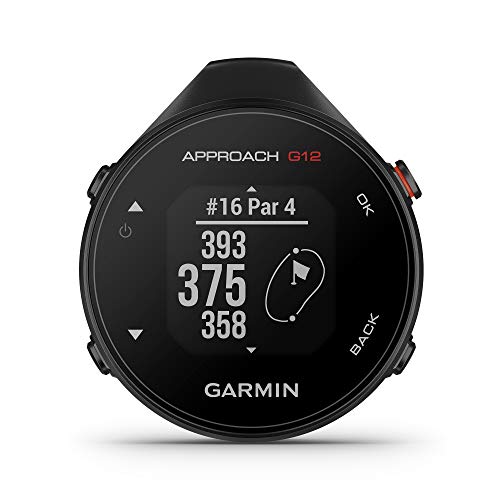
Garmin Approach G12 Clip-on Golf GPS Rangefinder 010-02555-00

Voice Caddie VC300SE Golf GPS Rangefinder

Voice Caddie Portable Golf Launch Monitor and Swing Analyzer

Garmin Approach G80 All-in-One GPS Golf Handheld

Rapsodo MLM2PRO Mobile Launch Monitor Golf Simulator

Bushnell Golf Phantom 3 Slope GPS Green

Bushnell Golf Phantom 3 Slope GPS Red/Blue
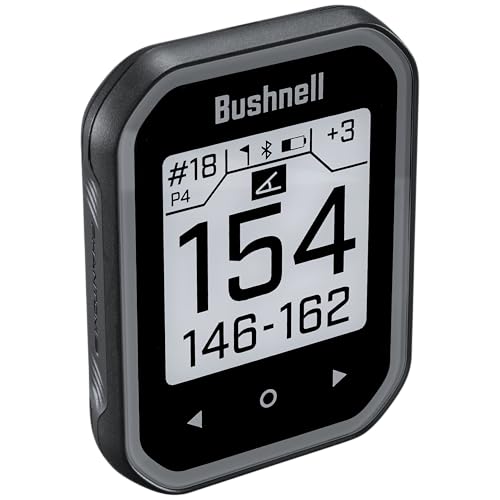
Bushnell Golf Phantom 3 Slope GPS Black
More Details On Our Top Picks
The clip-on format keeps the Garmin Approach G12 out of the way, which matters on a cart seat or clipped to a bag strap. With 42,000-plus preloaded courses, it suits regular play far better than a phone app that eats battery and invites distraction.
You get a simple yardage tool, not a crowded screen full of extras. That makes it a strong fit for golfers who want quick numbers, while the trade-off is obvious, it stays focused on rangefinding rather than training analytics.
Strong Points
- Clip-on design stays compact in transit.
- Large course library supports frequent travel golf.
- Quick access helps on brisk tee boxes.
- Simple operation suits first-time GPS users.
Points To Note
- It stays centered on distance checks, not practice data.
- The small footprint can feel spare for data-heavy golfers.
- Clip-on storage needs a little care to avoid snagging in a crowded bag.
Feature Snapshot
Who It Suits Best
You suit this pick best if you want a compact GPS tool for everyday rounds, especially on courses you play often.
A Better Fit Elsewhere
Garmin Approach G80 makes more sense for golfers who want launch-monitor data along with GPS yardages.
The Voice Caddie VC300SE leans into spoken yardages, which is handy on carts and in windy conditions where you’d rather not stare at a screen. Front, middle, and back green distances keep the readout practical for everyday scoring decisions.
Its 40,000-plus course count makes it useful for golfers who travel or rotate public courses. The honest read is that voice output helps speed, but it won’t suit you as well if you prefer a larger visual interface.
What We Like
- Voice guidance reduces screen checking during play.
- Front, middle, and back numbers help on approach shots.
- Course library covers a wide travel range.
- Simple interaction keeps pace steady between holes.
Room For Improvement
- Voice-first operation won’t suit every preference.
- The smaller interface can feel plain beside touch-screen units.
- Audio use depends on keeping the speaker path clear in your pocket or bag.
Details At A Glance
Built With In Mind
You fit this model best if you prefer spoken yardage and play a mix of cart rounds and travel golf.
Swap It Out When
Bushnell Golf Phantom 3 Slope GPS Green suits you better if you want a touch-screen layout and slope-adjusted yardages.
This Voice Caddie unit shifts the focus from course navigation to swing work, so it belongs in a garage bay, spare room, or backyard practice setup. The swing speed mode stands out because it lets you work on tempo without needing a ball in play.
That makes it more of a practice tool than a round-day companion, and that distinction matters. Long battery life is useful for extended range sessions, while the trade-off is that it speaks more to training than to on-course GPS convenience.
Upsides
- Real-time shot data supports practice sessions.
- Swing speed mode helps with tempo drills.
- No-ball drills work well indoors.
- Battery life suits longer home practice blocks.
- Portable format moves easily between indoor and outdoor setups.
Softer Spots
- It serves practice more than round navigation.
- The setup makes less sense for golfers who only want yardages.
Core Details
Right Fit For
You suit this pick best if your main goal is swing feedback rather than on-course yardage guidance.
Consider Something Else When
Garmin Approach G12 makes more sense for golfers who want a simpler on-course GPS device with course mapping.
The Approach G80 sits closer to a serious practice station than a basic GPS handheld. Its 3.5-inch touchscreen gives you a more spacious interface than the clip-on G12, and the built-in launch monitor means you don’t need a separate training device for the same session.
That combination suits golfers who split time between the range and the course. The trade-off is size and complexity, so casual walkers who want the lightest possible setup may feel better served by a simpler unit.
Highlights
- Touchscreen layout makes navigation more direct.
- Launch monitor support combines practice and play data.
- Handheld design works for range sessions.
- All-in-one approach reduces gear clutter.
Areas To Watch
- It asks for more attention than a basic GPS clip-on.
- The larger footprint is less discreet in a small pocket.
- Extra capability may be more than casual weekend golfers need.
Technical Sheet
The Right Fit
You fit this handheld best if you want one device for both practice sessions and on-course yardage calls.
Where A Sibling Pick Shines
Voice Caddie VC300SE suits you better if you want lighter course-only guidance with spoken distances.
The MLM2PRO is built for golfers who want more than a basic distance read, since it layers dual-camera capture and 15 metrics into the training experience. That makes it feel closer to a compact practice studio than a simple swing aid, especially in a garage bay or indoor simulator room.
The included Pro V1 balls make the package feel more complete, though the real value sits in the data depth. Compare that to the Voice Caddie portable monitor, which keeps the focus narrower, and you’ll see this one is aimed at golfers who enjoy studying the numbers.
Best Bits
- Dual cameras add visual feedback to swing work.
- Fifteen metrics give you a fuller practice picture.
- Indoor and outdoor use broadens setup options.
- Shot tracking suits golfers chasing repeatable practice habits.
- Included balls help round out the package.
Small Caveats
- The data depth asks for more attention and setup time.
- It makes less sense for casual course-only play.
- Practice-area storage should stay dry and padded to protect the cameras.
Feature Rundown
Who Should Grab It
You suit this model best if you care about data-rich practice and already spend time at home or on the range.
A Better Fit Elsewhere
Garmin Approach G12 is the cleaner choice for golfers who only want a compact course GPS with less setup.
The Phantom 3 Slope GPS is the clearest middle ground in this group, because it keeps the layout simple while adding slope-adjusted yardages. Slope means the device accounts for uphill and downhill changes, which matters on hilly courses where the flat number alone can mislead club selection.
The touchscreen and magnetic cart mount make it easy to live with during a round, especially for golfers who hop between walk and cart play. Compared with the Garmin G12, it feels more course-ready out of the box, though it still stays much lighter than a full launch monitor setup.
Reasons To Buy
- Slope-adjusted distances help on uneven terrain.
- Touchscreen control keeps yardage checks quick.
- Magnetic cart mount adds convenient placement.
- Large course coverage supports travel and local play.
Worth Noting
- Slope features add value most clearly on hilly tracks.
- The compact shape still asks for secure storage between rounds.
Feature Card
Whose Shelf It Belongs On
You suit this one best if you play varied courses and want a cart-friendly GPS with slope correction.
Another Choice May Suit
Voice Caddie VC300SE suits golfers who prefer spoken yardages over touch-screen controls.
This Phantom 3 version keeps the same slope-based layout as the green model, but the red and blue finish gives it more visual presence in a cart or bag. That can be useful on busy days, since a bright shell is easier to spot than a darker body when gear is moving around.
Functionally, it serves the same golfer as the green unit, so the decision here is mostly about color preference and visibility. For most courses, that makes it a straightforward choice rather than a complicated one.
Positives
- Same slope-aware distance support as the green version.
- Color finish stands out in mixed gear setups.
- Touchscreen use keeps the interface familiar.
- Magnetic cart mounting helps with quick placement.
Minor Gripes
- The main difference from the green model is visual, not functional.
- Bright finishes can show wear more visibly over time.
At A Glance
Made For
You suit this one best if you want the same Phantom 3 performance with a more visible finish.
Where A Sibling Pick Shines
Bushnell Golf Phantom 3 Slope GPS Black suits golfers who prefer a lower-contrast look.
The black Phantom 3 is the quietest-looking option in the group, which suits golfers who want their gear to blend into a pocket or bag. Same slope-adjusted yardages, same touchscreen layout, same magnetic cart mount, just in a more understated shell.
That understated finish makes sense for golfers who prefer their tech to stay out of the spotlight. The flip side is simple, it offers the least visual pop of the three Phantom colorways, so your taste decides the difference more than the spec sheet does.
Bright Spots
- Low-key finish works well in compact carry setups.
- Touchscreen interaction stays straightforward.
- Slope support helps with elevation changes.
- Magnetic cart mount keeps placement convenient.
Things To Consider
- The black finish is subtler than the other Phantom colors.
- Compact gear still benefits from a protective pouch in transit.
Core Details
Perfect Match For
You suit this version best if you want the Phantom 3 layout in the most understated color.
Look Elsewhere When
Bushnell Golf Phantom 3 Slope GPS Red/Blue fits better for golfers who want a more visible finish.
How To Choose The Right Golf Tracker Devices
Match The Device To Your Round
Course GPS units and launch monitors solve different problems, so start with the one you actually need. A golfer who wants yardage to the front, middle, or back of the green should focus on handheld GPS models like the Garmin G12 or Bushnell Phantom 3. A golfer who spends more time in a garage bay or hitting net should look toward swing analyzers and launch monitors instead.
Pay Attention To Interface And Pace
Touchscreens, voice output, and clip-on bodies all change how the device feels during play. A voice model helps when you want less screen checking, while a touchscreen helps when you want faster visual confirmation. Compact devices are easier to carry, but they can feel sparse beside larger all-in-one units.
Think About Course Coverage And Travel
A larger preloaded course library matters more than many people expect, especially for weekend travel or public-course hopping. The G12’s 42,000-plus courses and the Phantom 3’s 38,000-plus courses help you avoid setup headaches before a round begins. That kind of coverage is especially useful for golfers who don’t play the same home track every week.
Separate Practice Tools From On-Course Tools
Launch monitors earn their space when you want shot data, swing speed, or tempo feedback. They ask for more setup and attention, but they repay that with better practice context than a basic GPS unit can offer. For many golfers, the cleanest setup is one device for the course and a separate one for practice.
Things Worth Knowing First
Common Shopping Slip Ups
A common mistake is treating every golf tracker device like a GPS yardage tool. That leads to disappointment when a launch monitor or swing analyzer appears and you realize it’s built for practice, not hole-by-hole navigation. Another slip-up is ignoring size, since a larger handheld can feel awkward in a smaller pocket.
The Case For Spending Up
Higher-tier models cost more because they bundle more functions into one unit. A GPS handheld with a launch monitor, or a mobile system with dual cameras and multiple metrics, gives you more data and more ways to use the same purchase. The upgrade makes sense for golfers who practice often and want more than simple yardages.
Frequently Asked Questions
What does slope-adjusted distance mean?
Slope-adjusted distance accounts for uphill and downhill changes in the shot line. It helps you judge club selection on uneven courses more accurately than a flat yardage alone.
Are voice-output golf GPS units hard to use?
Not usually, since they’re built to speak distances with minimal interaction. They make the most sense for golfers who want quick information without staring at a screen.
Do launch monitors replace a golf GPS device?
No, they solve different problems. A launch monitor helps with practice feedback, while a GPS device helps with on-course yardages.
Which device style is easiest to carry?
Clip-on and compact handheld units are the easiest to move from hole to hole. Larger all-in-one models ask for more space but give you more functions.
Is course coverage worth paying attention to?
Yes, especially for golfers who travel or play several public courses. A larger course library cuts down on setup friction and keeps the device useful in more places.
Closing Thoughts
The best Golf Tracker Devices for 2026 depend on whether you want yardage, voice guidance, or serious practice data. The Garmin Approach G12 and Bushnell Phantom 3 models keep things simple for rounds, while the Garmin G80 and Rapsodo MLM2PRO reach farther into training territory. Voice Caddie’s options sit in the middle, depending on whether you prefer spoken distances or swing feedback. Match the device to your usual course routine, and the rest gets easier.


