

You want clearer feedback from practice, not guesswork after a bucket of balls. These seven golf swing analysers and training aids cover launch data, swing path feedback, impact feel, and shot-reference help, so you can match the tool to your practice style.
Some are built for a garage mat, some travel well in a golf bag, and some work better for tempo work than full data tracking. The right choice depends on whether you need numbers, path cues, or a simple way to tighten decision-making before the next round.
Quick Look at the Shortlist

Voice Caddie Portable Golf Launch Monitor and Swing Analyzer

Real Swing 300 Golf Swing & Hitting Trainer

Blast Motion Golf Swing & Stroke Analyzer GEN3 Sensor
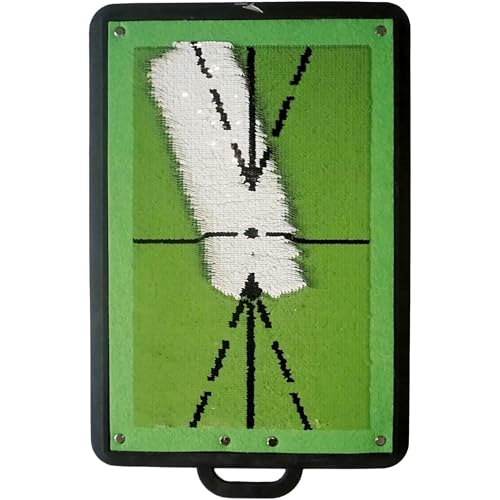
Birdie Golf Birdie Mat Pro 19.25″ Sports Accessory

CHAMPKEY Heavy-Duty Golf Hitting Mat

Swing Minder Golf Reference Cards

FODESAN 5-in-1 Retractable Golf Swing Trainer
More Details On Our Top Picks
Golfers who want measurable feedback instead of a vague feel will gravitate to this Voice Caddie unit. The swing-speed mode is useful in a living room or garage net setup, and the battery life claim makes it easier to leave charged gear out of the weekly routine.
Unlike the mat-based picks later in this list, this one focuses on shot data and training feedback rather than contact surface clues. That makes it a sharper fit for players who like numbers, though the trade-off is obvious, you’re paying for electronics rather than a simple strike aid.
Strong Points
- Launch-monitor style feedback suits data-minded practice.
- Swing-speed mode works without a ball, which helps dry swings in tight spaces.
- Battery life supports longer practice blocks without constant charging.
- Useful for indoor net work and outdoor range sessions.
Things To Consider
- Electronic training gear usually asks for more setup than a simple mat.
- It gives less direct help with strike feel than contact-feedback mats like CHAMPKEY.
- Space, device placement, and app comfort matter more here than on the simpler options.
Feature Snapshot
Who It Suits Best
Dedicated golfers who want data-backed practice and enough battery life for repeated sessions will get the most from it.
A Better Fit Elsewhere
BLAST Motion Golf Swing & Stroke Analyzer GEN3 Sensor suits golfers who want app-linked feedback and video highlights around every swing.
The Real Swing 300 leans into strike feedback, which is useful in a home bay or on a practice mat where you want to know what the club is doing through impact. Height adjustment gives it more room to fit different setups, and that matters in shared garages where one station has to serve several golfers.
Compared with Voice Caddie’s electronic data approach, this one is more tactile and simpler to live with day to day. The honest read is that it helps most when you want to work on path and contact quality more than launch numbers.
What We Like
- Impact-focused training makes contact feedback easier to interpret.
- Height adjustment broadens fit across setups and swing styles.
- Useful on a mat, which suits garage and basement practice.
- Less screen time, more direct swing awareness.
Room For Improvement
- It gives less depth than sensor-based analyzers like Blast Motion.
- Mat-style training aids can wear faster with heavy repeat use, so storage matters.
- Its usefulness depends on how much strike feedback you want from practice.
Quick Facts
Built With In Mind
Home practice golfers who want path and impact feedback without moving into app-driven gear will feel at home with it.
Swap It Out When
CHAMPKEY Heavy-Duty Golf Hitting Mat makes more sense for golfers who want a sturdier repeated-hitting surface with built-in path cues.
Blast Motion fits the golfer who likes feedback that arrives fast and lives inside an app. Real-time metrics and video highlight capture make it easier to revisit a swing later, which is handy after a range session or a quick chipping block before work.
Compared with Voice Caddie, this sensor is more tied to mobile review and swing capture, while the mat picks in this list stay physical and simple. You may find it especially useful for short-game work, since the product description pushes tee-to-green use and score-focused practice.
Upsides
- Real-time feedback supports quick adjustments between swings.
- App connection makes progress review easier after practice.
- Video capture highlights help you study motion, not just numbers.
- Useful across tee-to-green work, including short-game sessions.
Softer Spots
- App-based tools ask for a phone nearby, charged, and ready.
- Electronic sensors add a layer of setup that a mat never needs.
- Golfers who want only impact feel may find the feature set more than they need.
Technical Sheet
Right Fit For
Golfers who want app-driven swing feedback and short-game analysis will get the best fit from this sensor.
Where A Sibling Pick Shines
Voice Caddie Portable Golf Launch Monitor and Swing Analyzer suits you better when you want a battery-powered practice unit with a stronger home-and-range focus.
Birdie Mat Pro stands out because the surface itself is part of the feedback. Sequin-tech texture is meant to help you see swing path and ball impact, which works nicely in a backyard bay or on a compact practice area where you need a visual cue right under the club.
Against the more electronic Voice Caddie and Blast Motion picks, this one keeps things straightforward and portable. That simplicity is a plus for golfers who want a training aid they can carry around, though the smaller 19.25-inch footprint means you’ll want to stay precise with setup.
Bright Spots
- Surface feedback helps you read swing path and strike location.
- Portable size makes it easier to move between practice spots.
- Works for indoor and outdoor sessions, which adds flexibility.
- Good for golfers who prefer visual cues over app screens.
Minor Gripes
- The smaller format leaves less room for careless foot placement.
- Portable mats can show wear over time, so cleaning and storage matter.
- It teaches feedback best when your setup stays consistent.
Details At A Glance
Whose Shelf It Belongs On
Golfers who want portable visual feedback and don’t need full digital tracking will get the most from it.
Look Elsewhere When
Real Swing 300 Golf Swing & Hitting Trainer is the better call for a larger mat-based setup with height adjustment.
CHAMPKEY is the blunt-force option in this group, and that’s a good thing for repeat practice. The two-pad and three-pad setups point to a mat designed for different strike zones, so it suits garage routines, backyard drills, and other places where you want the surface to stay under steady use.
Unlike the more information-heavy analyzers, this one focuses on swing-path feedback through the hitting surface itself. That keeps ownership simple, though a mat like this still benefits from regular cleaning and a spot where it can dry and store flat.
Highlights
- Heavy-duty build suits repeated practice sessions.
- Multiple pad layout gives more than one strike-feel zone.
- Works indoors and outdoors, which makes it flexible for homes with limited space.
- Good choice for golfers who want an uncomplicated practice surface.
Points To Note
- It teaches through mat feedback, not digital shot data.
- Large hitting mats need storage space and occasional cleaning.
- Golfers chasing app metrics may prefer Blast Motion instead.
Core Details
The Right Fit
Golfers who want a durable practice mat for frequent strike work will feel best served here.
Another Choice May Suit
Birdie Golf Birdie Mat Pro makes more sense for golfers who want a smaller, more portable surface with visual swing-path cues.
Swing Minder takes a different route entirely, acting like a pocket guide for awkward golf shots. The waterproof, bag-clip format is the real appeal, especially for golfers who want quick reminders between holes or while waiting on the tee.
Compared with the electronic units, this is more about decision-making than swing telemetry. That makes it a smart companion for travel rounds and casual practice, though it won’t replace a sensor or mat when you want feedback on the club itself.
Best Bits
- Clip-on format keeps it easy to carry in a golf bag.
- Waterproof cards suit outdoor use and unpredictable weather.
- Covers 33 difficult shots, which helps in real on-course situations.
- Step-by-step visuals make quick review simple between swings.
Worth Noting
- It offers guidance, not swing-measurement data.
- Best used as a quick reference, not a full training replacement.
- Golfers who want contact feedback will need a mat or sensor instead.
Feature Rundown
Made For
Golfers who want a lightweight course-side reference tool will appreciate it most.
Reach For A Different Pick When
Blast Motion Golf Swing & Stroke Analyzer GEN3 Sensor suits you better when you want measurable swing feedback and video support instead of shot guidance.
FODESAN is the easiest carry in the group, and that matters for warmups or limited-space practice. The retractable format and click feedback give you a simple way to work on grip, tempo, and hand position without building a whole practice station.
Compared with CHAMPKEY and the other mats, this pick is about motion and hand placement rather than strike surface. It’s a strong everyday trainer for beginners, though advanced golfers may prefer something with more data or more detailed impact feedback.
Reasons To Buy
- Retractable format makes storage and transport easy.
- Grip trainer and grip correction give it a wider practice role.
- Tempo work helps both beginners and experienced players.
- Click feedback adds a clear cue during the swing.
Areas To Watch
- It teaches hand position more than ball-flight or launch behavior.
- Portable trainers can be easier to misplace than mats or monitors.
- Right- and left-handed use needs careful setup awareness.
Feature Card
Who Will Love This
Beginners and golfers who want a compact warmup aid will get the most from this trainer.
Skip It When
Voice Caddie Portable Golf Launch Monitor and Swing Analyzer is the better match for golfers who want actual shot data instead of hand-position training.
How To Choose The Right Golf Swing Analysers
Match The Feedback To Your Practice Style
Start with the kind of feedback you want on the range or at home. Launch monitors and sensors suit golfers who care about data, while mats and trainers suit anyone who wants to feel the club path or impact point. A shot-reference booklet like Swing Minder belongs in a bag for decision support, not for swing telemetry.
That difference matters more than marketing language. A player working on tempo in a garage net gets more value from Voice Caddie or FODESAN than from a pocket guide, while someone who wants quicker on-course decisions may prefer the opposite. The best match is the one that fits your habit, not your wishlist.
Think About Space, Setup, And Portability
Home setups change the equation fast. If your practice area is a garage, basement, or patio, a mat or compact trainer is easier to live with than a device that needs precise placement and phone handling. Portable gear also helps when you split practice between home and the range.
Birdie Mat Pro and Swing Minder are easier to carry around than a heavier mat, while CHAMPKEY asks for more room but offers a steadier strike station. That trade-off is normal in this category, and it’s usually worth accepting when you know your available space before you buy.
Look Beyond The Main Feature
The headline feature matters, but so does the ownership burden. Electronic analyzers need charging and app comfort, mats need storage and cleaning, and clip-on reference cards need zero setup but provide no swing data. The easy choice is not always the best long-term fit.
That’s where maintenance, durability, and routine come in. Golfers who practice often usually get more value from a tool that matches their habit with as little friction as possible.
Things Worth Knowing First
Hidden Buying Traps
A common mistake is mixing up swing feedback with swing measurement. A mat can show contact clues, but it won’t tell you what a launch monitor tells you, and a card set can guide shot choice without helping your mechanics.
Another trap is underestimating space. A heavy-duty mat can look simple on a product page and still demand storage room, while a small sensor can ask for more app attention than expected.
The Upgrade Payoff
Higher-tier analyzers usually cost more because they combine more than one job. Sensor-based models add app feedback, metrics, and often video support, which gives you a fuller picture than a basic strike aid.
The upgrade makes sense when you practice often and want repeatable information instead of feel alone. For occasional range sessions, a simpler mat or compact trainer can be the smarter use of space and money.
Frequently Asked Questions
What does a golf swing analyzer actually help with?
It helps you see or feel what your swing is doing, whether that means shot data, tempo cues, or impact feedback. The right type depends on the part of your game you’re trying to tidy up.
Do you need an app for these tools?
Not always. App use matters for sensor-style picks like Blast Motion, while mats, cards, and retractable trainers work without one.
Which option fits a small practice space?
Compact picks like FODESAN and Swing Minder are easier to store and move. Voice Caddie also suits limited spaces when you want data without a full mat station.
Are mat-based trainers enough for swing work?
They can be, especially for path and strike feedback. Golfers who want launch numbers or video analysis usually need a sensor-based option too.
Which pick works best for travel?
Swing Minder is the easiest to toss in a bag for on-course reference. FODESAN is also handy for travel because it stays compact and doubles as a warmup trainer.
Closing Thoughts
The right golf swing analyser depends on what you want to learn during practice. Voice Caddie and Blast Motion suit golfers chasing data, while CHAMPKEY, Birdie, and Real Swing 300 are better for tactile feedback and strike work. FODESAN keeps things compact, and Swing Minder fills the gap for quick shot guidance on the course. Pick the tool that fits your space, your routine, and the kind of feedback you’ll actually use.


