You need a projector shortlist that makes sense for a garage bay, spare room, or practice net without turning the space into a wiring project. The right choice depends on throw distance, brightness, input lag, and how much setup help you want baked in. This roundup keeps the focus on real simulator use, from compact rooms to fuller indoor enclosures.
Quick Look At The Shortlist

BenQ TH671ST 1080p Short Throw Projector

HAPPRUN 2000 ANSI 4K Decoding Projector

WiMiUS G2 Smart Projector

Maypug Mini Projector With Built-in Apps

BenQ MW632ST Business Short Throw Projector
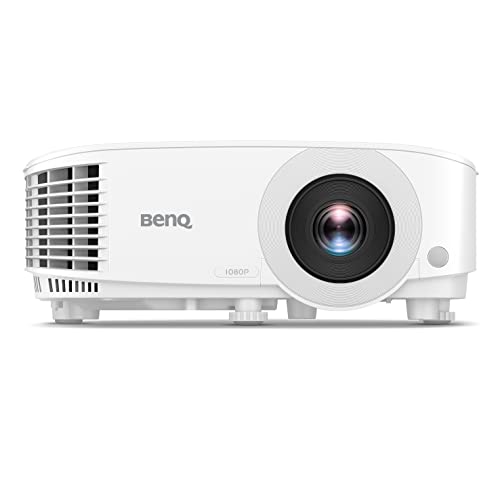
BenQ TH575 1080p Home Entertainment Projector

aikeec Golf Simulator Impact Screen

ANYTHING SPORTS Golf Simulator Enclosure Package
More Details On Our Top Picks
BenQ’s TH671ST fits a compact simulator space without forcing you to mount the unit far behind the hitting area. The short-throw design matters here because it helps reduce shadows and makes tight rooms easier to arrange, especially in a garage with limited depth.
That 1080p image works well for ball flight overlays and menu text, while the 3000-lumen rating gives you more headroom in rooms with some ambient light. The trade-off is simple, this is a purpose-built projector rather than a smart hub, so you’ll rely on your connected source for apps and streaming.
Strong Points
- Short-throw optics suit compact simulator layouts and closer ceiling mounts.
- 1080p resolution keeps shot data and course graphics legible.
- 3000 lumens give you usable brightness in less-than-dark rooms.
- Dual HDMI makes it easier to keep a gaming console and PC connected.
Things To Consider
- It leans more toward projection basics than app-heavy convenience.
- The built-in speaker is handy in a pinch, though external audio still suits a fuller setup.
- Ceiling placement and alignment matter, as with most short-throw units.
Feature Snapshot
Who It Suits Best
You get the most from this pick in a compact simulator room where throw distance is tight and clean image geometry matters.
Where A Sibling Pick Shines
BenQ TH575 suits you better if your space is brighter and you want the higher 3800-lumen output with a faster-feeling gaming profile.
This HAPPRUN model pushes harder on convenience than the BenQ TH671ST, with auto focus standing out right away. Auto focus means the projector can adjust image sharpness on its own, which saves time during setup and keeps portable use less fiddly.
The 2000 ANSI lumen rating is more modest than the brightest picks here, so it makes the most sense in darker simulator rooms or for mixed indoor-outdoor use where you control the environment. WiFi and Bluetooth add flexibility, but you still get the best result when the source device and placement are already sorted.
Upsides
- Auto focus trims setup time for mobile or temporary simulator layouts.
- WiFi and Bluetooth support widen your connection options.
- 4K decoding helps the projector accept high-resolution input cleanly.
- The portable form suits spare-room use and occasional outdoor sessions.
Worth Noting
- Brightness is lower than the brighter BenQ options in this list.
- Portable gear usually rewards careful storage and cable management.
- The broad feature set helps most once your source devices are already compatible.
Core Details
Made For
You fit this projector well if you want a portable unit for a garage net, spare room, or occasional indoor-outdoor use.
A Better Fit Elsewhere
BenQ TH575 suits you more if your simulator stays fixed in a brighter room and you care more about raw luminance than portability.
The WiMiUS G2 is the most self-contained option in this set, because the Google TV 14.0 platform lives inside the projector. Google TV is the streaming interface that bundles apps and navigation into the device, which matters when you want fewer external boxes hanging off the wall.
It also brings 1100 ANSI lumens, MEMC motion processing, HDR10, and 30W Dolby Audio, so it’s built to do more than throw an image. Compared with the HAPPRUN, this one is less about portability and more about sitting in a permanent media room where the software layer and audio matter just as much as the picture.
Highlights
- Built-in Google TV 14.0 cuts down on add-on streaming hardware.
- 1100 ANSI lumens still give you a usable projected image.
- MEMC supports smoother motion handling for sports and fast screen action.
- 30W Dolby Audio adds more presence than a basic onboard speaker.
- WiFi 6 and Bluetooth broaden connectivity in a modern home setup.
Areas To Watch
- Brightness trails the stronger BenQ units in brighter rooms.
- The feature stack makes more sense in a fixed setup than a carry-around rig.
- More smart features can mean more menu navigation than a simpler projector.
Details At A Glance
Whose Shelf It Belongs On
You’ll appreciate this one most in a living room or media room where you want streaming, sound, and projection in a single box.
Swap It Out When
BenQ TH575 makes more sense if your simulator area is brighter and you want more light output with a more straightforward projector-first setup.
Maypug takes a different route from the heavier BenQ units, because the built-in apps reduce the need for a streaming stick or laptop in a bedroom or small media corner. That cleaner footprint helps when you want a casual simulator screen during the week and a movie setup the rest of the time.
The 1080p and 4K support language points to flexible input handling rather than true native 4K output, so the practical gain is compatibility, not magic. Bluetooth and WiFi help the unit feel more self-sufficient, though compact projectors usually ask for careful placement and a little patience with room lighting.
Best Bits
- Built-in apps reduce the number of external devices you need.
- Portable form fits a bedroom, den, or lightweight simulator corner.
- WiFi and Bluetooth support easier day-to-day use.
- Works across phones, consoles, laptops, and USB sources.
Softer Spots
- Small projectors usually need more careful positioning than larger units.
- Brightness and room control matter a lot in casual bedroom setups.
- App-based convenience does not replace strong room darkening.
Feature Card
Built With In Mind
This suits you best in a small room where convenience matters more than chasing the brightest projector on the shelf.
Another Choice May Suit
WiMiUS G2 fits better for a lounge-style setup where built-in Google TV and stronger audio make the whole unit feel more complete.
The MW632ST sits close to the golf-sim use case by name, which already tells you a lot about its intended role. WXGA resolution is 1280 by 800, a step below 1080p detail but still useful for business slides, practice software, and casual video in a multipurpose room.
The 3200-lumen output and 10,000-hour lamp life make it attractive for a space that stays in rotation for work and practice alike. Compared with the TH671ST, this model leans a little more toward room flexibility and installed convenience than gaming-first sharpness.
Reasons To Buy
- Short throw design works well in tighter simulator rooms.
- 3200 lumens help the image stay visible in lit spaces.
- Wireless support and dual HDMI simplify mixed-device setups.
- 1.2x zoom and keystone correction help with alignment.
- The lamp life suits long-term, repeat use in shared spaces.
Minor Gripes
- WXGA is less detailed than the 1080p picks above.
- Short-throw placement still needs careful alignment.
- The business-first shape may feel less polished for a media room focused only on movies.
Quick Facts
Right Fit For
You suit this projector best if your space doubles as a meeting room, classroom, or practice bay and you want one unit to handle all three.
Reach For A Different Pick When
BenQ TH575 is the cleaner choice for a gaming-leaning simulator room that needs more brightness and a faster input feel.
TH575 is the brightest projector in this list, and that difference shows up most in rooms where the lights never stay fully off. The 3800-lumen rating, 1080p resolution, and 16.7ms low input lag make it the most direct fit for simulator play that also sees console use.
Low input lag means the time between your controller or source signal and the on-screen response stays short, which matters for games and interactive practice software. Compared with TH671ST, this model gives you more brightness and a slightly faster response profile, though it still asks for a sensible mount and screen match.
What We Like
- 3800 lumens give you strong visibility in brighter rooms.
- 1080p resolution keeps simulator graphics and menus crisp.
- 16.7ms input lag suits gaming and interactive practice use.
- Dual HDMI helps with multiple source devices.
- Auto vertical keystone makes setup easier in real rooms.
Room For Improvement
- The stronger brightness can still be wasted without a proper screen and mount plan.
- It remains a dedicated projector, so external streaming hardware still matters.
- Bright-room use works best when surrounding light is kept under control.
Technical Sheet
The Right Fit
You should put this at the top of your list for a brighter garage simulator, especially when gaming responsiveness matters.
Where A Sibling Pick Shines
BenQ TH671ST is the better fit for a tighter room where the short-throw layout and lower-lag profile matter more than maximum brightness.
This item isn’t a projector at all, and that’s exactly why it matters in a roundup like this. A golf simulator screen is the surface your projector throws onto, so a good one shapes image clarity and gives your setup a cleaner target than a plain wall.
The aikeec screen makes the most sense if you already have a projector and want the simulator bay to feel more finished. In a garage or dedicated practice room, it pairs naturally with the brighter BenQ models, while a casual bedroom setup may be too small to make the most of it.
Bright Spots
- Dedicated screen material gives your image a proper simulator surface.
- It helps the entire setup look more intentional than a bare wall.
- Works well as part of a net-and-screen arrangement.
- Complements short-throw projectors in a focused practice space.
Small Caveats
- It needs the rest of the simulator build around it.
- Screen care and storage matter more than they do with a plain wall.
Core Details
Perfect Match For
You fit this screen best if your projector is already chosen and the next step is building a cleaner simulator surface.
Look Elsewhere When
ANYTHING SPORTS Golf Simulator Enclosure Package suits you better if you want the screen, frame, netting, and mount hardware in one coordinated bundle.
This is the most complete build in the group, and it is aimed at people who want an enclosure rather than just a screen. The 8’4 x 8’4 x 5 size creates a defined practice bay, which makes sense in a garage where you want structure, protection, and a cleaner visual line.
The package includes frame poles, a projector mount, side shank nets, and a blackout cage, so the setup is closer to a purpose-built simulator room than a pieced-together corner. Compared with the aikeec screen, this is the more committed route, with more parts to manage but a far more complete enclosure.
Upsides
- All-in-one package reduces the need to source frame parts separately.
- Blackout cage and side nets support a cleaner practice area.
- Projector mount is included, which simplifies planning.
- Large enclosure size suits a serious home simulator build.
Points To Note
- Assembly takes more space and planning than a simple screen.
- The larger footprint may be too much for a small spare room.
- More parts also means more setup time and more storage to think about.
Feature Rundown
Who Should Grab It
You’re the right match for this package if you want a dedicated simulator bay in a garage or indoor practice room.
Skip It When
Maypug’s mini projector suits you better when floor space is limited and you need a lighter, more flexible setup.
How To Choose The Right Golf Simulator Projectors Under 500
Brightness, Throw Distance, And Room Light
Brightness, measured in lumens or ANSI lumens, decides how well the image holds up once room light enters the picture. A garage with the door cracked open needs more output than a dark spare room, and a short-throw projector helps you keep the unit close to the screen without your body blocking the picture.
That matters because simulator setups often sit in awkward spaces, not theater rooms. BenQ’s TH575 and TH671ST make sense when you want more light output and better placement control, while lower-output portable units fit calmer rooms with stronger light control.
Resolution, Lag, And Image Handling
Resolution tells you how much detail the image can carry, and 1080p is the practical floor for clear shot data and readable menus. Low input lag matters too, since that keeps the response snappy during game play and simulator interaction.
Features like auto keystone, auto focus, and 4K decoding help with convenience, but they serve different jobs. Keystone corrects image shape, focus sharpens the picture, and decoding lets the projector accept high-resolution source material, so each one should match a real setup need rather than a spec checklist.
Smart Features Versus Simple Projection
Built-in apps, WiFi, and Bluetooth sound attractive because they reduce the number of devices you need to connect. That said, a smart projector only helps when you actually want streaming and casual movie use alongside simulator duty.
For a dedicated golf bay, a simpler projector often feels cleaner and easier to maintain. WiMiUS G2 suits the all-in-one crowd, while the BenQ models suit people who would rather let a laptop, console, or media box handle the content.
Screen And Enclosure Pairing
The projector is only half the story, because the screen determines how controlled the final image feels. A dedicated impact screen or enclosure gives you a real target surface, and it also protects the room better than a plain wall can.
That’s where the aikeec screen and the ANYTHING SPORTS enclosure come in. They make sense once you’ve already settled on a projector and now want the whole bay to behave like a proper practice station.
A Quick Reality Check Before You Order
Mistakes Worth Dodging
Many setups go sideways because the projector is bright enough on paper but too awkward for the room. Throw distance, mounting height, and screen size need to line up before anything else.
Another common miss is choosing a projector with too many smart features for a space that only needs golf practice. That adds cost and menu clutter without making the ball flight any clearer.
What The Higher Tier Buys
More money in this category usually goes into brightness, stronger contrast, lower lag, and easier placement tools. It can also buy better audio, built-in software, or a more complete enclosure package instead of just the projector body.
The upgrade matters most in brighter rooms, larger screens, or spaces that do double duty for movies and games. For a narrow, dark practice bay, a simpler model often does the job without the extra hardware layer.
Frequently Asked Questions
What projector traits matter most for golf simulation?
Brightness, throw distance, and input lag matter first. Resolution and alignment tools come next.
Is 1080p enough for a simulator room?
Yes, 1080p is the practical baseline for most home simulator setups. It keeps course graphics and launch data readable without pushing your budget into a different bracket.
Do you need a short-throw projector?
Short throw helps in compact rooms because it lets you place the projector closer to the screen. That reduces shadowing and makes tight garages easier to work with.
Are built-in apps worth it?
They are useful when the same projector also handles streaming and casual viewing. For a dedicated golf bay, they matter less than brightness and placement.
Should you buy a screen or an enclosure first?
A screen is the simpler starting point for most setups. An enclosure makes more sense when you want a fuller, more contained practice zone.
Final Thoughts
You can get a very usable simulator setup without drifting into overbuilt territory. The BenQ TH575 stands out for bright rooms, the TH671ST suits tighter layouts, and the WiMiUS G2 makes sense when you want smart features built in. For a cleaner build, the aikeec screen and ANYTHING SPORTS enclosure fill the room around the projector instead of competing with it. Match the projector to your space first, and the rest of the setup gets much easier.