

Golf shot tracking devices make sense when you want more than yardage alone. They help you manage course distance, shot history, swing feedback, or full club-by-club tracking, depending on how deep you want to go. For weekend rounds, practice sessions, or daily play, the right pick keeps information close without slowing your pace.
This shortlist covers clip-on GPS units, wrist-worn watches, launch monitors, and sensor systems. You’ll see which models fit quick course checks, which ones suit indoor practice, and which ones make sense for golfers who want a fuller picture of their game.
The Shortlist At A Glance
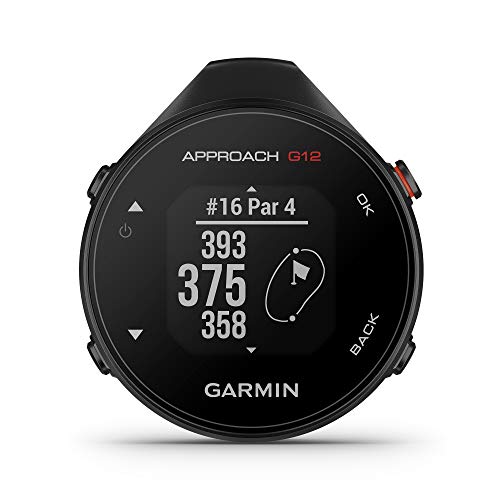
Garmin Approach G12, Clip-on Golf GPS Rangefinder 42k+ Courses

Voice Caddie VC300SE Golf GPS Rangefinder with Voice Output

Voice Caddie Portable Golf Launch Monitor and Swing Analyzer

Bushnell 368850 iON2 Golf GPS Watch

Bushnell Golf iON Elite GPS Watch, Color Touchscreen, Shot Tracker


Shot Scope H4 GPS Handheld with Shot Tracking

Arccos Smart Sensors: Automatic Golf Game Tracking System
More Details On Our Top Picks
The Garmin Approach G12 keeps the format stripped down to the essentials, which suits you well during a fast round or a practice loop. The clip-on design stays out of the way, so it works better than a wrist device for golfers who already wear a glove or prefer a bare wrist.
Its course library matters because you are not left guessing on unfamiliar layouts, and the small footprint makes it easy to move from pocket to bag. The trade-off is obvious, though, you are choosing a straightforward rangefinder style tool rather than a fuller shot-history platform.
Strong Points
- Clip-on form keeps the unit easy to carry.
- Preloaded course coverage helps on travel rounds.
- Simple layout suits quick yardage checks.
- Small size fits a busy walking round.
Things To Consider
- You give up deeper swing or club tracking.
- Small-screen devices can feel plain beside color-watch models.
- Clip-on gear needs a secure pocket or bag spot.
Feature Snapshot
Who It Suits Best
Golfers who want a simple, pocketable GPS aid for regular rounds will get the most from this shape.
Where A Sibling Pick Shines
Shot Scope H4 GPS Handheld with Shot Tracking suits you better when you want yardages plus broader stat capture.
Voice output changes the feel of a round more than most screen tweaks do, because you can get yardage without stopping to study a display. That helps walkers, cart riders, and anyone who wants fewer pauses between shots.
The VC300SE is especially useful around the green, where front, middle, and back distances help you pick a safer number. The trade-off is that spoken feedback can feel repetitive for golfers who prefer silent gear, so the fit depends on your pace and preference.
What We Like
- Voice prompts reduce time spent checking a screen.
- Front, middle, and back yardages support short-game decisions.
- Course coverage spans a wide list of layouts.
- Easy button-driven operation suits quick rounds.
Worth Noting
- Voice feedback may feel chatty for quiet rounds.
- No watch-style wear option, so it stays a handheld tool.
- Hands-free use still depends on hearing the output clearly.
Core Details
Who Will Love This
Walking golfers and steady recreational players who want spoken yardages without a watch will appreciate this format.
Skip It When
Garmin Approach G12 fits better for golfers who want a quieter, clip-on style unit with a simpler profile.
Shot-tracking practice gear only works well when it gives you feedback you can use right away, and this monitor is built around that idea. The swing-speed mode is useful for indoor sessions, especially in a living room or garage where you want a ball-free drill.
That makes it a stronger practice tool than the course-first GPS picks above, though the trade-off is clear, this is about training depth rather than day-to-day yardage. You may find it most useful during dedicated reps, not as an all-purpose round companion.
Highlights
- Real-time shot data gives immediate practice feedback.
- Swing-speed mode supports ball-free drills indoors.
- Portable format works for home or range use.
- Battery life listed up to 20 hours suits longer practice blocks.
Minor Gripes
- Practice-focused gear does not replace full course mapping.
- Indoor use needs enough open space for safe swings.
- Setup feels more involved than a basic handheld GPS.
At A Glance
Built With In Mind
Golfers who spend real time on practice reps, especially at home or on a covered bay, will get the most from this monitor.
A Better Fit Elsewhere
SKYTRAK Golf Launch Monitor suits you better when you want a more simulator-friendly practice setup with broader shot data depth.
The iON2 keeps the formula familiar, which is a plus for golfers who want wrist access without extra learning. A watch makes sense on the course because it keeps yardages visible at a glance, and you do not need to reach into a pocket between shots.
Compared with the Garmin Approach G12, this one gives you a more immediate worn-on-wrist feel, but it stays more basic than the color-screen iON Elite. The honest read is that it fits golfers who want straightforward access more than layered features.
Upsides
- Watch format keeps yardages close at hand.
- Black and blue styling stays understated.
- Simple GPS layout suits quick glances between shots.
- Good fit for players who dislike pocket devices.
Areas To Watch
- Basic models usually feel lean next to richer watch interfaces.
- Wrist wear depends on your comfort with a watch during play.
- Smaller screens can be less flexible than color touch models.
Details At A Glance
Right Fit For
Casual golfers who want a simple wrist GPS for everyday rounds will find the format easy to live with.
Another Choice May Suit
Bushnell Golf iON Elite GPS Watch suits you better when you want a color touchscreen and shot-tracking extras.
This Bushnell moves past the basics with a color touchscreen, which makes on-course checking feel more direct than the older iON2. The slope-adjusted yardage feature, meaning distance adjusted for uphill or downhill play, matters most on courses with noticeable elevation changes.
You also get shot tracking and a USB-C magnetic charger, so the watch is clearly aimed at golfers who want more detail in one wearable. The trade-off is that the extra feature set may feel like more than a casual nine-hole golfer really needs.
Reasons To Buy
- Color touchscreen makes the interface easier to scan.
- Slope-adjusted yardages help on uneven terrain.
- Shot tracker adds another layer of round awareness.
- USB-C charging fits modern everyday carry habits.
- Large course library helps frequent travelers.
Small Caveats
- Feature depth adds complexity you may not need.
- Golfers who want a simple watch could find it busy.
- Touchscreen gear needs routine cleaning to stay readable.
Core Details
Best Suited To
Golfers who want a feature-heavy wrist device for regular play and travel rounds will get the most value here.
Look Elsewhere When
Bushnell 368850 iON2 Golf GPS Watch makes more sense for golfers who prefer a simpler watch and fewer layers.
Photometric launch monitors read ball flight with camera-based measurement, and that approach is what gives SKYTRAK its practice appeal. You get ball speed, carry distance, total distance, spin rate, launch, and shot shape data, so your range session becomes much more informative than a plain GPS check.
That level of detail is useful for golfers building a repeatable swing or setting up a simulator bay, though it does ask more from your space and budget than the handheld devices above. For committed practice, it feels like a serious step up rather than a casual add-on.
Best Bits
- Photometric tracking gives detailed shot feedback.
- Carry, total distance, spin, launch, and shape data support deeper practice.
- Fits golf simulator and practice setups.
- Setup help is available around connectivity and troubleshooting.
Points To Note
- Practice monitor format is less portable than a watch or handheld GPS.
- Good use depends on a proper hitting area.
- More advanced gear usually asks for more setup time.
Feature Rundown
Whose Shelf It Belongs On
Committed golfers who practice often and want deeper shot feedback belong here more than on a simple course GPS watch.
Where A Sibling Pick Shines
Voice Caddie Portable Golf Launch Monitor and Swing Analyzer is the easier fit for golfers who want a lighter practice tool with less setup pressure.
The Shot Scope H4 sits in a useful middle zone, because it blends GPS yardages with shot tracking and a long list of statistics. That makes it a strong fit for golfers who want to understand trends, not just the next number on the screen.
Front, middle, and back green distances plus hazard readings give you practical course guidance, while the statistics side appeals to anyone tracking patterns across multiple rounds. The trade-off is that more information also means more attention, so it suits organized golfers better than casual dabblers.
Bright Spots
- Shot tracking pairs well with course GPS guidance.
- Front, middle, back, and hazard distances help with decisions.
- 36,000-plus courses support broad travel use.
- 100-plus statistics give you a fuller game picture.
- No subscriptions make ongoing ownership simpler.
Softer Spots
- Feature depth asks for a more engaged setup habit.
- Information-heavy tools feel less casual than plain GPS units.
- Handheld storage matters, especially in a crowded golf bag.
Spec Overview
Made For
Stat-minded golfers who still want simple course distance help will get a good balance here.
Reach For A Different Pick When
Garmin Approach G12 fits better for golfers who only want the quickest possible course-distance tool.
Automatic tracking is the big story here, because smart sensors change the amount of manual input you need during a round. That matters most for golfers who want club distances and game history without stopping to record each shot by hand.
The Arccos setup leans into modern convenience, with AI-driven distance help and GPS rangefinder support working together. The trade-off is that sensor-based systems can feel more involved at the start, so this fits golfers who are comfortable with a slightly more connected routine.
Standout Traits
- Automatic tracking reduces manual shot logging.
- Smart club distances help you learn longer-term patterns.
- GPS rangefinder support broadens on-course usefulness.
- Hands-off capture suits busy rounds and regular play.
Honest Caveats
- Sensor-based systems take more initial attention than simple GPS tools.
- Routine setup and storage matter if you rotate clubs often.
- More connected gear may feel like too much for minimalists.
Feature Card
The Right Fit
Golfers who want connected shot history with less manual recording will appreciate this system most.
Swap It Out When
Shot Scope H4 GPS Handheld with Shot Tracking suits you better if you want a simpler all-in-one handheld format.
How To Choose The Right Golf Shot Tracking Devices
Match The Format To Your Round
Handheld units fit golfers who want quick yardage checks without wearing anything. Watches make more sense for players who like data on the wrist and want to keep pockets clear.
Launch monitors serve a different job entirely, since they focus on practice feedback rather than course navigation. The format you choose should follow where you spend time, on the course, at the range, or in a simulator bay.
Decide How Much Data You’ll Actually Use
Basic GPS yardages are enough for many recreational rounds, especially on familiar courses. Shot tracking, club distances, spin rate, and launch data matter more when you want to study patterns over time.
More data can help, but only when you’ll review it. A slim tool that gets used every round often beats a packed device that stays in the bag.
Think About Comfort And Pace
Walking golfers often prefer lightweight tools that do not interrupt rhythm. Voice output, wrist wear, or clip-on formats can all reduce fumbling, though each comes with its own habit change.
For practice gear, space matters just as much as features. A launch monitor can be a great fit in a garage or dedicated bay, but it may feel overbuilt for a small apartment setup.
Look Past The First Round Of Features
Course library size matters more for travelers than for golfers who stay on one home layout. Charging style, screen readability, and physical durability also shape day-to-day ownership in a very real way.
Gear that feels convenient on day one should still be easy to clean, store, and recharge after repeated rounds. That’s where a modest design sometimes ages better than a crowded one.
Things Worth Knowing Before You Choose
Mistakes Worth Dodging
Many golfers focus on raw feature count and miss the practical fit. A watch with extra tracking can feel busy for someone who only wants yardages, while a simple handheld can feel too lean for anyone chasing stats.
Another common slip is ignoring the space your setup needs. Launch monitors and sensor systems ask for more routine than a clip-on GPS or basic watch, so the easier option usually wins for casual play.
What The Higher Tier Buys
Higher-tier models usually cost more because they add screen quality, extra shot data, more detailed course information, or automatic tracking. Better charging hardware and broader course libraries also tend to sit in that price layer.
The upgrade makes sense when you practice often, travel a lot, or want to study your game across many rounds. For a golfer who mostly needs front-to-back yardages, the extra spend can be unnecessary weight.
Frequently Asked Questions
What’s the difference between a GPS watch and a handheld rangefinder?
A GPS watch stays on your wrist and gives you quick distance checks. A handheld rangefinder or GPS unit is usually better if you want a larger screen or a clip-on form.
Do launch monitors help during regular rounds?
Launch monitors matter most during practice, especially for swing work and simulator setups. They are less about in-round yardage and more about shot feedback.
Is automatic shot tracking hard to live with?
Systems with sensors or automatic logging usually ask for a bit more setup at first. After that, they suit golfers who want less manual note-taking during play.
What course coverage number should you look for?
Large course libraries matter most for golfers who travel or play many different layouts. Home-course regulars can care less about the number and more about ease of use.
Which type is easiest for a casual golfer?
Simple handheld GPS units and basic golf watches are the easiest starting point. They keep the learning curve low while still helping with club choice and course flow.
Closing Thoughts
Your best match depends on how you play, not on how many features the box lists. A simple GPS unit keeps rounds moving, a watch keeps distances on your wrist, and a launch monitor gives you deeper practice feedback. Shot tracking systems sit farther up the ladder for golfers who want more data and less guesswork. Choose the format that fits your routine, and the technology stays useful instead of distracting.

