Golf bays at home ask for more than a bright screen and a big promise. You need a setup that fits the room, handles the viewing distance, and feels steady enough for repeated swings without turning the space into a tangle of cables and compromises.
That’s where this shortlist helps. You’ll find compact projectors for smaller rooms, longer-throw choices for tighter mounting plans, and impact screens sized for real practice areas, so your garage, spare room, or dedicated simulator corner can work like a proper setup instead of a rough experiment.
Quick Look At The Shortlist
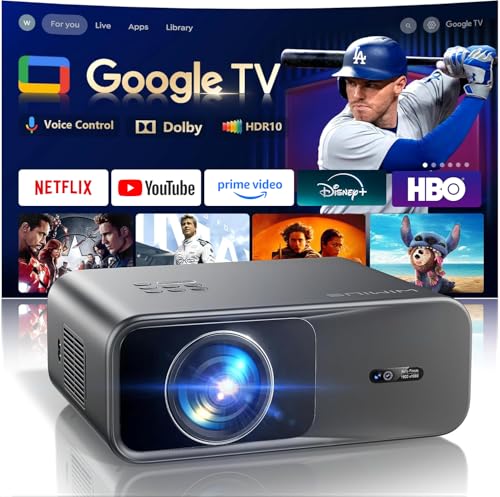
WiMiUS G1 Smart Projector 4K Supported with WiFi & Bluetooth

GOODEE Mini Projector with WiFi and Bluetooth

GoSports Golf Simulator Impact Screen 6.5 ft x 7 ft or 9 ft x 7 ft

BenQ MW632ST Business Projector
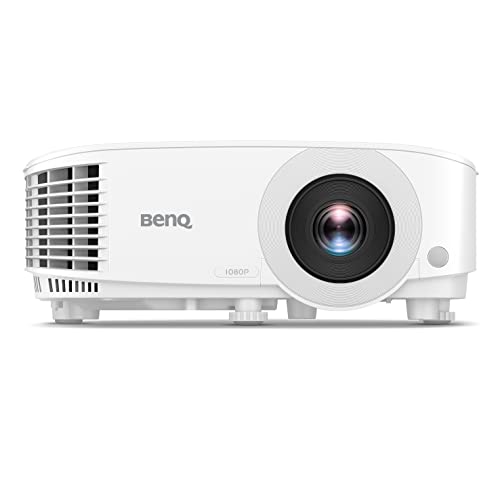
BenQ TH575 1080p 3800 Lumens Home Entertainment Projector

FUDONI Projector with WiFi & Bluetooth Native 1080P Home Theater Projector

aikeec Golf Simulator Impact Screen
aikeec Golf Simulator Impact Screen 10 FT X 10 FT
More Details On Our Top Picks
The G1 leans into convenience first, with built-in official apps and voice control keeping your simulator corner from feeling like a cable maze. That matters in a garage or den where you want a projector that behaves more like a living-room screen than a stubborn AV box.
Its 4K support, autofocus, WiFi, Bluetooth, and Dolby audio make it a flexible match for mixed-use spaces, especially when your setup also handles movies after practice. The trade-off is simple, smart-projector convenience often brings more menu layers than a bare-bones unit, so you’ll like this most when ease of use matters as much as image output.
Strong Points
- Built-in apps reduce the need for extra streaming gear.
- Autofocus helps the image stay usable after you move the mount.
- WiFi and Bluetooth support make device pairing less fussy.
- Dolby audio suits casual movie nights in the same room.
- Good fit for a multi-use space that shifts from practice to entertainment.
Things To Consider
- Smart menus can feel busy compared with simpler projectors.
- A full simulator room still needs careful placement and screen matching.
- Built-in audio helps for casual use, though a separate sound setup may suit a larger bay.
Feature Snapshot
Who It Suits Best
Weekend golfers setting up a shared media and practice room will get the most from this one.
A Better Fit Elsewhere
BenQ TH575 1080p 3800 Lumens Home Entertainment Projector suits a more gaming-first setup that needs lower-lag behavior for simulator sessions.
The GOODEE mini projector makes sense in tighter simulator spaces where every inch near the ceiling or rear wall matters. Compared with the WiMiUS G1, it gives you a smaller physical footprint and a simpler feel, which can be easier to live with in a studio apartment or spare bedroom.
Built-in apps, WiFi, Bluetooth, and 1080P HD compatibility give it enough flexibility for home entertainment and casual practice screens. The honest read is that compact projectors usually ask for a bit more compromise on large-room ambition, so this fits best when portability and easy placement matter more than a sprawling theater setup.
What We Like
- Mini size makes it easier to place on shelves or carts.
- Built-in apps cut down on extra streaming hardware.
- HD compatibility supports everyday viewing and casual simulator use.
- WiFi and Bluetooth give you useful wireless options.
Room For Improvement
- A compact body can mean more setup sensitivity in larger rooms.
- Short-throw support helps, though screen and mount distance still matter.
- Small projectors tend to work best when ventilation space stays clear.
Core Details
Who Will Love This
Apartment dwellers and small-room golfers will appreciate the lighter footprint and straightforward placement.
Swap It Out When
WiMiUS G1 is the stronger choice for anyone who wants more built-in smart features and a richer all-in-one feel.
GoSports shifts the conversation from projectors to the part that actually gets hit. The screen comes in two sizes, 6.5 ft by 7 ft or 9 ft by 7 ft, so you can match the wall space to your swing area without forcing a one-size setup.
That makes it useful for garages, spare rooms, and shared spaces where you need a screen that behaves like part of the room, not an afterthought. Compared with the projector-first picks above, this is the anchor piece that helps the whole simulator feel finished, though you still need the right projector distance and frame plan around it.
Highlights
- Two size options help you fit different wall widths.
- Built for impact-screen use rather than generic projection.
- Useful as the main hitting surface in a simulator room.
- Simple product shape makes storage and setup more straightforward.
Points To Note
- The screen works best with a frame or mounting plan that matches the room.
- Cleaning and care depend on how often balls strike the surface.
Details At A Glance
The Right Fit
Golfers building a dedicated hitting bay with a measured wall space will get the clearest fit from this screen.
Reach For A Different Pick When
aikeec Golf Simulator Impact Screen 10 FT X 10 FT suits bigger enclosures where you want a broader surface to work with.
The MW632ST is the room-saving choice here, thanks to short throw projection, which means a large image from a shorter mounting distance. In a golf simulator room with limited depth, that can solve a layout problem before it starts, especially compared with the more general-purpose GOODEE mini projector.
Its 3,200 lumens, WXGA resolution, wireless support, dual HDMI, keystone correction, and 1.2x zoom make it feel geared toward practical installs rather than flashy extras. The honest trade-off is that business-focused projectors can feel less entertainment-friendly than newer home units, but for sim spaces and bright rooms, that steadier approach has real value.
Reasons To Buy
- Short throw helps when the room depth is tight.
- 3,200 lumens support use in brighter indoor spaces.
- Dual HDMI keeps source swapping more manageable.
- Keystone correction helps straighten the image after placement.
- Up to 10,000-hour lamp life is appealing for frequent use.
Areas To Watch
- Business-first tuning may feel plain next to newer home theater units.
- Short-throw placement still needs careful measuring in a simulator bay.
- Lamp-based upkeep means eventual bulb planning, unlike some newer designs.
Core Details
Best Suited To
Golf sim owners working with a shallow room and brighter walls will appreciate the placement flexibility.
Look Elsewhere When
BenQ TH575 1080p 3800 Lumens Home Entertainment Projector is the better fit for a setup that puts game speed and sharper 1080p output ahead of business-use versatility.
For simulator play that also feels like gaming, the TH575 stands out through its 16 ms input lag at 1080p and 60Hz. That low-lag behavior matters in a golf setup because the on-screen motion feels more in step with your swing, unlike a slower, more general-purpose projector.
Its 3,800-lumen output, 1080p resolution, enhanced game mode, dual HDMI, 1.1x zoom, 3D readiness, and auto vertical keystone give it a confident feature set. You’ll notice the trade-off most in people who want pure plug-and-play simplicity, since this model is more about responsive image handling than a soft, couch-friendly living room feel.
Upsides
- 16 ms input lag suits fast-moving simulator and game use.
- 3,800 lumens help the image stand up in brighter spaces.
- 1080p resolution gives you a cleaner picture than lower-detail units.
- Enhanced game mode is a useful fit for action-heavy setups.
- Dual HDMI makes it easier to keep multiple sources connected.
Small Caveats
- Game-oriented tuning may feel less relaxed for pure movie viewing.
- Auto keystone helps, though careful placement still pays off.
- A 1.1x zoom range leaves only modest wiggle room during install.
Feature Rundown
Whose Shelf It Belongs On
Golfers who want a simulator projector with a clear gaming bent will feel right at home here.
Where A Sibling Pick Shines
BenQ MW632ST Business Projector makes more sense for a shallow room that needs short throw placement above all else.
The FUDONI projector is the broad-coverage option in this set, with native 1080P support, WiFi, Bluetooth, and a claimed max image size that stretches up to 300 inches. That kind of ceiling makes it appealing for larger garage builds, where the picture needs to feel expansive rather than boxed in.
Compared with the BenQ picks, it leans more toward flexible home theater use than responsive gaming. The trade-off shows up in shoppers who want a simpler, no-fuss sim projector, but for a room that pulls double duty and needs big-picture scale, this one has real appeal.
Bright Spots
- Native 1080P support gives the image a solid baseline.
- WiFi and Bluetooth reduce the need for extra adapters.
- Large-image support suits bigger simulator walls.
- HDMI, USB, phone, laptop, and TV stick compatibility widen source options.
Worth Noting
- Large-screen capability still depends on room depth and mounting plan.
- Big-image projectors usually reward tidy cable management and placement checks.
- Home theater tuning may be less immediate than gaming-first models.
Feature Card
Made With In Mind
Homeowners building a larger multi-use entertainment bay will get the most out of this projector.
Another Choice May Suit
BenQ TH575 1080p 3800 Lumens Home Entertainment Projector is a smarter fit for golfers who want quicker response and more gaming-friendly behavior.
This aikeec screen keeps the focus where it should be, on a clean impact surface for golf sim practice. Its plain, training-first design is useful in a garage or basement where you want the screen to stay out of the way and let the projector do the work.
Because the source details stay light, the safest read is that this is a straightforward screen rather than a feature-heavy system piece. That can be a plus for someone who already has the projector sorted and just needs a tidy screen to finish the bay, though larger or more demanding spaces may want a bigger surface like the 10 ft by 10 ft version.
Positives
- Simple screen format keeps the setup easy to understand.
- Works as a focused add-on for simulator rooms.
- Training-oriented design suits repeat practice sessions.
Honest Caveats
- Source details are light, so room fit takes a closer look.
- A screen-only pick still depends on your projector and frame plan.
- Cleaning needs depend on how often balls strike the surface.
Quick Facts
Built For In Mind
Golfers who already have a projector and want a no-drama training screen will get the most from this pick.
Where A Sibling Pick Shines
GoSports Golf Simulator Impact Screen 6.5 ft x 7 ft or 9 ft x 7 ft suits anyone who wants clearly stated size options for a measured wall.
The 10 ft by 10 ft aikeec screen is the room-filling option in this lineup. It suits a larger simulator build where you want the hitting zone and projection area to feel generous, not squeezed into a narrow panel.
Its source details are spare, but that size alone tells you a lot about the kind of bay it wants to live in. Compared with the smaller GoSports screen, this one is the bolder choice for a full-width practice wall, though it also asks for more wall space and more careful planning.
Best Bits
- 10 ft by 10 ft size suits wider simulator walls.
- Large coverage helps the setup feel more immersive.
- Simple screen-only format keeps the buying decision focused.
Minor Gripes
- The size needs a roomy wall and a thoughtful frame plan.
- Source details are limited, so setup planning matters more.
- Large screens can take more effort to store and clean.
Core Details
Perfect Match For
Golfers building a large garage or basement simulator with space to spare will appreciate the broader footprint.
Skip It When
GoSports Golf Simulator Impact Screen 6.5 ft x 7 ft or 9 ft x 7 ft is the safer fit for tighter walls and more modest enclosures.
How To Choose The Right Golf Projector Simulators
Match Throw Distance To Room Depth
Throw distance is the space a projector needs between the lens and the screen to make a certain image size. In a simulator room, that matters as much as brightness, because a short-throw unit like the BenQ MW632ST can solve a shallow room while a more general projector may need more breathing room.
Measure from the planned mount point to the impact screen before you choose. A projector that fits the wall but not the room becomes a hassle fast.
Choose Brightness For Your Light Level
Brightness, usually shown in lumens, tells you how much light the projector can throw onto the screen. A brighter room, especially a garage with daylight leaks, tends to favor higher-lumen models such as the BenQ TH575 or FUDONI.
Lower-light rooms can get by with less, but image washout becomes a real issue once overhead lights or side light enter the space. That’s why brightness matters more than flashy extras for most simulator builds.
Match The Screen To Your Swing Area
An impact screen is the surface that takes ball strikes and shows the projected image, so size and placement both matter. The GoSports and aikeec screens show two different ways to think about it, from clearly stated wall sizes to a broad 10 ft by 10 ft format.
The right choice depends on your frame, ceiling height, and how much wall you can dedicate to practice. Bigger is helpful, but only when the room can actually support it.
Think About Daily Use, Not Just Setup Day
Smart features such as built-in apps, WiFi, Bluetooth, and autofocus help when you want a room that feels ready to use without extra boxes everywhere. They’re handy in shared spaces, though they can add menu complexity compared with simpler projector designs.
For frequent practice, also think about cleaning access, mounting stability, and how easy the unit will be to service later. A tidy install often feels more reliable than a flashy one.
A Quick Reality Check
Common Shopping Slip Ups
One common mistake is matching the projector to the screen only by size, then forgetting room depth and throw distance. Another is ignoring ambient light, which can flatten the image in a bright garage even when the specs look strong on paper.
Shoppers also get caught by screen size that sounds impressive but doesn’t suit the wall. A 10 ft by 10 ft screen sounds great until you measure the space and realize the frame crowding the ceiling.
What The Higher Tier Buys
More expensive models usually spend the extra money on brightness, response speed, better lens control, and more flexible connectivity. In this category, that can mean a cleaner picture in mixed light, lower lag during swing feedback, and fewer placement headaches.
That upgrade makes sense when the simulator room gets used often or shares space with movies and games. For occasional practice, a simpler projector and a well-sized screen often feel more sensible.
Frequently Asked Questions
Do golf simulator projectors need short throw?
Short throw helps in tighter rooms because it creates a large image from closer to the screen. It’s not mandatory, but it solves a lot of layout problems in garages and smaller home bays.
How bright should a simulator projector be?
Brighter rooms usually benefit from higher lumen output. In a darker room, you can focus more on image quality and placement than raw brightness.
Do I need a special impact screen?
A true impact screen is built for repeated ball strikes and projection use. A regular wall surface won’t give you the same result or the same durability expectations.
Can a mini projector work in a golf bay?
A mini projector can work well in a compact room with careful placement. It’s a better fit for smaller setups than for a wide, dedicated simulator enclosure.
Why do some setups use business projectors?
Business projectors often bring useful brightness and short-throw options. That makes them practical in rooms where layout and lighting matter more than theater-style features.
Closing Thoughts
The best setup for your golf simulator comes down to room shape, light level, and how often you want to use it. A smart projector like the WiMiUS G1 or GOODEE mini model suits a mixed-use room, while BenQ’s short-throw and low-lag choices fit tighter or more serious practice spaces. For the screen side, GoSports gives you clear sizing choices, and aikeec covers bigger practice walls. Match the parts to your room, and the whole space starts to feel deliberate rather than improvised.