Finding the right golf GPS can take a little friction out of your round, especially when you want quick yardages, simple course navigation, or a handheld that fits cleanly in your pocket or cart. Some of these picks lean light and basic, while others add slope readings, voice output, or even launch-monitor features for practice days. The mix here covers casual weekend play, regular league rounds, and golfers who want a more capable handheld without carrying extra gear.
Quick Look At The Shortlist
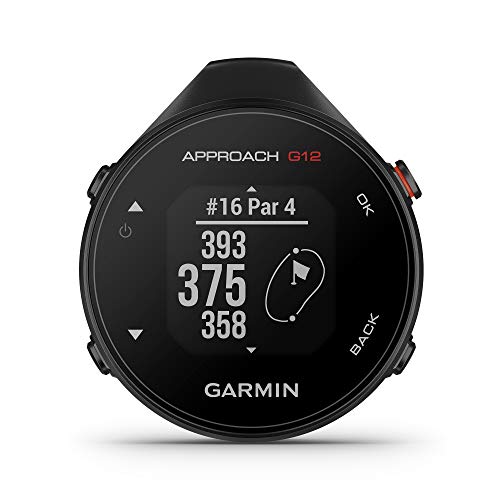
Garmin Approach G12, Clip-on Golf GPS Rangefinder 010-02555-00

Voice Caddie VC300SE Golf GPS Rangefinder

Garmin Approach G80 All-in-One Premium GPS Golf Handheld 3.5 Inch Touchscreen

Bushnell Golf Phantom 3 Slope GPS Red/Blue

Bushnell Golf Phantom 3 Slope GPS Green
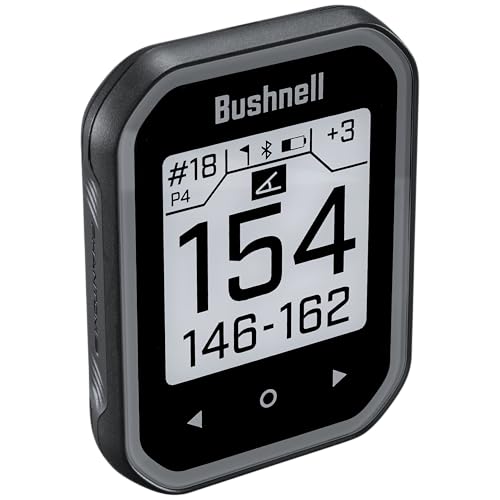
Bushnell Golf Phantom 3 Slope GPS Black

Swami KISS 2.0 Handheld Golf GPS Ragnefinder Blue

Swami KISS 2.0 Handheld Golf GPS Ragnefinder Grey
More Details On Our Top Picks
When your round is walk-heavy and you want yardages without carrying a bulky handheld, the G12 fits that kind of day well. Its clip-on format keeps it small, and the 42,000-plus preloaded courses matter because you can head to unfamiliar tracks with less guesswork.
The trade-off is simple, you give up the larger screen and richer extras that show up on the Garmin Approach G80. For golfers who care more about fast course numbers than touch-heavy menus, this is a tidy, low-fuss pick.
What We Like
- Clip-on size stays out of the way in a pocket or bag.
- Preloaded course coverage helps on trips and away rounds.
- Simple controls suit golfers who want quick distance checks.
Small Caveats
- The smaller format leaves less room for the kind of at-a-glance detail bigger handhelds offer.
- It feels more like a navigation aid than a feature-heavy practice tool.
Feature Snapshot
Who It Suits Best
You fit this pick best if you walk courses often and want a clip-on GPS that stays simple.
A Better Fit Elsewhere
Garmin Approach G80 suits you better when you want more screen space and practice tools in one handheld.
The VC300SE leans into hands-free convenience, which is handy during quick rounds or on busy tee sheets. Voice output gives you the distance at the press of a button, so you do not have to stare at a screen between shots.
Front, middle, and back readings cover the basic yardage question neatly, though it does not chase the more layered feature set you get from the Bushnell Phantom 3 Slope models. For golfers who want clear numbers without fussing with menus, that simplicity is the point.
Positives
- Voice feedback helps in moments where you want to keep your eyes on the course.
- Front, middle, and back distances cover the most common approach decisions.
- Course coverage across many locations works well for travel rounds.
- Button-driven use keeps it approachable for newer golfers.
Points To Note
- The voice-first format suits some golfers more than others.
- You trade away the larger, touch-forward experience found on premium handhelds.
- Carrying it in a pocket or pouch works best, since loose storage can invite scratches over time.
Details At A Glance
Made For
You fit this pick well if you prefer spoken yardages and want a straightforward GPS for regular play.
Where Another Pick Shines
Garmin Approach G12 is the cleaner fit for golfers who want a smaller clip-on unit instead of voice output.
The G80 stands apart because it pulls two jobs into one handheld, course navigation and launch-monitor use. That makes sense for golfers who split time between range work and rounds, especially when they want one device to cover both settings.
The 3.5-inch touchscreen gives you a more visual, touch-led feel than the smaller G12, though the added capability also means a busier tool in your pocket or bag. For practice-focused golfers, that trade-off usually feels fair.
Highlights
- Combined GPS and launch monitor functions reduce the need for separate gear.
- Touchscreen control makes menu navigation feel more direct.
- Useful for range sessions and on-course days alike.
- The larger display helps you parse information more comfortably than a tiny clip-on unit.
Trade Offs
- The extra capability adds complexity that casual golfers may not need.
- It takes up more room than the clip-on choices earlier in the list.
Core Details
Best Suited To
You fit this pick best if you practice often and want GPS plus swing feedback in one handheld.
Look Elsewhere When
Voice Caddie VC300SE suits you better when you want a simpler, voice-led distance check instead of practice extras.
The Phantom 3 Slope leans more advanced than the clip-on Garmin picks, and that shows up in the slope-adjusted yardage feature. Slope means the device factors in uphill and downhill play, which helps on courses with uneven lies and elevated greens.
The magnetic cart mount is a real convenience on cart rounds, and the touchscreen makes the unit feel more modern than the older button-led style. For golfers who ride most of the time, that combination is easy to appreciate, though the added course guidance can be more than a casual nine-holer needs.
Bright Spots
- Slope-adjusted distances help with hilly or uneven courses.
- Magnetic cart mounting keeps the unit close at hand during a ride.
- Touchscreen control keeps yardage checks fast and legible.
- Coverage for 38,000-plus courses supports travel and local play.
Honest Caveats
- Slope features add a layer that some players will never use regularly.
- Cart-first design is less appealing for golfers who walk every round.
- The touchscreen benefits from a quick wipe after dusty or wet rounds.
Quick Facts
Whose Shelf It Belongs On
You fit this pick best if you play cart golf often and want slope support without carrying a larger handheld.
Swap It Out When
Garmin Approach G12 suits you better when you want a lighter, clip-on option for walking rounds.
This green version carries the same core Phantom 3 Slope setup, so your choice here is mostly about finish and preference. That makes it useful for golfers who care about the function first, then want a color that feels a little less common on the cart.
Compared with the red and blue version, the specs and use case stay the same, which keeps the decision simple. The honest read is that you’re choosing style, not a different feature set.
Upsides
- Same slope-adjusted yardage support as the other Phantom 3 Slope option.
- Magnetic cart mounting keeps it easy to place and remove.
- The green finish offers a different look without changing the core experience.
Minor Gripes
- The main distinction is cosmetic, so the feature jump over the red and blue model is small.
- Cart-focused use still matters more than walking convenience.
Feature Rundown
Right Fit For
You fit this pick best if you already like the Phantom 3 Slope idea and want the green finish.
A Better Fit Elsewhere
Bushnell Golf Phantom 3 Slope GPS Red/Blue suits you better when you want the same features in a brighter colorway.
The black Phantom 3 Slope keeps the same feature set but swaps in a more understated finish, which some golfers prefer on the cart or in the bag. It sits in the middle ground nicely, since you get the slope tools without calling much attention to the device itself.
Compared with the green and red/blue variants, the difference is mostly visual, not functional. That makes this the safest style choice for golfers who want the feature set first and the color to stay quiet.
Best Bits
- Same slope-adjusted distance support as the other Phantom 3 Slope versions.
- Black finish looks restrained and easy to pair with other gear.
- Magnetic cart mounting keeps setup quick during a round.
Room For Improvement
- The feature list mirrors the other Phantom 3 Slope colorways, so the upgrade is mostly about finish.
- Walkers may prefer a lighter clip-on form factor.
At A Glance
The Right Fit
You fit this pick best if you want the Phantom 3 Slope feature set in the least attention-grabbing finish.
Reach For A Different Pick When
Swami KISS 2.0 Grey suits you better if you want a more budget-conscious handheld with integrated magnets.
The blue Swami KISS 2.0 keeps the focus on practical extras, especially the integrated magnets and the two display modes. That makes it handy on a cart, where you may want to park the unit in view instead of keeping it buried in a pocket.
Preloaded course data helps it feel ready out of the box, and that matters for golfers who move between local tracks without wanting a lot of setup work. Compared with the Bushnell Phantom 3 models, this one feels more stripped back, but that also keeps it approachable.
Reasons To Buy
- Integrated magnets support easy cart placement.
- Two display modes give you a little flexibility in how you read yardages.
- Preloaded course data reduces setup time before a round.
- Its straightforward layout suits golfers who want less menu work.
Worth Noting
- The feature set is simpler than the more advanced slope-focused handhelds above it.
- Portable gear like this usually benefits from dry storage after rainy rounds.
Core Details
Built With In Mind
You fit this pick best if you want a simple handheld with magnets and don’t need a long feature list.
Another Choice May Suit
Bushnell Golf Phantom 3 Slope GPS Black suits you better if you want slope-adjusted yardages and a more polished display.
The grey version mirrors the blue Swami KISS 2.0 in features, so the choice again comes down to finish and preference. For golfers who want the same magnetic convenience without a brighter color, this version keeps things low-key.
Because the core layout stays the same, it remains a straightforward option for cart rounds and local course use. That makes it a sensible pair with the blue model, depending on which color feels more natural in your bag.
Positives
- Integrated magnets make cart placement simple.
- Two display modes give you a little flexibility.
- Preloaded course data supports easy setup before play.
Areas To Watch
- The grey finish changes the look more than the experience.
- It sits closer to the basic end of the category than the slope-enabled handhelds above it.
Spec Overview
Perfect Match For
You fit this pick best if you want the Swami KISS 2.0 formula in a muted grey finish.
Where A Sibling Pick Shines
Swami KISS 2.0 Handheld Golf GPS Ragnefinder Blue suits you better if you prefer a brighter look on the cart.
How To Choose The Right Golf Gps
Match The Form To Your Round
Walking golfers usually do best with a clip-on or pocketable unit, because a smaller body stays out of the way between shots. Cart riders often prefer a magnetic mount or a larger screen, since the device can sit in view all round.
That difference matters more than brand names. A compact Garmin Approach G12 suits quick, simple yardage checks, while a Bushnell Phantom 3 Slope feels more natural on a cart with room for a touchscreen.
Look Past Yardages Alone
Basic front, middle, and back readings cover a lot of golf, but slope-adjusted distances add context on hilly tracks. Slope means the device accounts for elevation change, so uphill and downhill holes feel less like guesswork.
Voice output, like the Voice Caddie VC300SE, helps when you want yardages without staring at a display. A launch monitor, such as the Garmin Approach G80, shifts the device into practice territory and can justify more cost for golfers who spend time at the range.
Think About Screen, Mounting, And Storage
Small screens are easier to carry, yet they ask a little more of your eyes. Larger touchscreens are simpler to read, though they take up more room and usually make more sense for regular play than for a minimalist pocket setup.
Integrated magnets can be a real convenience on carts, while clip-on and handheld styles fit better in a pocket or push-cart pouch. Storage matters too, because a unit that gets tossed loose with tees and divot tools tends to collect wear faster.
Choose The Feature Level You’ll Actually Use
Entry-level GPS models work well for golfers who mainly want clean distances and quick course recognition. Mid-tier options add slope, stronger displays, or voice guidance, which helps on unfamiliar layouts and in mixed weather.
Premium units cost more because they often combine categories, not because they simply look fancier. The upgrade makes sense for golfers who practice often, ride carts frequently, or want one device to handle more than basic yardage.
Things Worth Knowing First
Hidden Buying Traps
Many golfers overbuy features they never use, then end up with a device that feels busier than helpful. A better path is to start with the way you play, then match the tool to that routine.
Another common miss is overlooking mounting style. A cart magnet sounds minor until you spend every round juggling a handheld that never quite has a home.
The Upgrade Payoff
Higher-tier golf GPS units usually spend extra on larger displays, added practice tools, better mounting, or slope support. Those details help on trickier courses and during repeat play, where small conveniences save time.
The upgrade pays off most for golfers who play often enough to notice the difference. For occasional nine-hole rounds, a simpler unit can feel more sensible and easier to live with.
Frequently Asked Questions
What does slope do on a golf GPS?
Slope adjusts distance to account for uphill and downhill shots. That helps you judge club choice on uneven holes.
Are voice GPS units useful on the course?
Voice output can be handy when you want yardages without looking at a screen. It suits quick play and golfers who prefer simple interactions.
Does a larger screen make a golf GPS better?
A larger screen usually makes numbers and menus easier to read. It also adds bulk, so pocket carry becomes less convenient.
Why would you choose a launch monitor model?
A launch monitor adds practice value beyond basic course distances. That matters most for golfers who spend time on range work.
What’s the most practical choice for cart golfers?
A magnetic mount is very handy for cart use because the device stays visible and easy to reach. The Bushnell Phantom 3 Slope models and the Swami KISS 2.0 line fit that style well.
Closing Thoughts
Your best golf GPS depends on how you move through a round, not just how many features the listing stacks on the page. A simple clip-on works well for walking, a voice model keeps your eyes up, and a slope-enabled handheld brings more help on demanding courses. Practice-focused golfers may want the Garmin Approach G80, while cart regulars will likely appreciate the Bushnell Phantom 3 Slope or Swami KISS 2.0 setups. Match the tool to your routine, and the choice gets much easier.