You want yardage help that feels quick, clear, and easy to trust during a round. That usually means choosing between a compact clip-on, a larger handheld with extra tools, or a simple cart-friendly unit that keeps the screen readable while you play.
The eight picks below cover those use patterns without drifting into fluff. You’ll see which models suit casual weekend rounds, which ones make sense for frequent golfers, and which versions trade a little simplicity for more on-course flexibility.
Quick Shortlist At A Glance
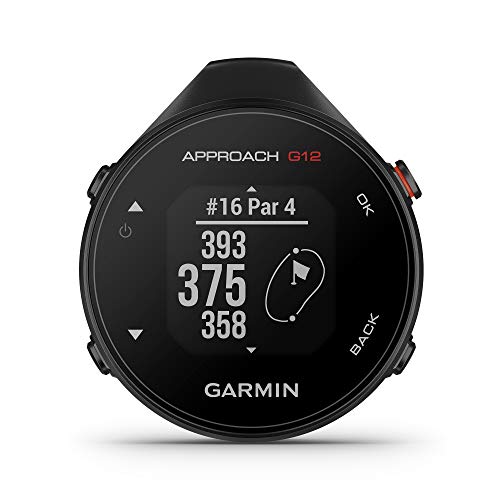
Garmin Approach G12 Clip-on Golf GPS Rangefinder 010-02555-00

Garmin Approach G80 All-in-One GPS Golf Handheld 3.5′ Touchscreen


Bushnell Golf Phantom 3 Slope GPS Green
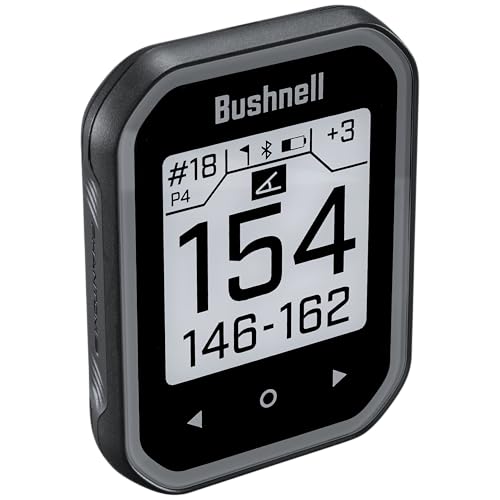
Bushnell Golf Phantom 3 Slope GPS Black

Bushnell Golf Phantom 3 Slope GPS Orange

Swami KISS 2.0 Handheld Golf GPS Ragnefinder Blue

Swami KISS 2.0 Handheld Golf GPS Ragnefinder Grey
More Details On Our Top Picks
The clip-on format makes this one feel especially natural for golfers who want yardages without carrying a full handheld. Garmin’s preloaded course library is broad enough for routine play, and that matters most on busy weekends when you just want quick numbers and less fiddling.
The trade-off is obvious: you get convenience, not a big screen or extra training tools. For walking rounds, cart bags, and anyone who likes gear that stays out of the way, the G12 keeps the focus on the round rather than the device.
Strong Points
- Clip-on carry keeps it light in a pocket or bag.
- Preloaded course coverage helps on local and travel rounds.
- Simple layout suits golfers who want fast yardage checks.
- Small size is easier to store and clean after a round.
Things To Consider
- The smaller body leaves less room for advanced on-device features.
- You may prefer a larger display in bright sun or for aging eyes.
Feature Snapshot
Who It Suits Best
Golfers who want a small, no-fuss clip-on with a large course library fit this style best.
Where A Sibling Pick Shines
Garmin Approach G80 suits you better if you want a larger touchscreen and a handheld with extra practice features.
The G80 stands apart because it pushes beyond plain yardages and adds an integrated launch monitor, which is a sensor system that tracks shot data for practice. That makes it appealing for range sessions and pre-round warmups, though the extra capability also means you’re carrying more device than a basic course unit.
Compared with the slimmer G12, this one feels built for golfers who split time between the course and the practice tee. The 3.5-inch touchscreen gives you a clearer control surface, and that helps most when you want one handheld to handle several jobs.
What We Like
- Integrated launch monitor adds practice value beyond simple yardage.
- Touchscreen control makes menu use more direct.
- Handheld form keeps all-in-one functions in a single unit.
- Useful for golfers who spend time on the range and course.
Room For Improvement
- The added features bring more complexity than a basic GPS unit.
- Some golfers may find the larger tool set more than they need for casual rounds.
Core Details
Built With In Mind
Golfers who want a handheld for both course management and range work are the clearest match here.
Look Elsewhere When
Garmin Approach G12 is the simpler choice for golfers who want a lighter, clip-on design without practice extras.
This Phantom 3 variant makes sense for golfers who ride in carts and want the unit to stay put, thanks to the magnetic mount. Slope-adjusted distances account for uphill or downhill changes, so the yardage readout feels more useful on hilly layouts than a flat-number-only device.
Against the Garmin options, it leans more into easy on-cart visibility than extra learning tools. The red and blue finish also helps it stand out in a bag, which sounds small until you’re hunting through gear before a tee time.
Highlights
- Magnetic cart mount keeps it handy during riding rounds.
- Slope-adjusted yardages help with elevation changes on the course.
- Touchscreen control keeps the interface straightforward.
- Built for golfers who want fast glanceable yardage.
- Color styling makes it easier to spot in mixed gear.
Worth Noting
- Slope readouts can be more than casual players want on simpler courses.
- The cart-first focus matters less for golfers who walk every round.
Details At A Glance
The Right Fit
Cart riders who want slope-adjusted distances in a visible, easy-to-place handheld will get the most from this model.
Another Choice May Suit
Bushnell Golf Phantom 3 Slope GPS Black suits golfers who want the same format in a darker finish that disappears a little more into the bag.
The green Phantom 3 keeps the same slope-aware handheld layout as the red/blue version, but the brighter finish gives it a more visible, easy-to-spot personality. That matters in a crowded bag or cart, especially during rounds where you swap gear quickly between holes.
Nothing here feels flashy for its own sake, which is a good thing. You get the same general cart-friendly setup and touchscreen handling, so the real difference is visual preference rather than a different play style.
Upsides
- Bright finish is easier to identify at a glance.
- Slope-adjusted yardage remains useful on uneven courses.
- Magnetic cart mount supports steady placement during a round.
- Touchscreen control keeps everyday use simple.
Small Caveats
- The green shell is mostly a style choice, not a feature leap.
- Golfers who walk often may not care much about the cart mount.
Feature Rundown
Who Should Grab It
Cart golfers who like bright gear and want slope-adjusted yardage in a simple handheld should feel right at home.
Swap It Out When
Bushnell Golf Phantom 3 Slope GPS Black fits you better if you want the same setup with a darker, more understated finish.
The black Phantom 3 is the quietest-looking version in this Bushnell trio, and that understated finish makes sense for golfers who like their gear to blend in. It still carries the same slope-aware handheld setup, so you’re choosing appearance without giving up the core layout.
For most golfers, that simple visual change is enough to decide it. It keeps the same cart-ready, touchscreen-friendly feel as the red/blue model, but the darker shell suits players who want something less noticeable on the dash or in the bag.
Best Bits
- Dark finish looks restrained and easy to pair with other gear.
- Slope adjustment adds helpful context on hilly holes.
- Magnetic mounting supports tidy cart placement.
- Touchscreen handling stays approachable for routine use.
Minor Gripes
- The color choice is mainly about style, not added function.
- Walkers may care less about the magnetic cart focus.
Quick Facts
Whose Shelf It Belongs On
Golfers who want a low-key handheld with slope support and cart-friendly mounting are the best match here.
Reach For A Different Pick When
Bushnell Golf Phantom 3 Slope GPS Red/Blue suits you better if you want the same setup with a more visible finish.
The orange finish is the easiest to find quickly, and that matters more than it sounds when a round gets busy. Like the other Phantom 3 versions, it keeps slope-adjusted distances and the magnetic cart mount, so the only real change is the more visible shell.
That makes it a solid fit for golfers who want one of the series’ most noticeable colorways without giving up the familiar handheld layout. In crowded cart storage, the bright body can save you a few seconds and a little rummaging.
Reasons To Buy
- Bright color helps you spot it fast.
- Slope support gives you more context on uneven holes.
- Magnetic cart mount keeps it close during play.
- Simple handheld design keeps routine use approachable.
Areas To Watch
- The orange finish is mostly a visibility choice.
- Cart-mounted use matters less for golfers who walk.
At A Glance
Perfect Match For
Golfers who like a highly visible handheld and ride most rounds will get the most value from this colorway.
Where Shoppers Go Wrong
Bushnell Golf Phantom 3 Slope GPS Black fits better for golfers who want the same layout in a quieter finish.
The KISS 2.0 keeps things simple with integrated magnets, which makes cart mounting feel easy rather than fussy. Two display modes give you a little flexibility in how yardages appear, and preloaded course data helps it fit everyday use without a steep learning curve.
Compared with the Garmin G80, this one is much more about straightforward course help than practice analytics. That simpler focus is a plus for golfers who just want a readable unit with a bit of convenience built in.
Positives
- Integrated magnets support quick cart placement.
- Two display modes give you a touch more flexibility.
- Preloaded course data supports routine rounds.
- Handheld format stays easy to carry and store.
Softer Spots
- Two display modes still sound simple beside more layered handhelds.
- The spelling in the product name may make search results a little clumsy.
- Golfers wanting practice tools will need a different style of unit.
Spec Overview
Who Will Love This
Golfers who want a clean, uncomplicated handheld with magnet convenience and basic display flexibility are the right match.
Another Choice May Suit
Garmin Approach G80 is the better fit for golfers who want practice-oriented features alongside course navigation.
The grey version keeps the same KISS 2.0 layout, but the muted color gives it a more understated look than the blue model. That matters for golfers who want the same magnetic, preloaded setup without a brighter shell calling attention to itself.
In most golf bags, that quieter finish feels easy to live with. It’s a sensible choice for golfers who want straightforward help on the course and don’t need extra layers of functionality.
Positives
- Muted finish blends in nicely with other golf gear.
- Integrated magnets make cart mounting easy.
- Preloaded course data supports regular rounds.
- Two display modes add basic flexibility.
Points To Note
- The grey shell is about appearance, not added features.
- Golfers wanting richer practice tools will need a different unit.
Technical Sheet
Built With In Mind
Golfers who want a low-profile handheld with magnet convenience and simple course access are the strongest fit.
Look Elsewhere When
Swami KISS 2.0 Blue suits you better if you want the same setup in a brighter colorway that stands out more quickly.
How To Choose The Right Golf Gps Units
Start With How You Play
Walking golfers usually do best with a small clip-on or a compact handheld, because less bulk means less distraction between shots. Cart riders often prefer a magnetic mount or a larger screen, since the unit can stay visible without leaving the steering wheel area cluttered.
The G12 leans light and simple, while the Phantom 3 family favors cart placement and quick glance use. That split matters more than brand polish, because the right shape saves time every hole.
Match Screen Style To Your Eyes And Pace
A touchscreen feels familiar, especially for golfers who move through menus quickly and like a direct tap response. Smaller displays can still work well, but they ask for a little more attention during bright afternoons or fast-paced rounds.
The Garmin G80 gives you a larger touch surface, and the Phantom 3 units keep the interface straightforward. That makes a difference on courses where you want a fast look rather than a long stop at the tee box.
Think About Extra Features Honestly
Some golfers only want yardage and hole context, which makes a simple unit the better match. Others practice often and benefit from extras like the G80’s launch monitor, which expands the device beyond course play.
Extra features add cost and a bit of learning time. The honest read is simple: pay for them only when you’ll use them regularly, not just because they sound impressive on a product page.
Check Course Coverage And Mounting Details
Preloaded course data matters most for travel golfers and anyone who plays a mix of local and out-of-town layouts. Magnetic mounting matters most for cart users, because it cuts down on hunting for the device and keeps the screen where you can see it.
The Bushnell Phantom 3 line leans hard into mounting convenience, while the Swami KISS 2.0 keeps things uncomplicated with integrated magnets and preloaded data. That combination can be enough for many casual rounds, which is why simple often still wins.
What To Weigh Before You Choose
Mistakes Worth Dodging
A common miss is choosing a unit with more features than your round actually needs. That usually leaves you paying extra for functions that stay untouched after the first week.
Another slip is ignoring how the device will sit on your cart or in your pocket. A shape that feels fine in the listing can be awkward in real use, especially during quick transitions between holes.
The Upgrade Payoff
Higher-tier units usually cost more because they combine larger touchscreens, broader function sets, or more specialized practice tools. The Garmin G80 shows that clearly, since an integrated launch monitor changes it from a basic yardage aid into a more versatile practice companion.
You get the most from that upgrade when your routine includes the range, lessons, or course prep work. For golfers who only need quick yardages, a simpler handheld often makes more sense.
Frequently Asked Questions
Do Golf Gps Units Work On Most Courses?
Many of these units ship with large preloaded course libraries, so coverage is broad. Still, course coverage matters most when you travel often or play a mix of public and private layouts.
What Does Slope Adjustment Mean?
Slope adjustment changes the yardage based on uphill or downhill conditions. That helps on hilly courses, but some golfers prefer a simpler readout for casual play.
Are Magnetic Models Better For Cart Use?
Magnetic mounting is handy when you ride often, because the device stays close and visible. Walkers usually care less about that feature and more about size and pocket carry.
Do Touchscreens Make A Big Difference?
A touchscreen usually speeds up menu use and makes the unit feel more familiar. Glare, glove use, and screen size still matter, so the best screen style depends on your course habits.
Is A Launch Monitor Worth Paying More For?
A launch monitor matters most for golfers who spend time practicing and want shot feedback from the same handheld. For pure round help, a simpler GPS unit usually covers the basics just fine.
Closing Thoughts
The right choice here depends less on brand names and more on how you move around the course. The G12 keeps things compact, the G80 gives you extra practice depth, and the Phantom 3 and KISS 2.0 models make cart-friendly simplicity the main story. Once you match screen size, mounting style, and feature level to your habits, the shortlist gets much easier. Pick the one that fits your round, not the one that tries to do everything.