

Building a golf simulator at home gets easier when you match the projector, enclosure, and screen to your room instead of chasing flashy spec sheets. A short-throw unit can save space in a garage bay, while a floor-mounted cover makes sense when ceiling work feels like a headache. The list below focuses on practical fits for small rooms, mixed-use spaces, and setup styles that need protection as much as projection.
Quick Look At The Shortlist
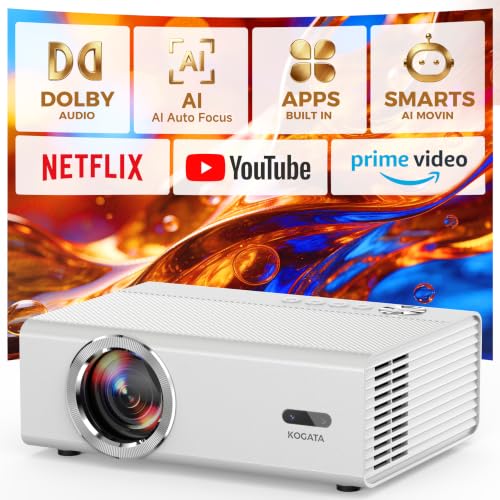
KOGATA Smart Projector with WiFi Bluetooth 2000 ANSI AI Auto Focus
KOGATA 4K-Projector with WiFi Bluetooth, VIDAA Smart OS AI Auto Focus

Optoma GT2000HDR Ultra-Compact Short Throw Full HD Home Laser Projector
KOGATA Short Throw Projector 4K with Built-in Apps 2000 ANSI AI Auto Focus
EEISIN Golf Simulator Projector Cover Enclosure with Turf

GoSports Golf Simulator Projector Cover with Turf

FFRESW Golf Simulator Impact Screen, Triple Layer Projection Screen

GoSports Golf Simulator Projector Cover – Floor Mounted Enclosure

benut Golf Simulator Projector Cover, Floor-Mounted Projector Enclosure

Saysurey Golf Simulator Projector Cover with Turf Floor Mounted Enclosure
More Details On Our Top Picks
KOGATA gives you a projector that feels built for mixed-use rooms, not just a dark home theater. The 2000 ANSI brightness rating matters most in a garage or den with some ambient light, and the auto focus helps cut down on fuss during setup. The trade-off is that a loaded feature list can matter less than raw room fit, so you still need enough throw distance and wall space.
For a golf simulator space that doubles as a movie room, the wireless and smart-app angle keeps the setup cleaner than a bare-bones unit. Compared with the Optoma GT2000HDR below, this pick leans more into convenience and streaming flexibility than a laser-first hardware story. That makes it a sensible choice for casual sim sessions and everyday entertainment.
Strong Points
- 2000 ANSI brightness gives you more flexibility in rooms that are not fully dark.
- Auto focus reduces the kind of manual fiddling that can slow down a garage setup.
- WiFi and Bluetooth support help keep cables under control around a simulator bay.
- Built-in app support suits households that want one device for practice and streaming.
Things To Consider
- The feature stack looks broad, so placement planning still matters more than the headline list.
- You may want to leave time for network sign-ins and source setup the first time around.
- As with many all-in-one projectors, the room layout matters more than any single spec.
Feature Snapshot
Who It Suits Best
Home golfers who want one projector for practice, streaming, and casual movie nights will get the most from this KOGATA model.
A Better Fit Elsewhere
Optoma GT2000HDR suits a space-conscious sim room better, especially for anyone who wants a short-throw layout with less placement guesswork.
This KOGATA model leans harder into smart convenience than the first pick, thanks to VIDAA Smart OS and voice control. AirPlay support also helps Apple-heavy households keep a golf sim area from turning into a cable nest. The honest read is that more software layers can be helpful, but they also ask more from your home network.
For a bedroom setup or a shared family space, the auto focus and app layer make day-to-day use feel less fussy. Compared with KOGATA’s Smart Projector with WiFi Bluetooth, this one puts more weight on smart interface flexibility and voice-driven control. That makes it a strong fit for anyone who wants projector setup to feel closer to a streaming device than a classic AV box.
What We Like
- VIDAA Smart OS keeps streaming access inside the projector itself.
- AirPlay support helps Apple devices hand off content with less friction.
- Voice control can simplify quick changes during a practice session.
- Auto focus helps the image settle faster after you move the unit.
- 2000 brightness gives you room to work with in more than one environment.
Room For Improvement
- Software-heavy models can feel more dependent on your network quality.
- More features usually mean more menu layers to learn at first.
- The room layout still has to support a clean throw path.
Details At A Glance
Made For
Tech-friendly households that want streaming, casting, and golf practice in one room will get the most value from this model.
Another Choice May Suit
KOGATA Smart Projector with WiFi Bluetooth 2000 ANSI AI Auto Focus suits a simpler setup better, especially for anyone who wants fewer software layers.
The Optoma GT2000HDR stands out because short throw changes the whole room plan. Short throw means the projector can sit close to the screen, which helps in narrow simulator spaces where ceiling mounts or deep throw distances are awkward. For a garage bay or spare room, that convenience is a big deal, and laser light engines are often valued for steady output and lower maintenance attention over time.
Compared with the KOGATA models above, this one skips the smart-app style extras and focuses on placement efficiency. That simpler approach suits a golfer who wants a cleaner physical layout more than a software-rich interface. You may find it especially helpful in rooms where a projector has to stay out of the swing path.
Upsides
- Short throw placement saves space behind the hitting area.
- Ultra-compact sizing helps in garages, offices, and tight bonus rooms.
- Laser projection suits setups that stay in service for long periods.
- Full HD resolution gives you a practical image for golf visuals and menus.
Softer Spots
- It does not lean on the smart-app convenience of the KOGATA picks.
- Short throw still needs careful alignment for the screen size you want.
- Compact hardware can limit the feeling of an all-in-one entertainment box.
Core Details
Right Fit For
Golf sim owners with tight rooms or awkward ceiling constraints will appreciate how little space this Optoma asks for.
Swap It Out When
KOGATA Short Throw Projector 4K with Built-in Apps 2000 ANSI AI Auto Focus fits better for anyone who wants streaming features and broader entertainment use in the same room.
This KOGATA model sits between the two earlier styles, combining short throw placement with built-in apps and 2000 ANSI brightness. That makes it feel especially useful for a bedroom, den, or garage where you want fewer boxes around the room. The trade-off is predictable: more onboard features usually mean more setup choices, though that can be a plus once everything is configured.
Compared with Optoma GT2000HDR, this one gives you a more feature-heavy smart experience rather than a laser-focused hardware approach. For a casual simulator owner who also watches movies and streams sports, that balance can be the sweeter fit. It keeps the room tidy without asking you to add extra streaming hardware.
Highlights
- Short throw placement works well in compact simulator rooms.
- Built-in apps cut down on external streaming devices.
- 2000 ANSI brightness helps in spaces with some ambient light.
- AI auto focus reduces the time spent dialing in the image.
- WiFi and Bluetooth broaden how you connect sources and audio.
Points To Note
- The richer feature set can add a little more setup time up front.
- Short throw still depends on a disciplined screen and projector position.
- Smart functions work best in a room with dependable network coverage.
Feature Rundown
Who Should Grab It
You will get the most from this KOGATA if your simulator room also serves as a regular media space.
Look Elsewhere When
Optoma GT2000HDR makes more sense for a leaner setup that values compact hardware over app-heavy convenience.
EEISIN shifts the discussion from projectors to protection, and that matters in a simulator room where the projector sits low. The floor-mounted design can save you from ceiling hardware, but the real appeal is the steel frame and polycarbonate panels, which are meant to stand between the unit and errant hits. For a garage or basement bay, that kind of physical shielding can be worth more than another smart feature.
The cord routing openings are a practical touch, especially in a setup where cables can easily become messy. Compared with the GoSports covers later in the list, this EEISIN enclosure leans harder into heavier construction and a more enclosed feel. It suits a space where safety from mis-hit balls matters more than keeping the footprint visually light.
Best Bits
- Floor-mounted layout avoids ceiling installation work.
- Steel framing adds a sturdier feel around the projector.
- Polycarbonate panels help shield the unit without giving up clarity.
- Cable openings support cleaner routing and less snagging.
- Ground placement keeps the projector accessible for maintenance.
Areas To Watch
- The internal size has to match your projector before you commit.
- Heavy-duty construction can take more effort to position neatly.
- The enclosure style adds another surface to dust and wipe down.
Technical Sheet
The Right Fit
This EEISIN cover suits simulator spaces where ground-level protection matters more than a clean wall-mounted look.
A Better Fit Elsewhere
GoSports Golf Simulator Projector Cover with Turf suits a lighter, simpler LED-projector setup more comfortably.
GoSports takes a straightforward route, which often works well in a home simulator corner. The floor-mounted enclosure avoids the mess of ceiling work, and the turf top gives it a more finished look than bare hardware. Since it is only recommended for LED projectors, the fit is narrower than the EEISIN enclosure above, but that narrower focus can also make the choice easier.
For a golfer who wants less clutter and fewer permanent changes to the room, this is a calm, sensible option. Compared with the heavier EEISIN unit, it feels less about hard-shell defense and more about clean integration into the space. That can be enough for many setups, especially in finished basements or shared family rooms.
Positives
- Floor-mounted design avoids ceiling hardware and contractor work.
- Turf styling helps the enclosure blend into a room better.
- LED-only guidance makes compatibility expectations clearer.
- Simple footprint suits setups that need less visual clutter.
Minor Gripes
- LED-only guidance limits projector matching.
- The simpler build may not feel as heavily armored as steel-framed options.
- Ground-mounted gear still needs routine dusting around the base.
Core Details
Best Suited To
Casual simulator owners with an LED projector and a room that shares space with daily life will get the most from this GoSports cover.
Where A Sibling Pick Shines
EEISIN Golf Simulator Projector Cover Enclosure with Turf suits a more impact-prone setup better, especially where heavier shielding matters.
An impact screen is the part of a simulator that takes the ball strike, so the surface matters as much as the projector. FFRESW uses a triple-layer build with 3D air mesh, which points toward durability and a smoother projection surface for indoor training. The 9′ by 7′ size is a useful fit for many garage and home setups, though the room still needs enough width and height to frame it properly.
Compared with the projector covers earlier in the list, this item is the one that changes the hitting experience most directly. The probe and snap hooks help with mounting, and that practical hardware matters when you want the screen to stay put through regular use. It suits a golfer who already has the projector side mostly sorted and needs the actual strike surface next.
Bright Spots
- Triple-layer construction gives the screen a more substantial feel.
- 3D air mesh helps the surface work as both display and impact zone.
- Included hooks support a more secure hanging setup.
- 9′ by 7′ sizing works for many compact simulator builds.
Worth Noting
- Screen mounting still depends on your room framing and hardware plan.
- The size suits many setups, but it is not a universal room fit.
- Fabric screens need routine care to keep dust and marks from building up.
Quick Facts
Whose Shelf It Belongs On
This FFRESW screen suits golfers who are building a dedicated indoor hitting area and want the screen handled first.
Skip It When
GoSports Golf Simulator Projector Cover with Turf makes more sense for a projector-first setup where you still need hardware protection more than a new screen.
This GoSports enclosure keeps the formula simple, which is part of the appeal. It is another floor-mounted option for LED projectors, so it fits best in rooms where ceiling mounting feels like too much work or too much visual clutter. The design is straightforward enough that many people will care more about placement and cable routing than about a long feature list.
Compared with the EEISIN enclosure, this one reads as the lighter-touch choice. That can be a good thing in a finished room where you want the simulator equipment to step back a little. It works well for setup-minded golfers who prefer less installation drama and a cleaner floor-level footprint.
What We Like
- Floor mounting keeps the projector off the ceiling project list.
- LED-projector focus narrows the compatibility question.
- Low-key enclosure style suits shared living spaces.
- Straightforward layout can make the first setup feel less intimidating.
Points To Note
- LED-only guidance still limits the projector pool.
- Simpler construction means less of the heavy-shell feel you get from steel-framed covers.
- Floor-mounted gear still benefits from regular dust removal and cable checks.
Feature Card
Who Will Love This
Golf simulator owners who want a clean, no-fuss LED-projector cover will find this GoSports unit easy to live with.
Where Shoppers Go Wrong
EEISIN Golf Simulator Projector Cover Enclosure with Turf is the better match for anyone who wants thicker-looking protection and a more enclosed frame.
benut puts airflow into the picture, which can matter in a ground-mounted enclosure where gear may run for long sessions. The cooling fan and turf cover make this a more layered solution than a bare shell, and that helps it feel suited to active simulator use. For a compact corner or basement setup, that kind of built-in practicality is easy to appreciate.
Compared with the simpler GoSports cover just above, this one adds a little more hardware and a little more peace of mind around heat management. The trade-off is that more moving parts can mean more attention over time, especially in dusty rooms. It works well for golfers who want a protection-first enclosure with a few extra conveniences.
Upsides
- Cooling fan adds a helpful layer for longer simulator sessions.
- Turf cover softens the visual feel of the enclosure.
- Floor-mounted layout keeps installation simpler than ceiling systems.
- Durable protection suits active rooms with more accidental contact risk.
Small Caveats
- A fan adds another part that may need cleaning now and then.
- The enclosure approach still depends on your projector size and room footprint.
- Floor-mounted gear can collect dust around the base more quickly.
Feature Overview
Built With In Mind
This benut enclosure suits simulator owners who want a practical floor-mounted cover with airflow built in.
A Better Fit Elsewhere
GoSports Golf Simulator Projector Cover – Floor Mounted Enclosure suits a simpler LED-only setup better when you want fewer parts to manage.
Saysurey closes the list with another floor-mounted enclosure that keeps the focus on protection, turf styling, and fan-assisted use. The LED-projector framing makes it a cleaner fit for people who already know the type of hardware they own. For a home or outdoor simulator corner, the mix of cover and cooling can make the room feel more orderly.
Compared with the benut enclosure, this one lands in a similar lane but reads a touch more gift-friendly and general-purpose. That can matter in a room that serves more than one golfer, or in a setup where you want the enclosure to feel tidy rather than technical. The honest read is that this is a practical, not flashy, finishing piece.
Reasons To Buy
- Floor-mounted layout keeps the setup simpler than a ceiling build.
- Turf cover gives the enclosure a cleaner simulator-room appearance.
- Cooling fan supports longer sessions with less concern about heat buildup.
- LED-projector focus makes the compatibility story more direct.
Honest Caveats
- LED-only guidance narrows the field of suitable projectors.
- Fan-equipped gear usually needs a little more routine dust care.
- The enclosure still depends on a room layout that leaves enough ground space.
Core Details
Whose Shelf It Belongs On
This Saysurey cover suits you best when you want an LED-projector enclosure that feels tidy, practical, and easy to place in a simulator room.
Reach For A Different Pick When
benut Golf Simulator Projector Cover, Floor-Mounted Projector Enclosure suits you better if you want a similar layout with a stronger emphasis on airflow.
How To Choose The Right Budget Projectors For Golf Simulator
Space Comes First
Throw distance, screen size, and room depth decide a lot before image quality even enters the chat. Short throw models such as Optoma GT2000HDR or KOGATA’s short-throw projector fit tighter simulator rooms because they sit closer to the screen, which helps keep your swing area open.
Ceiling height matters too, especially in garages with joists, lighting, or garage-door tracks in the way. Floor-mounted covers solve a different problem, since they let you keep the projector low without drilling into the ceiling.
Brightness, Resolution, And Image Tools
Brightness is the number that tends to matter most in a room that is not perfectly dark. KOGATA’s 2000 ANSI models are built for spaces with some ambient light, while Full HD on the Optoma GT2000HDR gives you a clear, practical image for simulator graphics and menus.
Auto focus can be a real quality-of-life feature in a shared room, because the image settles faster after you move the projector. It does not replace good placement, but it reduces the small annoyances that can make setup feel longer than it should.
Software Convenience Versus Simple Hardware
Built-in apps, WiFi, Bluetooth, voice control, and AirPlay are useful when the simulator room doubles as a movie or sports space. KOGATA’s smart models lean into that convenience, which saves you from juggling extra boxes and cables.
Simple hardware still has its place. The Optoma projector and the GoSports covers make a stronger case for people who value straightforward placement, fewer menus, and less to learn on day one.
Protection And Mounting Choices
Floor-mounted enclosures matter for simulator setups that live in family rooms, garages, or basements where balls can wander. EEISIN and GoSports focus on that protection-first approach, and the steel-and-polycarbonate route from EEISIN makes sense where impact worries are higher.
LED-only covers narrow compatibility, but they also make the fit easier to understand. The trade-off is simple, you gain a cleaner enclosure plan and give up some flexibility on projector types.
Things Worth Knowing First
Common Shopping Slip Ups
One easy mistake is buying for brightness alone and forgetting room layout. A projector can look good on paper and still feel awkward in a narrow bay if you ignore throw distance.
Another common miss is treating every enclosure as universal. LED-only covers and size-limited enclosures need a real fit check before you commit.
What The Higher Tier Buys
More expensive models usually spend money on lens control, light engine quality, smarter setup aids, and better room flexibility. That shows up in convenience, steadier image behavior, and fewer compromises around placement.
The upgrade matters most in a room you use often, especially one that serves double duty as a simulator and living space. For a casual practice corner, simpler gear can make more sense.
Frequently Asked Questions
What projector style works best for a golf simulator?
Short throw models are usually easier to place in smaller rooms because they sit closer to the screen. Regular throw can still work, but it asks more from your room depth.
Do you need a projector enclosure for a garage setup?
An enclosure helps most in spaces where balls can bounce off walls or where the projector sits low. It also keeps the setup looking more finished.
Is 2000 ANSI brightness enough for a simulator room?
That level can work well in rooms with some light, especially when the screen and wall colors are controlled. Darker rooms still make any image look calmer and easier to read.
Why choose an LED-only projector cover?
LED-only covers narrow the fit, which can make the choice easier. They are useful when you already know the projector type and want a simpler match.
What matters more, image quality or room fit?
Room fit usually comes first because the best-looking projector still needs the right distance and placement. After that, brightness and focus tools help polish the result.
Final Thoughts
The right budget projector setup for golf simulator use depends on your room before it depends on the spec sheet. In a tight garage, Optoma GT2000HDR and the KOGATA short-throw models make the most sense, while the GoSports and EEISIN covers fit the protection side of the equation. If your space also handles movies, streaming, or family use, the smarter KOGATA options give you more flexibility. For a cleaner, calmer simulator bay, match the unit to the room and keep the installation simple.