
Building a golf simulator setup on a sane budget usually comes down to three things: usable image size, dependable placement, and gear that does not make the room feel crowded. The picks below cover projectors, impact screens, and floor-mounted enclosures, since a home bay often needs the whole chain to work together.
You may be setting up in a garage, a spare room, or a backyard practice area, and each choice below fits a different kind of space. Some are about projection clarity, while others are about protecting the projector itself, so you can match the item to the part of the setup that needs the most help.
Quick Look At The Shortlist

Alvar Outdoor Projector 4K Support with WiFi and Bluetooth

Complete Golf Simulator Enclosure Package 4K-Ready Impact Screen
KOGATA Smart Projector with WiFi Bluetooth 2000 ANSI AI Auto Focus

Optoma GT2000HDR Ultra-Compact Short Throw Full HD Home Laser Projector
Golf Simulator Projector Cover Enclosure with Turf Heavy Duty Floor Mounted

GoSports Golf Simulator Projector Cover with Turf Floor Mounted Enclosure

Golf Simulator Impact Screen Triple Layer Projection Screen 9’×7′

GoSports Golf Simulator Projector Cover Floor Mounted Enclosure

Golf Simulator Projector Enclosure with Cooling Fan & Artificial Turf Floor-Mounted Protective Cover
More Details On Our Top Picks
Alvar’s projector suits a home bay that does double duty for movie nights and golf practice. The built-in apps, WiFi, Bluetooth, HDR10, auto focus, and auto keystone give you a setup that feels less fiddly than many basic budget projectors.
The 2500 ANSI brightness claim matters most in rooms with some ambient light, though a golf screen still benefits from a darker space. The trade-off is that a smart projector like this can feel more feature-heavy than purpose-built simulator gear, so it makes sense for casual golfers who want one unit for several jobs.
Strong Points
- Auto focus helps the image settle quickly after placement changes.
- Auto keystone can reduce the usual rectangle-adjustment hassle on a simulator wall.
- Built-in streaming apps keep your setup simpler in rooms without a separate media box.
- Bluetooth and WiFi add flexibility for audio and casting.
Things To Consider
- The smart-app side adds convenience, but it also adds menu steps compared with a bare projector.
- Golf use still depends on screen placement and room lighting, so brightness alone does not solve everything.
- Large projector bodies can be less convenient on a small shelf or cart.
Feature Snapshot
Who It Suits Best
Casual golfers who also want a living-room projector will get the most out of it.
Where A Sibling Pick Shines
KOGATA’s smart projector makes more sense for someone chasing a brighter display in a larger media room.
This package is built for the person who wants the simulator bay pieces gathered in one box instead of sourcing them one by one. The screen, blackout cage, mount, frame poles, and side shank nets give you a more complete starting point than the projector-only picks above.
That kind of bundle helps in a garage where you want fewer compatibility headaches and faster setup. The honest trade-off is that an enclosure kit needs more floor space than a simple cover, so it fits committed home builds better than a temporary practice corner.
What We Like
- The bundled parts reduce the usual guesswork around matching pieces.
- The blackout cage helps keep stray light from washing out the screen area.
- Side shank nets add a useful layer of containment around practice swings.
- The package format saves you from coordinating several separate orders.
- It suits a more permanent simulator room layout.
Room For Improvement
- The larger footprint is less friendly to narrow garages or shared rooms.
- Bundle setups often take more planning around ceiling height and wall clearance.
Core Details
Built With In Mind
Garage-based golfers who want a fuller simulator bay in one purchase are the best match here.
Swap It Out When
GoSports’ projector cover is the easier route for smaller rooms that only need projector protection, not a full enclosure.
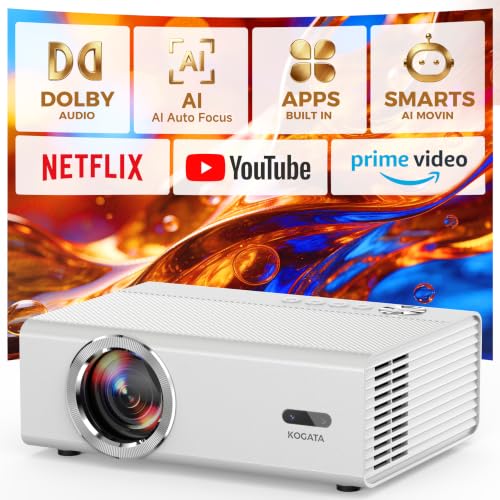
Among the projector choices here, this one leans hard into brightness and automated setup help. The 2000 ANSI rating, AI auto focus, and 50W audio make it a solid match for a room that carries both simulator use and everyday media duty.
Official licensed apps and HDR10+ support make it feel more complete than a bare-bones unit, though that also means you’re paying for a broader feature mix. For most basement or media-room builds, that trade feels sensible as long as you want one projector to do several jobs.
Bright Spots
- The brightness rating helps it stand out in rooms that are not pitch dark.
- AI-assisted focusing can make re-positioning less tedious.
- Wireless connectivity gives you more ways to link content sources.
- Official apps simplify streaming compared with add-on devices.
- 50W audio reduces the need for immediate external speakers in casual spaces.
Points To Note
- Feature-rich projectors usually ask a little more from your setup time.
- Heavier smart-function menus can feel excessive for someone who only wants a plain simulator image.
Details At A Glance
The Right Fit
You’ll get the most out of it in a multipurpose media room that also serves as a simulator space.
Look Elsewhere When
Optoma’s GT2000HDR suits tighter simulator rooms better, especially where short throw placement matters more than app extras.
Short-throw projectors matter a lot in simulator rooms where you cannot push the unit far back. Optoma’s compact laser design is the most installation-friendly projector in this group, especially for tighter garages or basement walls.
That small footprint is the appeal, but the trade-off is that you are choosing a more focused display tool rather than a feature-packed smart hub. For serious simulator spaces, that clarity of purpose can be refreshing, especially beside the more app-heavy Alvar and KOGATA picks.
Highlights
- Short throw placement works well in cramped simulator rooms.
- Ultra-compact sizing keeps shelf and mount planning simpler.
- Laser light source usually suits users who want less lamp-style maintenance over time.
- Full HD support is enough for many home golf visuals.
Small Caveats
- The compact form helps installation, but it gives up the smart-app extras found in the other projector choices.
- Full HD is solid for simulator use, though some shoppers will want more resolution headroom for mixed home theater duty.
Technical Sheet
Whose Shelf It Belongs On
This suits you best when room depth is tight and the projector must sit close to the screen.
Another Choice May Suit
Alvar’s projector makes more sense for mixed-use spaces where built-in apps and wireless flexibility matter more than throw distance.
This cover is less about image quality and more about keeping a floor-mounted projector protected in a golf bay. The steel frame, polycarbonate panels, cable pass-throughs, and turf finish give it a sturdier feel than a simple soft case.
It makes sense for home simulators where stray balls or awkward foot traffic are part of normal use. The trade-off is simple, though: you are buying protection and placement flexibility, not a projector itself, so you need the room layout to suit a low-mounted unit.
Standout Traits
- Floor mounting avoids the hassle of ceiling hardware and wiring.
- Steel framing adds confidence for busy practice areas.
- Polycarbonate panels help shield the unit while still keeping the setup visually tidy.
- Cable openings help keep cords from bunching behind the enclosure.
- The turf finish blends into many simulator rooms better than bare metal.
Worth Noting
- Floor placement needs enough open space around the hitting zone.
- A protective enclosure adds another item to wipe down and maintain.
- Compatibility depends on the projector’s physical size, so checking dimensions matters.
Core Details
Perfect Match For
Home simulator owners who want ground-level protection around a standard projector will appreciate the layout.
Skip It When
GoSports’ floor-mounted cover suits a simpler LED-projector setup better when you want a lighter enclosure with less size planning.
GoSports keeps the concept focused: put the projector on the floor, protect it, and skip the ceiling-mount headache. That makes this enclosure appealing to golfers who want a cleaner installation path without bringing contractors or extra hardware into the project.
It is only recommended for LED projectors, so the fit is narrower than the more universal EEISIN cover. That narrower scope is a good thing for the right setup, because it gives you a clearer compatibility target.
Best Bits
- Floor mounting keeps the setup straightforward.
- Turf styling helps the enclosure blend into a simulator room.
- LED-only guidance removes some guesswork around use-case fit.
- It avoids the cost and labor of ceiling hardware.
Areas To Watch
- LED-only support narrows the group of projectors it can serve.
- Floor placement still needs careful cable routing and cleaning around the bay.
Feature Rundown
Who Will Love This
You’ll like this enclosure most in a garage bay where simplicity matters more than a custom ceiling setup.
Reach For A Different Pick When
EEISIN’s floor-mounted enclosure works better for a wider range of projector sizes, especially where a sturdier shell feels more important.
This pick is for the part of the setup that takes the visual hit, literally and figuratively. A triple-layer screen and 3D air mesh build give you a more purpose-built hitting surface than a plain wall or improvised sheet.
The 9 by 7 foot size suits many home training bays, especially where the screen has to live in a garage or basement with standard ceiling height. It does mean you need to think carefully about framing and room width, but that is the normal trade-off for a dedicated simulator screen.
Positives
- Triple-layer construction gives the screen a more substantial feel.
- 3D air mesh helps the screen suit golf impact use instead of casual movie-only duty.
- The included probe and snap hooks simplify hanging in a home bay.
- 9’×7′ size fits many common simulator room layouts.
- It can anchor the whole visual side of a practice area.
Minor Gripes
- A dedicated impact screen still needs a proper frame or support plan.
- The size can feel large in very tight spare rooms.
Key Specs
Made For
Home golfers building a dedicated hitting station will get the most from this screen.
A Better Fit Elsewhere
ANYTHING SPORTS’ enclosure package makes more sense for someone who wants the screen plus frame pieces in one larger kit.
GoSports keeps this enclosure stripped down in a good way. You place the projector on the floor, avoid ceiling mounting, and protect the unit with a form factor that fits naturally into a golf simulator bay.
The key detail is that it is only recommended for LED projectors, so it’s less flexible than the EEISIN cover. That is not a flaw so much as a narrower lane, and for many garage builds, narrow lanes are easier to manage.
Upsides
- Simple floor placement keeps the setup approachable.
- It avoids the labor and hardware of overhead mounting.
- The enclosure style suits a dedicated golf room nicely.
- LED-specific guidance helps keep the match clear.
Areas To Watch
- The LED-only note limits projector compatibility.
- Floor-mounted gear still asks for tidy cable runs and regular dust removal around the unit.
Feature Card
Best Suited To
Golf sim owners who want a straightforward projector shield without extra complexity fit this enclosure well.
Consider Something Else When
Optoma’s GT2000HDR is the better route for very tight rooms where the projector itself needs to sit close to the screen.
This enclosure leans into the details that matter once a simulator bay starts seeing regular use. The cooling fan and artificial turf finish make it feel more thought through than a plain shell, especially in a garage where heat and dust are part of the routine.
Floor mounting keeps installation manageable, while the protective cover design helps reduce the worry around accidental bumps. It is a sensible fit for someone who wants the projector shielded without building a custom overhead rig.
Reasons To Buy
- The cooling fan adds practical support for longer sessions.
- Artificial turf helps the enclosure look at home in a golf setup.
- Floor-mounted placement simplifies the install path.
- It fits the kind of garage bay that sees repeated use.
Honest Caveats
- Fan-equipped enclosures usually need a little more attention to placement and cable management.
- The protective shell takes up floor space, so cramped rooms may feel tight.
- Cleaning around turf-covered gear can take a bit more care than around smooth plastic.
Spec Overview
Who Should Grab It
You’ll appreciate this most in a dedicated practice bay where the projector stays in one place and sees regular use.
Look Elsewhere When
EEISIN’s heavy-duty cover is the better fit for a wider projector size range and a more industrial-style shell.
How To Choose The Right Budget Golf Simulator Projectors
Match Brightness To Your Room
Brightness matters more than flashy extras when the room stays partly lit. ANSI brightness is the common rating for projected image output, and higher numbers usually help the picture hold together in a garage with open doors or a basement with ambient light.
A darker room lets you stretch a smaller projector farther, so the same unit can feel quite different from one home to the next. For golf use, that usually means your room setup matters just as much as the spec sheet.
Pay Attention To Throw Distance
Throw distance is how far the projector sits from the screen to make a full image. Short throw models matter in cramped simulator rooms because they fill the screen from closer up, which reduces shadows and frees up walking space.
That detail often decides whether a setup feels tidy or cramped. Garage sim owners and basement users tend to benefit the most from shorter placement needs.
Think Beyond The Projector Alone
A simulator room works best as a system, not a pile of separate parts. The screen, enclosure, mount point, and cable routing all affect how easy the setup feels once the novelty wears off.
That’s why some of the picks here are protection pieces rather than projectors. A floor-mounted cover or impact screen can solve the real problem in a budget build, which is often safer placement rather than another app menu.
Choose Smart Features With Purpose
WiFi, Bluetooth, auto focus, and auto keystone can make day-to-day use easier. Auto keystone means the projector can digitally square the picture, while auto focus keeps the image sharp after placement changes.
The catch is that each added feature brings more menus and more things that need to behave properly. For a simple practice bay, fewer features can feel cleaner, but a shared media room usually benefits from the extras.
Things Worth Knowing Before You Set Up
Mistakes Worth Dodging
One common slip-up is buying a projector without checking room depth or screen size first. Another is pairing an enclosure with a projector that sits too large for the interior space, which turns an easy weekend build into a return headache.
Alignment matters too. A floor-mounted unit can work well, but only when cable routing and foot traffic are planned from the start.
The Upgrade Payoff
Higher-tier models usually cost more because they bring stronger brightness, better image correction, and more flexible placement. Short throw optics, laser light sources, and smarter autofocus systems all add engineering complexity, and that shows up in the price.
Those extras are worth paying for when you use the room often or share it with other family activities. For a once-a-week practice corner, the simpler path usually makes more sense.
Frequently Asked Questions
What matters most in a budget golf simulator projector?
Brightness, throw distance, and image alignment tools matter most. Those three decide whether the image lands cleanly on your screen without making the room feel cramped.
Do you need a short throw projector for golf simulation?
No, but short throw helps a lot in tight rooms. It reduces projector distance, which often makes garage and basement setups easier to live with.
Is an impact screen better than a plain wall?
An impact screen is built for simulator use, so it suits a hitting bay better than a wall or sheet. It also gives you a more predictable visual surface for projection.
Why do some enclosures sit on the floor?
Floor-mounted enclosures avoid ceiling hardware, wiring, and extra install work. That makes them useful in spaces where you want less disruption and a simpler layout.
Can one projector handle both movies and golf practice?
Yes, many smart projectors can cover both jobs well enough for a home room. The best fit depends on whether you care more about streaming convenience or simulator placement.
Closing Thoughts
The right budget golf simulator projector setup depends less on the label and more on how your room actually behaves. A short-throw projector helps in a tight bay, a full enclosure helps in a committed garage build, and a floor-mounted cover can protect gear without turning the room into a construction site. Match the pick to the space first, then the extras, and you’ll end up with a setup that feels calm instead of fussy. That usually makes the whole practice routine easier to keep.