

You want a golf sim setup that fits a garage, spare room, or practice bay without turning the space into a construction project. The right pick depends on throw distance, screen size, projector protection, and how much clutter your room can tolerate. That mix matters more than flashy marketing, especially in a setup that has to live with swings, balls, and daily use.
Quick Look At The Shortlist

GooDee 4K Smart Projector

Optoma GT2000HDR Ultra-Compact Short Throw Projector

Golf Simulator Impact Screen 3D Air Mesh
Golf Simulator Projector Cover Enclosure with Turf

GoSports Golf Simulator Projector Cover with Turf

Golf Simulator Impact Screen Triple Layer 9’×7′

GoSports Golf Simulator Projector Cover
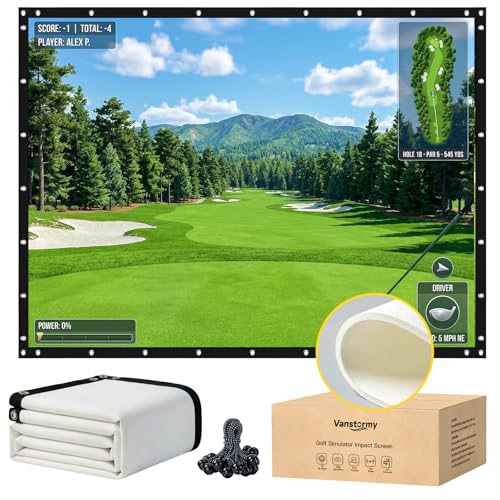
Golf Simulator Impact Screen Heavy Duty 3-Layer

Golf Simulator Projector Cover with Turf and Fan
More Details On Our Top Picks
For a garage bay that also doubles as movie night space, this GooDee model has the broadest feature mix in the list. ToF autofocus means it can adjust focus quickly, and auto keystone helps square the image when the projector sits slightly off-center, which is handy in real rooms that never feel perfectly symmetrical.
The built-in streaming apps and Dolby Audio make it more flexible than the screen-only entries below, though the trade-off is that you’re paying for a fuller entertainment package. That makes it a stronger fit for households that want one projector for practice sessions and casual viewing, not just a fixed sim lane.
Strong Points
- ToF autofocus helps keep the image sharp with less manual fiddling.
- Auto keystone is useful in cramped rooms where placement options are limited.
- Built-in streaming apps reduce the need for extra hardware in a shared space.
- Dolby Audio gives you a cleaner out-of-box movie-night setup.
- 5G WiFi 6 and Bluetooth broaden wireless connection options for everyday use.
Things To Consider
- Smart features add convenience, but they also add menu layers you may not need for a pure sim build.
- The mix of entertainment extras can make it feel more general-purpose than golf-focused.
- Like most living-room projectors, placement still matters for the cleanest image edge alignment.
Feature Rundown
Who It Suits Best
You’ll get the most from this projector if your sim room also serves as a casual media room and you want fewer add-ons around the screen.
Where Another Pick Suits Better
Optoma GT2000HDR Ultra-Compact Short Throw Projector suits a tighter dedicated bay more cleanly, especially for setup-minded golfers who care more about placement efficiency than smart-TV extras.
Short throw projectors earn their keep in golf rooms because they can sit close to the screen and still throw a usable image. That matters in basements, garages, and spare rooms where you don’t want a projector hanging far back from the hitting area.
Compared with the smarter GooDee above, this Optoma is the cleaner tool for a purpose-built sim layout. The honest trade-off is that you’re leaning toward a more focused projection setup rather than an all-in-one entertainment hub.
What We Like
- Ultra-compact body makes it easier to fit into tighter room plans.
- Short throw design helps keep the unit out of the swing zone.
- Full HD output gives you a sharp match for simulation screens.
- Laser light source is a practical fit for frequent use in a fixed setup.
Points To Note
- Short throw placement still needs careful measuring so the image lands correctly.
- It is more purpose-built than flexible for mixed media use.
- Dedicated rooms benefit most, while multi-use living areas may want the GooDee instead.
Core Details
Right Fit For
You’re the best match for this one if your sim setup is dedicated, measured, and built around saving floor space.
Look Elsewhere When
GooDee 4K Smart Projector fits better for households that want streaming apps, built-in audio, and a more flexible living-room role.
This screen belongs in a budget sim build where you want something straightforward, not fussy. The 3D air-mesh construction points to a more forgiving surface for repeated golf use, and the grommet holes with bungee cords make mounting easier in a home bay or outdoor practice area.
Unlike the projector-focused picks above, this is about the strike surface itself, so it pairs naturally with any projector you already own. The trade-off is simple: you’re choosing the screen and hardware path, not an all-in-one visual solution.
Upsides
- 3D air mesh suits repeated ball impact in a practice setup.
- Grommet holes and bungee cords make hanging more manageable.
- Indoor and outdoor use broadens where you can set up.
- Works as a projector screen and a golf training surface.
Areas To Watch
- The source details focus on construction, so size planning still depends on your room and bay layout.
- Mesh screens usually need careful tensioning to hang evenly.
- Compared with the enclosure products, this offers less physical protection for nearby gear.
Details At A Glance
Built With In Mind
It suits home golfers who already have a projector and want a screen they can hang in a garage, patio, or training room.
Skip It When
GoSports Golf Simulator Projector Cover with Turf fits better for setups that need projector protection more than a fresh strike screen.
Some sim rooms need a projector solution that puts protection ahead of clean ceiling mounting, and this enclosure pushes in that direction. The full-steel frame and polycarbonate panels are the main story here, giving the projector a guarded floor-level home that makes sense in spaces where stray swings or bumping feet are a real concern.
The built-in cable management openings are a small but useful touch, especially in a room where cords can become a daily nuisance. Compared with the screen-heavy items earlier, this one serves the hardware side of the build, so it’s a better fit for shoppers who already know their projector dimensions and want a sturdier shell around them.
Bright Spots
- Floor-mounted design avoids ceiling hardware and related installation work.
- Steel frame adds a solid feel for busy sim rooms.
- Polycarbonate panels help shield the projector from impact-prone areas.
- Cord openings help keep wiring cleaner and less pinched.
- The internal size limit is clearly stated, which helps planning.
Softer Spots
- You’ll want to measure carefully, because the enclosure only fits projectors within the listed interior space.
- It takes more floor real estate than a bare projector stand.
- Cleaning around turf and enclosed panels can be a little more involved than a simple shelf mount.
Spec Overview
The Right Fit
You’ll appreciate this most in a dedicated sim room where projector protection matters as much as the image on the screen.
Where A Sibling Pick Shines
GoSports Golf Simulator Projector Cover is the cleaner choice for LED-projector setups that want a simpler floor-mounted shell with less bulk.
For a room where you want the projector out of the way, this floor-mounted cover keeps the layout simple. It is only recommended for LED projectors, so the fit is more focused than the broader enclosure above, but that narrower target also makes it easier to place in a dedicated sim space.
Compared with the heavier EEISIN enclosure, this GoSports unit feels like the neater middle ground for straightforward setups. The turf detail adds a finished look, though the real value is practical: you avoid ceiling hardware while keeping the projector low and protected.
Positives
- Floor-mounted design helps avoid ceiling installation work.
- LED-projector focus keeps the compatibility goal clearer.
- Turf top gives the enclosure a more finished look in the room.
- Works well in cleaner layouts where equipment sits low and tidy.
Room For Improvement
- The LED-only recommendation narrows the pool of projectors you can use.
- It does not offer the same heavy enclosure feel as the steel-and-polycarbonate option.
- Floor placement still asks you to keep foot traffic and cable paths organized.
Feature Card
Whose Shelf It Belongs On
This belongs with golfers who already run an LED projector and want a tidy, low-profile floor setup.
Another Choice May Suit
GooDee 4K Smart Projector suits mixed-use spaces better, since it bundles streaming apps and audio into the same unit.
The triple-layer construction gives this screen a more built-up feel than the simpler mesh option earlier in the list. The 9’×7′ size is a practical middle ground for garage sims and home practice bays, large enough to matter without taking over the entire room.
Probe and snap hooks help with hanging, which is useful in a bay where you want the screen secured without a long installation session. You may find the fixed size limiting, though the upside is that the layout decision gets easier once your frame dimensions are known.
Best Bits
- Triple-layer build gives the screen a sturdier, more structured feel.
- 9’×7′ sizing suits many home and garage setups.
- Probe and snap hooks simplify attachment to an enclosure or frame.
- Works well for golfers who want a dedicated strike surface and projector screen.
Minor Gripes
- Fixed sizing means your frame has to match the screen, not the other way around.
- It asks for a proper hanging plan so the layers stay even.
- Compared with the size-rich Vanstormy option, it offers less flexibility.
Technical Sheet
Made For
It fits home golfers who already know their frame size and want a clear, enclosed hitting surface.
Reach For A Different Pick When
Vanstormy Golf Simulator Impact Screen suits you better when you need more size choices to match a custom enclosure.
This is the stripped-down version of GoSports’ floor-mounted idea, and that simplicity is the point. It keeps the projector low, removes ceiling mounting headaches, and works best with LED projectors in a room where you want the setup to stay tidy without adding another layer of structure.
Compared with the turf-topped model above, this one feels more bare-bones, which can be a plus for compact rooms. The trade-off is obvious: you get less visual finish, but you also get a cleaner, less fussy enclosure for a small sim corner.
Reasons To Buy
- Floor-mounted format avoids ceiling work and extra hardware.
- LED-projector recommendation keeps the use case focused.
- Compact enclosure style suits smaller practice corners.
Small Caveats
- The simpler finish may feel plain in a polished home theater space.
- LED-only guidance limits flexibility across different projector types.
- Cleaning and cable routing still matter in low-mounted setups.
Core Details
Who Will Love This
You’ll like this most if your room is compact and you want a basic enclosure without decorative extras.
Swap It Out When
EEISIN Golf Simulator Projector Cover Enclosure with Turf is the better fit for shoppers who want heavier protection and a built-in turf finish.
Size flexibility is the big reason this screen stands out, and that matters a lot in golf sims where the frame, ceiling height, and hitting lane all compete for space. The 3-layer build and grommets with bungee cords make it easy to think about as part of a larger enclosure rather than a loose hanging sheet.
Compared with the fixed 9’×7′ FFRESW screen, this Vanstormy option gives you more room to match your frame instead of reworking the frame around the screen. The trade-off is that more choice means more measuring, so it suits methodical setups better than casual weekend installs.
Highlights
- 25 size options give you broad room-by-room flexibility.
- Three-layer construction suits repeated golf use in a home bay.
- Grommets and bungee cords help with enclosure mounting.
- Works well for garage builds where dimensions vary from space to space.
Worth Noting
- Many size choices also mean more measuring before you commit.
- Installation is easier when you already know your frame measurements.
- Cleaning and storage are simpler when the screen stays fixed in place.
At A Glance
The Right Fit
This is the stronger match for you if your room has unusual dimensions and you need screen sizes that actually line up with the build.
Where A Sibling Pick Shines
Golf Simulator Impact Screen Triple Layer 9’×7′ is easier to choose for shoppers who prefer a single fixed dimension and a simpler buying decision.
The cooling fan is the detail that sets this enclosure apart from the other floor-mounted covers here. In a room where the projector sits low and tucked in, extra airflow can be a sensible addition, especially for longer practice sessions and home setups that stay powered up often.
That said, the strength of this pick is its blend of protection, turf finish, and ventilation rather than a long list of extras. It fits shoppers who want a more polished protected station and are comfortable measuring the projector space with care.
Positives
- Cooling fan adds a useful ventilation touch for low-mounted setups.
- Turf finish helps the enclosure feel more complete in the room.
- Floor-mounted format avoids ceiling mounting work.
- LED-projector focus keeps the setup purpose-driven.
Areas To Watch
- Any fan-driven enclosure asks for a little more attention to cords and placement.
- The broader enclosure style takes more room than a bare shelf mount.
- It fits best once your projector dimensions are already confirmed.
Quick Facts
Perfect Match For
This suits you best if you want a floor enclosure with a more finished look and a little extra airflow around the projector.
Where Another Pick Suits Better
GoSports Golf Simulator Projector Cover is the better fit for a simpler LED-only enclosure that keeps the design more minimal.
How To Choose The Right Budget Golf Sim Projectors
Throw Distance And Room Shape
Throw distance tells you how far the projector must sit from the screen to create the right image size. In a garage bay or basement lane, short throw models reduce clutter and keep the unit away from the hitting zone.
Room shape matters just as much. A narrow room benefits from compact placement, while a wider room gives you more freedom with standard or longer throw setups.
Screen Match And Image Correction
Projector choice only makes sense when it matches the screen you already plan to use. A large impact screen needs a projector that can fill it cleanly, while a smaller bay may look better with a tighter image and less wasted wall space.
Keystone correction, which adjusts the image into a rectangle when the projector sits off-angle, helps in real rooms with odd shelf placement. It helps, but it does not replace smart placement, so measuring first still saves headaches.
Use Case: Pure Sim Or Shared Room
A dedicated golf room can lean toward a short throw or enclosure-first setup, since the goal is mainly clean ball tracking and screen coverage. A shared family room benefits from smart streaming apps, built-in audio, and a cleaner all-around media profile.
That split explains why the GooDee and Optoma sit on different ends of the list. One leans into convenience, the other leans into layout control.
Protection, Mounting, And Maintenance
Projector covers and floor enclosures help keep gear away from stray contact, but they also add bulk and need careful measuring. Screens with grommets and bungee cords are simpler to hang, yet they still need tension checks and occasional cleaning around the edges.
For most home golfers, the easiest setup is the one you can live with after month three, not just on day one. That usually means fewer loose cables, clear floor paths, and parts that fit the room instead of fighting it.
What To Weigh Before You Commit
Mistakes Worth Dodging
The most common slip-up is buying for the projector before checking the room. Ceiling height, wall width, and screen distance decide far more than a glossy feature list.
Another easy miss is overlooking the projector type. A floor cover built for LED units should stay matched to LED use, and a short throw model needs room math that lines up with the screen.
The Upgrade Payoff
Higher-tier gear usually costs more because it solves more problems at once. Better correction tools, sturdier enclosures, and more thoughtful materials all add cost, and that shows up most in busy spaces where the setup stays assembled all week.
Paying up makes sense once you want less fiddling and more repeatable placement. For casual weekend practice, a simpler screen or enclosure often does enough without adding complexity.
Frequently Asked Questions
What matters most in a budget golf sim projector?
Throw distance and room fit matter first. After that, image correction and brightness help the setup feel usable in everyday lighting.
Do you need a short throw projector for golf simulation?
No, but short throw models make tight spaces easier to manage. They help keep the projector closer to the screen and farther from the swing area.
Is a projector cover worth adding to a sim room?
Yes, in rooms where the projector sits low or near traffic. A cover or enclosure helps organize the layout and can reduce accidental contact.
What size impact screen works for a garage setup?
That depends on wall width, ceiling height, and your hitting lane. A fixed size like 9’×7′ works for many garages, while custom size options help in unusual spaces.
Should you choose a smart projector or a dedicated sim projector?
A smart projector works well in mixed-use rooms that also handle streaming and casual viewing. A dedicated setup usually fits golfers who care more about placement efficiency than extra apps.
Final Thoughts
The best fit depends on the room in front of you, not just the projector spec sheet. A compact short throw setup helps in tight spaces, while a smart all-rounder makes sense in a room that does double duty. Screens and enclosures matter just as much, since they shape how tidy and durable the whole bay feels. Choose the piece that solves your space first, and the rest of the build becomes much easier to live with.