

Golf Shot Trackers now cover a wider range than many golfers expect, from full launch monitors to simple stroke counters and GPS yardage aids. You get different levels of detail, different setup demands, and very different price-to-complexity trade-offs, so the right choice depends on how much information you want during practice or out on the course.
For a home simulator corner, a driving range session, or a busy course round, the goal stays the same, cleaner feedback without adding clutter to your routine. The picks below separate portable swing analyzers, automatic game-tracking systems, and compact score counters so you can match the tool to the way you play.
The Shortlist At A Glance

Voice Caddie Portable Golf Launch Monitor and Swing Analyzer

Rapsodo MLM2PRO Mobile Launch Monitor Golf Simulator 3 ProV1 Balls

Rapsodo MLM2Pro Mobile Launch Monitor Golf Simulator 3 Chrome Tour Balls

Original Stroke Counter with Universal Golf Glove Fastener

Arccos Smart Sensors Automatic Golf Game Tracking System

Medsuo 2 PCS Golf Score Counter 2 Player Stroke

Frienda 4 Pcs Golf Score Counter 1.2 Inch Touch Reset
MiLESEEY GeneSonic Pro Golf GPS Speaker 43K+ Courses
More Details On Our Top Picks
Voice Caddie’s portable format fits the golfer who wants shot feedback without building a full simulator setup. The swing-speed mode stands out for indoor tempo work, because you can rehearse motion without a ball taking over the space.
Compared with the Rapsodo units that lean harder into camera-led data, this one keeps the experience simpler and more direct. For a garage bay, living room practice corner, or backyard session, that can be the cleaner path, although detail-hungry golfers may want more metrics.
Strong Points
- Portable footprint suits quick practice sessions at home or at the range.
- Swing-speed mode supports tempo work without needing a ball.
- Battery life up to 20 hours helps for longer practice blocks.
- Simple setup makes it friendlier for golfers who want less screen time and more reps.
Things To Consider
- You give up the deeper camera-based detail found in the Rapsodo options.
- It suits practice routines better than full course shot logging.
- Battery charging and storage matter because small launch monitors are easy to misplace in a packed golf bag.
Feature Rundown
Who Should Grab It
Golfers who want a compact practice aid for home swings and range work fit this model well.
A Better Fit Elsewhere
Rapsodo MLM2PRO Mobile Launch Monitor Golf Simulator suits you better when camera detail and broader shot metrics matter more than a simpler practice-first setup.
This Rapsodo package leans into serious practice use, especially for golfers who split time between a home net and the driving range. Dual-camera capture is the key detail here, since camera views usually help you see swing and ball-flight context in a way simpler trackers cannot.
The extra ProV1 balls make sense for someone building a repeatable practice routine, though the core value still sits in the launch-monitor platform itself. Compared with the Voice Caddie pick, you’re buying into more data depth and a more involved setup, which is great for focused practice and less useful for casual scorekeeping.
What We Like
- Dual cameras add richer swing and shot context.
- Indoor and outdoor use broadens where you can practice.
- Fifteen metrics give you more to compare across sessions.
- The bundle approach helps you start practice without piecing together extras immediately.
- Works well for structured range sessions where you want notes, not guesswork.
Worth Noting
- More moving parts mean more setup time than a simple stroke counter.
- The fuller feature set makes it less casual than the Voice Caddie unit.
- Keeping lenses and accessories clean matters, especially after dusty range use.
Feature Snapshot
The Right Fit
Dedicated golfers who want shot detail for home practice and range sessions fit this model well.
Skip It When
Voice Caddie Portable Golf Launch Monitor and Swing Analyzer suits you better when a lighter, simpler training aid matters more than camera-led detail.
This version mirrors the Rapsodo platform above but swaps in a different ball bundle, so the real question is how you want to outfit your practice setup. For golfers who already know they want a camera-based launch monitor, that bundle difference can be the only meaningful choice.
The 15-metric setup and dual-camera approach put it in the same conversation as the ProV1 version, though the ball choice changes the feel of the package. It suits simulator spaces and range work, but the value is strongest when you plan to use the added data regularly instead of just checking the occasional swing.
Highlights
- Dual-camera tracking supports detailed swing review.
- Fifteen metrics help you spot trends over time.
- Indoor and outdoor use keeps it flexible for mixed practice routines.
- Chrome Tour balls fit golfers who want a different bundled setup from the ProV1 version.
Areas To Watch
- The feature set asks for more attention than simpler trackers.
- It makes more sense for committed practice than casual scorekeeping.
- Cleaning camera faces and storing the unit carefully matters after range use.
Technical Sheet
Built With In Mind
Golfers building a simulator-style practice routine will get the most from this model.
Another Choice May Suit
Rapsodo MLM2PRO Mobile Launch Monitor Golf Simulator 3 ProV1 Balls is the easier fit for golfers who want the same platform with a different ball bundle in the box.
Not every golfer needs sensors, apps, or a screen, and this glove-mounted counter keeps things stripped down to the essentials. It’s a low-friction way to remember score during a round, especially for casual play where pulling out a phone feels clumsy.
The dial counts up to 9, then rolls through the next tens cycle, so it works as a simple memory aid rather than a full data tool. Compared with the Rapsodo units and Arccos system, this is the quietest option in the lineup, which makes it a good fit for golfers who want less tech and less upkeep.
Best Bits
- Universal glove fastener keeps it easy to attach.
- Dial-based counting needs no battery.
- Simple operation suits relaxed rounds and practice days.
- Small size keeps it from taking up bag space.
Small Caveats
- It tracks score only, so it won’t help with shot analysis.
- The count-up system asks you to stay mindful once you pass nine.
- Glove attachments can wear over time, so periodic checking is sensible.
Core Details
Whose Shelf It Belongs On
Casual golfers and walking players who want a simple stroke memory aid fit this counter well.
Reach For A Different Pick When
Medsuo 2 PCS Golf Score Counter is the better match for golfers who want a two-player handheld counter instead of a glove-mounted single-round helper.
Arccos sits at the data-heavy end of this group, and that’s the point. Automatic game tracking and GPS-based distance help make sense for golfers who want a fuller record of how they play across a round, not just a one-off swing reading.
Smart club distances are the feature that usually matters most here, because they turn scattered shots into usable distance context. Compared with the simpler counters above, this feels closer to a connected golf system, and the trade-off is obvious, more capability, more setup, and a stronger need to stay organized.
Upsides
- Automatic tracking reduces the need to enter every shot by hand.
- GPS range support helps with on-course decision making.
- Smart club distances give your bag a more useful distance map over time.
- Portable system design suits golfers who want analysis after the round.
Points To Note
- It asks for more setup and routine than a basic score counter.
- The learning curve will feel steeper than the Voice Caddie or Medsuo options.
- Keeping sensors organized matters, especially in a crowded golf bag.
Feature Card
Who Will Love This
Data-driven golfers who want round-level tracking and distance context will get the most from Arccos.
Swap It Out When
Original Stroke Counter with Universal Golf Glove Fastener is the easier fit for golfers who want only a simple score reminder with almost no setup.
Medsuo keeps the job narrow and useful, which is exactly why it works for casual groups and simple competition rounds. Two clickers let you track two players at once, so there’s less handoff and less confusion than using a single counter for everyone.
The plastic body is meant to stay light in the bag, and the no-battery setup keeps maintenance close to zero. Compared with Frienda’s clip-on four-pack, this one feels more like a straightforward shared counter, especially for golfers who want a pair of handheld units rather than multiple attachment styles.
Positives
- Two counters in one package help with paired play.
- Dual clickers make simultaneous stroke tracking easier.
- No battery requirement reduces upkeep and charging chores.
- Compact size fits well in a pocket or small golf pouch.
- Useful for training, family games, and casual competition rounds.
Room For Improvement
- It tracks strokes only, so it does not replace launch-monitor tools.
- The compact shell is practical, though it still deserves careful storage to avoid scuffs.
- Round counting works best when you stay consistent about whose score each clicker is carrying.
Details At A Glance
Perfect Match For
Pairs and casual foursomes who want a simple handheld score counter will find this a sensible fit.
Where A Sibling Pick Shines
Frienda 4 Pcs Golf Score Counter suits you better when clip-on convenience and more pieces in the pack matter more than a paired handheld format.
Frienda leans into attachment convenience, and that makes it useful for golfers who like keeping the counter close at hand. Four pieces in three colors also give you enough units for different bags, gloves, or casual group use without juggling a single shared counter.
The clip design is the selling point, because it helps the counter stay attached to gloves, clothing, belts, or a bag strap. Compared with Medsuo’s handheld pair, this is the more versatile carry option, though you give up the cleaner two-player structure of the other item.
Bright Spots
- Four-piece pack gives you more placement options.
- Clip design helps it stay attached during a round.
- Works on gloves, clothes, bags, and belts.
- Small body keeps it out of the way while you swing.
Minor Gripes
- It remains a score counter, so shot data is outside its job.
- Mixed-color pack may matter less than the carrying method for some golfers.
- Clips should be checked from time to time so they keep their grip.
Spec Overview
Best Suited To
Golfers who want a clip-on score counter with several pieces in the pack will appreciate this one.
Look Elsewhere When
Medsuo 2 PCS Golf Score Counter suits you better when a paired handheld format feels more practical than clip-on flexibility.
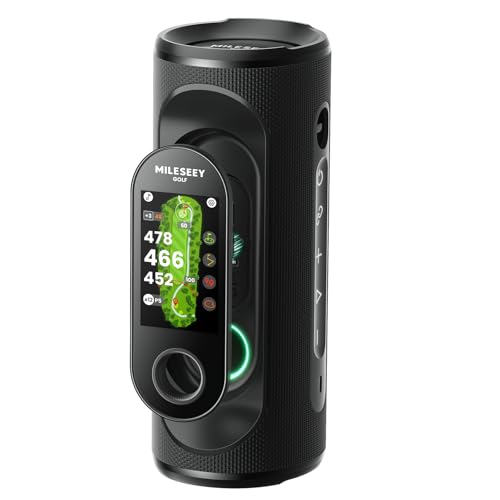
MiLESEEY takes a very different path from the launch monitors and score counters above, because it’s built around GPS guidance and course information. The detachable handheld design, color touchscreen, and visual plus audible yard readings make it feel geared toward golfers who want help from tee to green.
The IP67 rating matters because it speaks to dust and water resistance in a course-ready shell, while the 15-hour battery supports a long day out. For regular walkers and cart users alike, that mix lands in a useful middle ground, though the speaker-led format is more about guidance than shot analysis.
Reasons To Buy
- 43K-plus mapped courses give it broad course coverage.
- No subscription requirement keeps the setup straightforward.
- Detachable handheld design adds flexibility around the course.
- Visual and audible yard readings help in noisy or bright conditions.
- 15-hour battery life supports long rounds and practice days.
Softer Spots
- It helps with yardages, not swing mechanics.
- The richer feature set will feel heavier than a basic stroke counter.
- Touchscreen devices benefit from careful storage in a golf bag pocket.
Core Details
Made For
Golfers who want yardages, course guidance, and a handheld GPS helper will get the most from this model.
Where Another Pick Suits Better
Arccos Smart Sensors Automatic Golf Game Tracking System suits you better when shot-by-shot tracking and club-distance analysis matter more than GPS guidance alone.
How To Choose The Right Golf Shot Trackers
Match The Tool To Your Routine
Golf shot trackers split into two camps, practice tools and on-course helpers. Launch monitors and swing analyzers suit golfers who want swing-speed feedback, shot context, and simulator practice, while stroke counters and GPS units suit golfers who care more about the round itself.
That distinction matters because a compact counter can be perfect for a quick nine, but it won’t tell you much about carry or launch. A data-heavy unit can tell a fuller story, yet it asks more from your setup and your patience.
Look At Setup And Maintenance
Simple counters need almost no upkeep, which makes them useful for walkers, casual groups, and anyone who dislikes charging another device. More advanced systems often involve sensors, cameras, or a touchscreen, so they reward careful storage, lens cleaning, and a little routine organization.
For a bag that already holds tees, rangefinders, and gloves, size and attachment style matter more than many shoppers expect. Clip-on designs stay handy, but handheld units may feel cleaner in the hand during a round.
Decide How Much Data You’ll Actually Use
Some golfers want only score memory and yardages, while others want club-distance trends and repeated swing readings. The extra data sounds appealing, yet unused features only add friction.
Think in terms of your normal week, not a perfect practice plan. A golfer who works on tempo in a garage bay needs a different tool than someone who mainly wants to keep score without losing count.
Pick For The Way You Play
Range regulars usually benefit from launch monitors, especially models with camera support or swing-speed modes. Casual foursomes often do better with glove-mounted or handheld counters that stay out of the way.
Course-first golfers tend to prefer GPS guidance or automatic shot tracking. The cleaner the fit between tool and routine, the more likely you are to keep using it.
Things Worth Knowing First
Mistakes Worth Dodging
One common slip is buying more data than you’ll use. A feature-rich tracker can look impressive, but a simpler counter may be the smarter move for casual rounds and quick practice.
Another mistake is ignoring attachment and carry style. A unit that clips neatly to a glove or bag may fit your routine better than a handheld device that has to be stored and retrieved constantly.
The Upgrade Payoff
Higher-tier models usually cost more because they add cameras, GPS mapping, sensor networks, or richer display hardware. That extra hardware gives you more context, but it also adds setup time and more pieces to manage.
The upgrade makes sense for golfers who practice often and want numbers they can compare over time. For occasional play, the simpler option often feels more natural and less fussy.
Frequently Asked Questions
What Does A Golf Shot Tracker Actually Do?
It records some part of your game, such as strokes, swing speed, yardages, or shot context. The exact job depends on whether you choose a basic counter, a GPS tool, or a launch monitor.
Do You Need A Phone For These Trackers?
Some models work with minimal setup, while others lean on companion apps or connected features. The product page matters here because the level of phone dependence varies a lot by model.
Are Simple Score Counters Worth It?
Yes, for golfers who mainly want to avoid losing track during a round. They keep the job narrow, which is exactly why they stay useful.
Which Option Fits Practice At Home?
Launch monitors and swing analyzers fit home practice best because they focus on swing feedback. The Voice Caddie and Rapsodo units are the strongest matches in this group for that use.
What’s Better For Course Play?
GPS units and automatic tracking systems suit course play better than swing analyzers. Arccos and MiLESEEY serve that need in different ways, one focused on shot tracking and the other on yardage guidance.
Final Thoughts
Golf shot trackers do very different jobs, so the right choice comes down to how you play and what you want to learn. For practice-heavy golfers, the Rapsodo and Voice Caddie options bring more feedback, while Arccos and MiLESEEY lean harder into on-course insight. Simple counters still earn their place for golfers who want the lightest possible routine. Match the tool to your round, your practice space, and your patience level, and the right pick will feel natural from the first use.


