

Golf GPS trackers can save you from guesswork, especially on courses you don’t know well or during a round that’s already moving quickly. You want distance info that’s easy to read, simple to carry, and useful without slowing your rhythm. Some picks lean into plain GPS yardages, while others add slope, voice guidance, or even swing data for practice days. That mix makes it easier to match the gear to how you actually play.
The Shortlist At A Glance
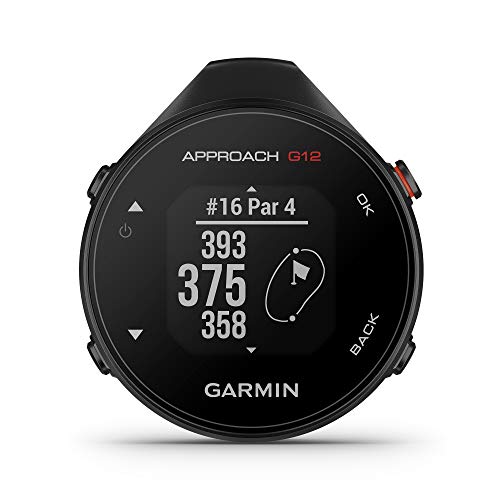
Garmin Approach G12 Clip-on Golf GPS Rangefinder 42k+ Preloaded Courses

Voice Caddie VC300SE Golf GPS Rangefinder

Voice Caddie Portable Golf Launch Monitor and Swing Analyzer

Bushnell Golf Phantom 3 Slope GPS (Green)

Bushnell Golf Phantom 3 Slope GPS (Red/Blue)

Swami KISS 2.0 Handheld Golf GPS Ragnefinder, Blue

Swami KISS 2.0 Handheld Golf GPS Ragnefinder, Grey

Bushnell Golf Wingman View Golf Speaker
More Details On Our Top Picks
The Garmin Approach G12 suits you well on walkable rounds, where a small clip-on unit makes more sense than a larger handheld. Its course library is broad, and that matters on trips or weekend rounds where unfamiliar layouts can slow your decision-making.
The trade-off is straightforward, since you are choosing a very focused tool rather than a feature-packed device. That makes it a tidy fit for golfers who want quick yardage help and little else hanging off the bag.
Strong Points
- Clip-on format keeps pocket bulk down.
- Preloaded course coverage helps on travel rounds.
- Simple layout suits fast decisions between shots.
- Smaller footprint is easier to carry than bulkier handheld units.
Things To Consider
- Very focused feature set, so it is not the right fit for practice-focused golfers.
- Clip attachment works best when you keep your bag setup tidy.
- You give up the broader practice-tracking tools found on the Voice Caddie launch monitor.
Feature Snapshot
Who It Suits Best
Walkers, casual rounds, and golfers who value compact gear will get the most from this one.
Where A Sibling Pick Shines
Bushnell Golf Phantom 3 Slope GPS (Green) is a better fit for cart riders who want a touchscreen and slope-adjusted yardages in one handheld unit.
The Voice Caddie VC300SE leans into ease, especially for rounds where you’d rather keep your eyes on the fairway than on a tiny display. Voice output is the main draw here, and that helps on long walks or breezy days when checking a screen feels like one task too many.
Compared with the Garmin Approach G12, this pick trades compact clipping for spoken distance guidance and green-target detail. For most casual players, that makes it feel more immediate, though you may prefer a screen-first unit if you like scanning data quietly.
What We Like
- Voice distance calls keep information simple to absorb.
- Front, middle, and back green data support club selection.
- Large course coverage helps on unfamiliar layouts.
- Hands-free style works nicely while walking between shots.
Worth Noting
- Audio-first operation is not for every quiet setup.
- You may find a display-heavy unit easier for quick visual comparisons.
- Less practice-oriented than the Voice Caddie launch monitor.
Core Details
Who Will Love This
You will appreciate it most during relaxed rounds, cart paths, or walking rounds where quick spoken yardage is easier than screen checking.
A Better Fit Elsewhere
Bushnell Golf Phantom 3 Slope GPS (Red/Blue) suits cart golfers who want a touchscreen and slope-adjusted distances in a more visual package.
This Voice Caddie unit pulls away from pure course navigation and moves into practice territory. Real-time shot data is the point, and that makes it a smarter fit for range sessions, garage nets, or a living-room swing routine where you want feedback tied to your motion.
The all-new swing speed mode matters for tempo work, and the no-ball-needed setup lowers the barrier for short practice sessions. The honest read is that this is more training tool than round companion, so it helps most when your goal is improving mechanics rather than finding the green.
Upsides
- Live shot data gives practice sessions more structure.
- Swing speed mode supports tempo work without a ball.
- Indoor and outdoor use broaden where you can train.
- Portable size makes it easy to move between spaces.
Areas To Watch
- It is a practice device first, not a simple course GPS.
- You will not use it the same way you would use the Bushnell Phantom 3 models.
- Training gear like this usually asks for more setup attention than a clip-on rangefinder.
Quick Facts
Built With In Mind
Golfers who want feedback on swing mechanics, tempo, and shot behavior will benefit most here.
Skip It When
Garmin Approach G12 is the cleaner choice for golfers who only want a tiny course GPS with less practice complexity.
Cart golfers usually get the most from the Bushnell Golf Phantom 3 Slope GPS, because the touchscreen and magnetic mount make it easy to place and read at a glance. Slope-adjusted distances add another layer for hillier courses, where raw yardage alone can feel incomplete.
Compared with the Voice Caddie VC300SE, this one stays visual instead of vocal, and that suits you better if you like checking numbers quietly. It feels a bit more polished for fast course navigation, though the hand-held format still asks for occasional charging and a little care with the touchscreen.
Bright Spots
- Touchscreen control makes yardages quick to check.
- Slope-adjusted readings help on uneven holes.
- Magnetic cart mounting keeps it easy to place near you.
- Large course coverage supports travel and home club use.
Small Caveats
- Touch-based controls may feel less direct with gloves or wet fingers.
- The magnetic setup is most useful for cart play, not walking rounds.
- You may not need slope adjustment for flatter home courses.
Technical Sheet
The Right Fit
You will like this most on cart-heavy rounds, especially on courses with elevation changes.
Swap It Out When
Voice Caddie VC300SE is the better match for walkers who want spoken yardages and less screen handling.
You get the same basic Phantom 3 Slope package here, but the red and blue finish gives it a little more personality in the cart basket or on a busy range day. That sounds cosmetic, and it is, yet some golfers care about finding their device fast among gloves, tees, and towels.
The practical value stays the same as the green version, so your choice here comes down to taste more than function. For style-conscious golfers, that keeps the decision simple, while everyone else can treat it as the same tool in a different color.
Highlights
- Same touchscreen layout as the green model.
- Slope-adjusted yardages support uneven holes.
- Magnetic cart mount keeps the unit within easy reach.
- Bright finish is easy to spot quickly.
Minor Gripes
- The color choice does not change the core feature set.
- Touchscreen use is still more cart-friendly than walking-friendly.
- Cleaning fingerprints off a glossy screen takes a little routine care.
Details At A Glance
Whose Shelf It Belongs On
Golfers who want their gear to look a little sharper without changing function will appreciate this version.
Another Choice May Suit
Bushnell Golf Phantom 3 Slope GPS (Green) is the cleaner match for golfers who prefer the same setup in a more restrained color.
The Swami KISS 2.0 takes a more straightforward route, and that can be a relief for golfers who don’t want a learning curve. Integrated magnets make cart storage easier, while the two display modes give you a little flexibility in how you read the screen during a round.
It sits closer to the Garmin Approach G12 than the Bushnell Phantom models in spirit, though its magnetic hold gives it a slightly different everyday rhythm. The honest read is that this is a practical pick for simple course use, not a feature-heavy showpiece.
Reasons To Buy
- Integrated magnets help it rest securely on a cart surface.
- Two display modes make the screen easier to suit your preference.
- Preloaded course data supports immediate use on familiar and travel rounds.
- Blue finish makes it easy to identify in your gear.
Points To Note
- The simpler layout will not satisfy golfers who want advanced data views.
- Magnetic storage is handy, but it still needs a clean spot on the cart.
- Compared with Bushnell Phantom 3 Slope units, it keeps the feature set lighter.
Core Details
Made For
You suit this pick best when you want a simple handheld GPS that stays easy to store on a cart.
Reach For A Different Pick When
Bushnell Golf Phantom 3 Slope GPS (Green) makes more sense for golfers who want slope-adjusted yardages and a touchscreen interface.
The grey Swami KISS 2.0 keeps the same practical format, so the real difference is the finish and how it blends with your other gear. That makes it a tidy option for golfers who prefer muted colors and a less obvious look in the cart or bag.
Compared with the blue version, this one is more understated, though the usage story stays almost identical. You may find that small visual difference matters more than it sounds, especially when you like your tools to stay visually calm and easy to spot without shouting for attention.
Best Bits
- Neutral grey finish keeps the look subtle.
- Integrated magnets simplify cart placement.
- Two display modes make the interface a bit more adaptable.
- Preloaded course data helps shorten setup time before play.
Softer Spots
- Same lighter feature mix as the blue version.
- Color difference is the main reason to choose it over the blue model.
- Players who want slope support will need to look at the Bushnell Phantom 3 line.
At A Glance
Right Fit For
You will like this version most if you prefer a calm, low-key color and simple handheld GPS use.
Look Elsewhere When
Voice Caddie VC300SE is the better pick for golfers who want spoken yardages instead of a screen-first layout.
The Bushnell Golf Wingman View sits in an unusual middle ground, because it is part speaker and part golf aid. Audible and visual distance info, hazard detection, and remote control make it attractive for cart rounds where you want a little more utility from one device.
That broader mix means it is less minimal than the Garmin Approach G12 or Swami KISS 2.0 models, and that’s the trade-off. For golfers who like course audio and extra convenience in one body, it feels like a smart fit, though it may be more device than a pure distance-first setup.
Positives
- Combines golf audio with distance information.
- Visual and spoken cues help in different playing conditions.
- Hazard detection adds context beyond plain yardage.
- Remote control can make cart use easier.
- Magnetic cart mount keeps it easy to position.
Honest Caveats
- More complex than a simple handheld rangefinder.
- The added speaker function may be more than you need for quiet rounds.
- Extra features usually mean extra attention to setup and charging habits.
Core Details
Who Should Grab It
You suit this pick best when you want golf support and cart audio in the same package.
Where A Sibling Pick Shines
Voice Caddie VC300SE is the cleaner choice for golfers who want spoken yardages without the extra speaker focus.
How To Choose The Right Golf Gps Trackers
Match The Device To Your Round Style
Walkers usually do best with a light, compact unit like the Garmin Approach G12 or a voice-guided model such as the Voice Caddie VC300SE. Cart golfers often get more from magnetic mounting, a bigger screen, or slope-adjusted yardages, which is where the Bushnell Phantom 3 line starts to make sense. The real question is not how much tech sounds impressive, it’s how often you want to stop and check it during play.
Think About The Type Of Distance Help You Want
Some golf GPS trackers give plain yardages, while others add front, middle, and back green numbers or slope-adjusted readings. Slope means the device accounts for uphill and downhill changes, which helps on uneven courses but isn’t essential on flatter ones. Voice output is another fork in the road, and it suits golfers who prefer to keep moving without staring at a screen.
Don’t Ignore Practice Use
A launch monitor such as the Voice Caddie swing analyzer belongs in a different bucket from a course GPS. It focuses on swing behavior, shot data, and training feedback, so it fits range sessions and indoor drills more than a Saturday round. That split matters because a practice-only tool can be excellent, just not very helpful if you mainly need hole-to-hole guidance.
Look At Mounting, Storage, And Screen Style
Clip-on designs stay small, magnetic carts keep gear close, and touchscreens make quick checks feel smoother. The trade-off shows up in maintenance and handling, since magnets need a clean metal spot and touchscreens need a bit more care with fingerprints or wet hands. A simple layout can be the better long-term choice for golfers who want less fuss and fewer button presses.
What To Weigh Before You Click
Common Shopping Slip Ups
A common mistake is treating every golf GPS tracker as the same kind of tool. Some are built for course navigation, some lean into voice prompts, and some are really practice devices with shot data instead of on-course yardages. You sidestep trouble by matching the device to your usual round, not to the longest feature list.
Another miss is overlooking how you carry it. A clip-on model suits a walking setup, while a magnetic cart mount matters more on riding rounds, and a touchscreen may feel awkward for golfers who prefer quick button presses. The fit is in the handling, not just the number of courses stored on the device.
Where The Extra Money Goes
Higher-tier models usually spend more on screen quality, slope-adjusted yardages, better mounting systems, or added functions like audio output and hazard cues. That extra spend can pay off on courses with hills, on carts where fast access matters, or during travel when you want broader course coverage. For straightforward local play, a simpler unit often does enough.
You also tend to pay for convenience, not just raw features. A golf GPS that is easier to read, quicker to mount, or more flexible in bright sunlight can save small annoyances every round. That matters more than flashy extras for golfers who play often and want the device to disappear into routine.
Frequently Asked Questions
What does a golf GPS tracker do?
It gives you distance information to help with club choice and shot planning. Some models also show green segments, slope-adjusted yardages, or hazard context.
Is voice output useful on the course?
It helps golfers who want hands-free distance checks and fewer screen taps. It is especially handy during walking rounds or when you want to keep moving.
Do you need slope-adjusted distances?
Slope-adjusted readings are useful on hilly courses because they factor in elevation change. Flat layouts usually make plain yardage enough for many golfers.
Is a launch monitor the same thing as a golf GPS tracker?
No, a launch monitor focuses on swing and shot data, while a GPS tracker focuses on course distance help. The two can support different parts of your game.
Which style is easiest to carry?
Clip-on and compact handheld units are usually the easiest to live with. Magnetic cart models are convenient too, but they make more sense for riding than walking.
Closing Thoughts
You have a clear path here: choose the lightest, simplest tracker for casual rounds, move up to slope and touchscreen features for cart play, or pick a launch monitor when practice is the real goal. The right choice depends less on hype than on how you move around the course and how much information you want in front of you. Keep the focus on fit, and the device will feel useful instead of fussy.

